

Screen Mode: toggling between "Preview" and "Normal"
I'm trying to help a user in my group who does NOT want to use the "W" keyboard shortcut to toggle between "Preview" and "Normal" Screen Mode.
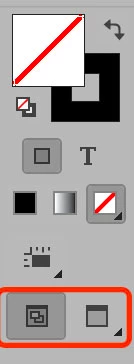
Until recently, he used a legacy version of InDesign which had a button at the bottom of the toolbar which, when clicked, would toggle between "Preview" and "Normal," without having to click and hold, or right-click, and select from four options (Normal, Preview, Bleed, and Slug).
I've looked back at CS4 and I can't find the two-part toggle button on the toolbar.
And, of course, the current version of InDesign CC has the four-part button I've described.
Does this two-part toggle button for Preview/Normal Screen Mode exist anymore? Can I customize this user's toolbar to have this function?

Thanks in advance,
Mike
 AdChoices