aaronf31067511
Known Participant
October 21, 2022
Answered

Script a Watermark on all images on a layer

  • October 21, 2022
  • 4 replies
  • 1427 views

Looking for a script to add a watermark to all images on a particular layer in InDesign. Or is it possible to make an object style that includes a watermark and apply it to all images on a layer? 

This topic has been closed for replies.
Correct answer rob day

Hi @aaronf31067511, Try this—edit the "MyLayer" variable to the name of your image layer, and the "Mark" variable to the text you want for the mark.


//the name of the layer containing the images to mark
//edit as needed
var ln = "MyLayer"

//the watermark’s text
var wt = "Mark"

//the watermark layer
var mln = "WaterMarks"

var doc = app.activeDocument
var ag = doc.allGraphics;


//the mark content’s paragraph style
var ps = makeParaStyle(doc, "WaterMark")
ps.properties = {basedOn:"No Paragraph Style", pointSize:48, justification:Justification.CENTER_JUSTIFIED, fillColor:"Paper"}

//the mark’s text frame’s object style
var os = makeObjStyle(doc, "WaterMarks");
os.properties = {appliedParagraphStyle:ps, strokeColor:"None", strokeWeight:0, fillColor:"None"}
os.textFramePreferences.properties = {verticalJustification:VerticalJustification.CENTER_ALIGN};
os.contentTransparencySettings.blendingSettings.opacity = 70;

//a new layer for the mark
if (doc.layers.itemByName(mln).isValid) {
	doc.layers.itemByName(mln).remove()
} 
var wml = makeLayer(doc, mln)

//add the marks
var b, pp, wf;
for (var i = 0; i < ag.length; i++){
    if (ag[i].constructor.name == "Image" && ag[i].itemLayer == doc.layers.itemByName(ln)) {
        b = ag[i].parent.geometricBounds;
        pp = ag[i].parentPage;
        wf = pp.textFrames.add ({ geometricBounds: b, itemLayer:wml, fillColor:"None", appliedObjectStyle:os, contents:wt});
        wf.texts.everyItem().appliedParagraphStyle = ps;
    } 
};   

/**
* Makes a new named ParagraphStyle 
* @ param the document to add the style to 
* @ param style name 
* @ return the new paragraph style 
*/

function makeParaStyle(d, n){
    if (d.paragraphStyles.itemByName(n).isValid) {
        return d.paragraphStyles.itemByName(n);
    } else {
        return d.paragraphStyles.add({name:n});
    }
}

/**
* Makes a new named ObjectStyle or returns an existing style 
* @ param the document to add the style to 
* @ param style name 
* @ return the new object style 
*/
function makeObjStyle(d, n){
    if (d.objectStyles.itemByName(n).isValid) {
        return d.objectStyles.itemByName(n);
    } else {
        return d.objectStyles.add({name:n});
    }
}

/**
* Makes a new named Layer 
* @ param the document to add the layer 
* @ param layer name 
* @ return the new layer 
*/

function makeLayer(d, n){
    if (d.layers.itemByName(n).isValid) {
        return d.layers.itemByName(n);
    } else {
        return d.layers.add({name:n});
    }
}


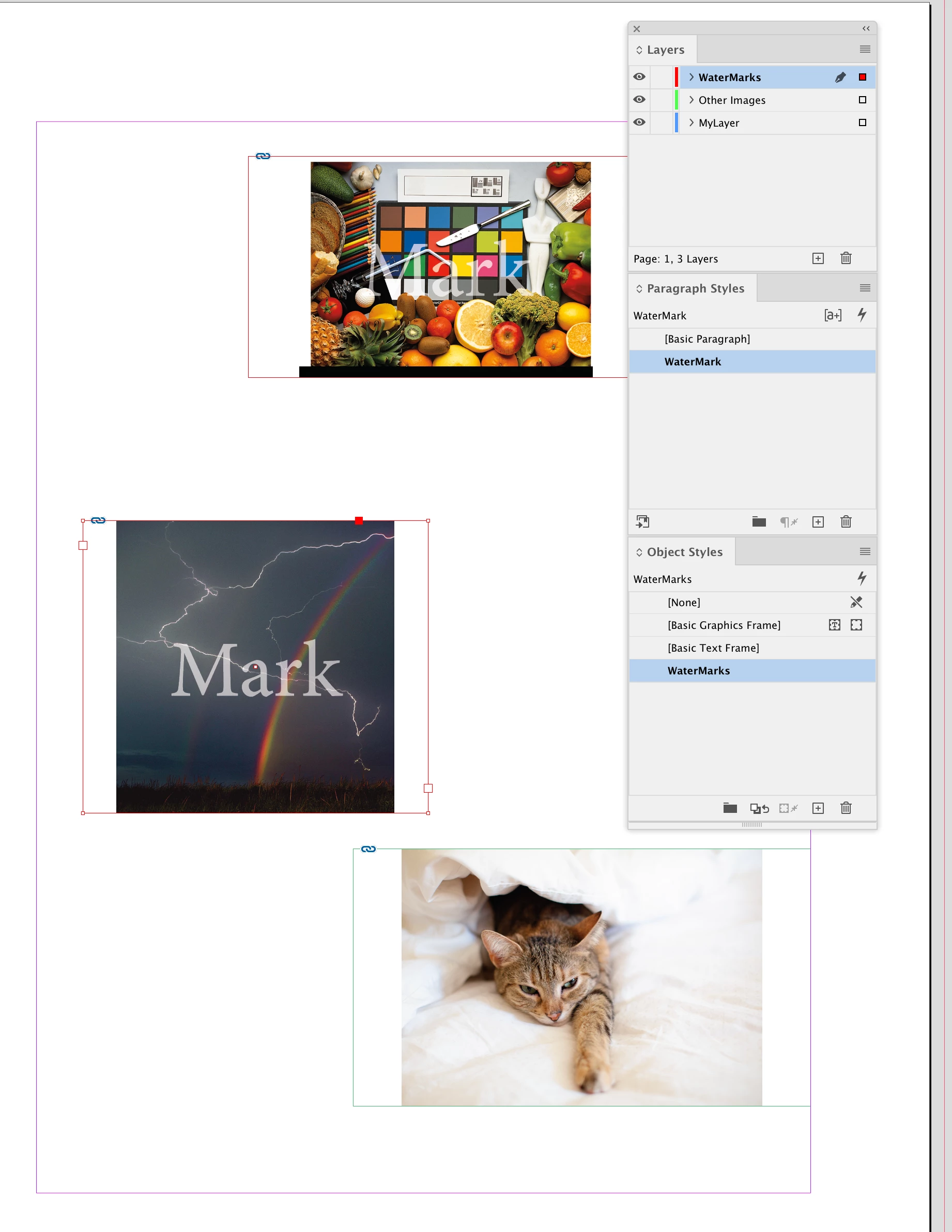
The script creates a Paragraph Style and Object Style for the watermark, which you could redefine as needed after running:


4 replies

rob day
Community Expert
rob dayCommunity ExpertCorrect answer
Community Expert
October 23, 2022

Hi @aaronf31067511, Try this—edit the "MyLayer" variable to the name of your image layer, and the "Mark" variable to the text you want for the mark.


//the name of the layer containing the images to mark
//edit as needed
var ln = "MyLayer"

//the watermark’s text
var wt = "Mark"

//the watermark layer
var mln = "WaterMarks"

var doc = app.activeDocument
var ag = doc.allGraphics;


//the mark content’s paragraph style
var ps = makeParaStyle(doc, "WaterMark")
ps.properties = {basedOn:"No Paragraph Style", pointSize:48, justification:Justification.CENTER_JUSTIFIED, fillColor:"Paper"}

//the mark’s text frame’s object style
var os = makeObjStyle(doc, "WaterMarks");
os.properties = {appliedParagraphStyle:ps, strokeColor:"None", strokeWeight:0, fillColor:"None"}
os.textFramePreferences.properties = {verticalJustification:VerticalJustification.CENTER_ALIGN};
os.contentTransparencySettings.blendingSettings.opacity = 70;

//a new layer for the mark
if (doc.layers.itemByName(mln).isValid) {
	doc.layers.itemByName(mln).remove()
} 
var wml = makeLayer(doc, mln)

//add the marks
var b, pp, wf;
for (var i = 0; i < ag.length; i++){
    if (ag[i].constructor.name == "Image" && ag[i].itemLayer == doc.layers.itemByName(ln)) {
        b = ag[i].parent.geometricBounds;
        pp = ag[i].parentPage;
        wf = pp.textFrames.add ({ geometricBounds: b, itemLayer:wml, fillColor:"None", appliedObjectStyle:os, contents:wt});
        wf.texts.everyItem().appliedParagraphStyle = ps;
    } 
};   

/**
* Makes a new named ParagraphStyle 
* @ param the document to add the style to 
* @ param style name 
* @ return the new paragraph style 
*/

function makeParaStyle(d, n){
    if (d.paragraphStyles.itemByName(n).isValid) {
        return d.paragraphStyles.itemByName(n);
    } else {
        return d.paragraphStyles.add({name:n});
    }
}

/**
* Makes a new named ObjectStyle or returns an existing style 
* @ param the document to add the style to 
* @ param style name 
* @ return the new object style 
*/
function makeObjStyle(d, n){
    if (d.objectStyles.itemByName(n).isValid) {
        return d.objectStyles.itemByName(n);
    } else {
        return d.objectStyles.add({name:n});
    }
}

/**
* Makes a new named Layer 
* @ param the document to add the layer 
* @ param layer name 
* @ return the new layer 
*/

function makeLayer(d, n){
    if (d.layers.itemByName(n).isValid) {
        return d.layers.itemByName(n);
    } else {
        return d.layers.add({name:n});
    }
}


The script creates a Paragraph Style and Object Style for the watermark, which you could redefine as needed after running:


Loic.Aigon
Legend
October 21, 2022

As @chrisg11235813  stated, it would be easy to think of a scriopt that would apply a pseudo watermark (think of an overlaying text frame). But that would be a very week solution that PDF experts would easily circumvent.

A strong solution would be that the image itself is watermarked in its flesh but InDesign cannot do that by its own (i.e. editing pixels of the image). However you may have several solutions to achieve your project:

1) Use InDesign to create a watermarked version of the image

I know that sounds contradictory to my intro. Yet, you can, add the watermarks as a TextFrame, group Image & Text, export to image, replace former image by the "watermarked" image. Problem is that it's a lot of operations and the output image may diverge from the original (for ex, ID won't export to PSD format).

2) Use Applescript(mac) or VB (Windows) to switch between apps in your script

For example, the script starts from InDesign, collects files, add watermark with PS, update in ID, export to PDF.

3) Use the BridgeTalk object in your JS script so you can achieve a similar ID > PS > ID workflow inside your InDesign Script.

4) Use Imagemagick to add watermark

You would need to call a process with Applescript or VB (regarding your OS) to execute ImageMagick. But eventually you could achieve the expected result.

I could probably think to a few other approach but the right question is the one from @rob day : what do you have in mind regarding this project?

aaronf31067511
Known Participant
October 21, 2022

The intent is to identify reference images that I don't have rights to with simple copy that states that "usage is prohibited" (or something to that effect). A text frame above the image could work.. but I have documents with hundreds of images linked all over the place, so going back to photoshop to add isn't really an option... at least not that I know how best to solve. 


Also, hoping I can do this as a layer that can be turned on/off during export... I would like to show a PDF presentation without the watermark then turn it on and export a PDF with watermark to send to clients. 

Community Expert
October 22, 2022

Are there other images in your layout that do have the rights to?

How will the script identify which images you don't have rights to? Or is it all images in the document?


chrisg11235813
Participating Frequently
October 21, 2022

If you are adding a watermark as a deturrant to unauthorized copying, it would be better to add the watermark to the actual image --- having it on a seperate layer would be pretty easy to "delete" in a PDF

Robert at ID-Tasker
Legend
October 21, 2022

I think there was/is an option to setup flattening/transparenncy option to force texts to be vectorised and to cut images into pieces - and it would permanently "damage" the original image ??

Loic.Aigon
Legend
October 22, 2022

You can use that trick yes, but it will apply to the whole document and it might not be what you want 😉

rob day
Community Expert
Community Expert
October 21, 2022

Hi @aaronf31067511 , Do you want to add a text frame with the watermark above the image, or add the watermark to the image in Photoshop? Do you have some scripting knowledge, or are you looking for a finished script?

aaronf31067511
Known Participant
October 21, 2022

The intent is to identify reference images that I don't have rights to with simple copy that states that "usage is prohibited" (or something to that effect). A text frame above the image could work.. but I have documents with hundreds of images linked all over the place, so going back to photoshop to add isn't really an option. 


Looking for a quick script or something already made that I could coopt.. I have basically no knowledge of scripting.