
Script or plug in to make inline objects extend outside a text box on the LEFT side?
UPDATE
The answer to this is actually in the thread I posted to, and the problem I had was solved by FRIdNE and I missed it! So, if you're trying to do this too, click on the link to the other thread and scroll down to FRIdNE's comments/solution.
Although he's also posted a handy video in this thread!
Okay, so I'm sure we are all aware of how ridiculous it is that anchored and inline objects go ABOVE text in indesign... because who want's to read the text anyways right?
BUT I found a solution to this here:https://community.adobe.com/t5/indesign-discussions/anchored-object-behind-text/td-p/10781132
HOWEVER I need my graphic to extend outside the text box, on the left side, which apparently you can't do, even though you CAN do it on the right side. Go figure.
What I am basically trying to achieve is this:

Except the banner envelope thing needs to be anchored to the text in some way so I'm not chasing down and repositioning 1000 title banners every time someone makes edits to the text:
But all I have been able to achieve so far is this:
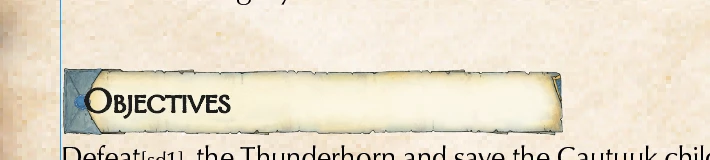
Which, don't get me wrong, is 90% where I need to be, but that extra indent now required to the title just irks me too much. It's so far from the start of the body text, plus, the break outside of the text box, to the left, further reinforces that this is a new section.
There must be someone out there that has figured out a way to do this, pretty please? I had a quick google for scripts or other bodge job work around but didn't really get very far.
I also thought I could extend the text box and then increase the indent for all the other text elements so the banner would sit further left, but I'm using columns and that messes the columns up and the gutter and it was just a short lived moment of triumph that ended in tragedy haha.
Thanks for any suggestions!
PS
Google also gave me the following script but I couldn't get it to work even with chatgpt trying to help me fix it:
// Function to push anchored objects outside the text frame
function pushAnchoredObjectsOutside() {
var selection = app.activeDocument.selection;
for (var i = 0; i < selection.length; i++) {
if (selection[i].typename === "GraphicFrame") {
// Check if the object is anchored
if (selection[i].itemLink) {
// Access Anchored Object Options
selection[i].itemLink.options.anchoredPosition = "Outside Frame";
}
}
}
}
// Call the function to apply the change
pushAnchoredObjectsOutside();
 AdChoices