
Inspiring
December 9, 2019
Question

Script to add table row and insert text from one of the columns

  • December 9, 2019
  • 1 reply
  • 3149 views

I'm trying to see if there's a way to script the following:


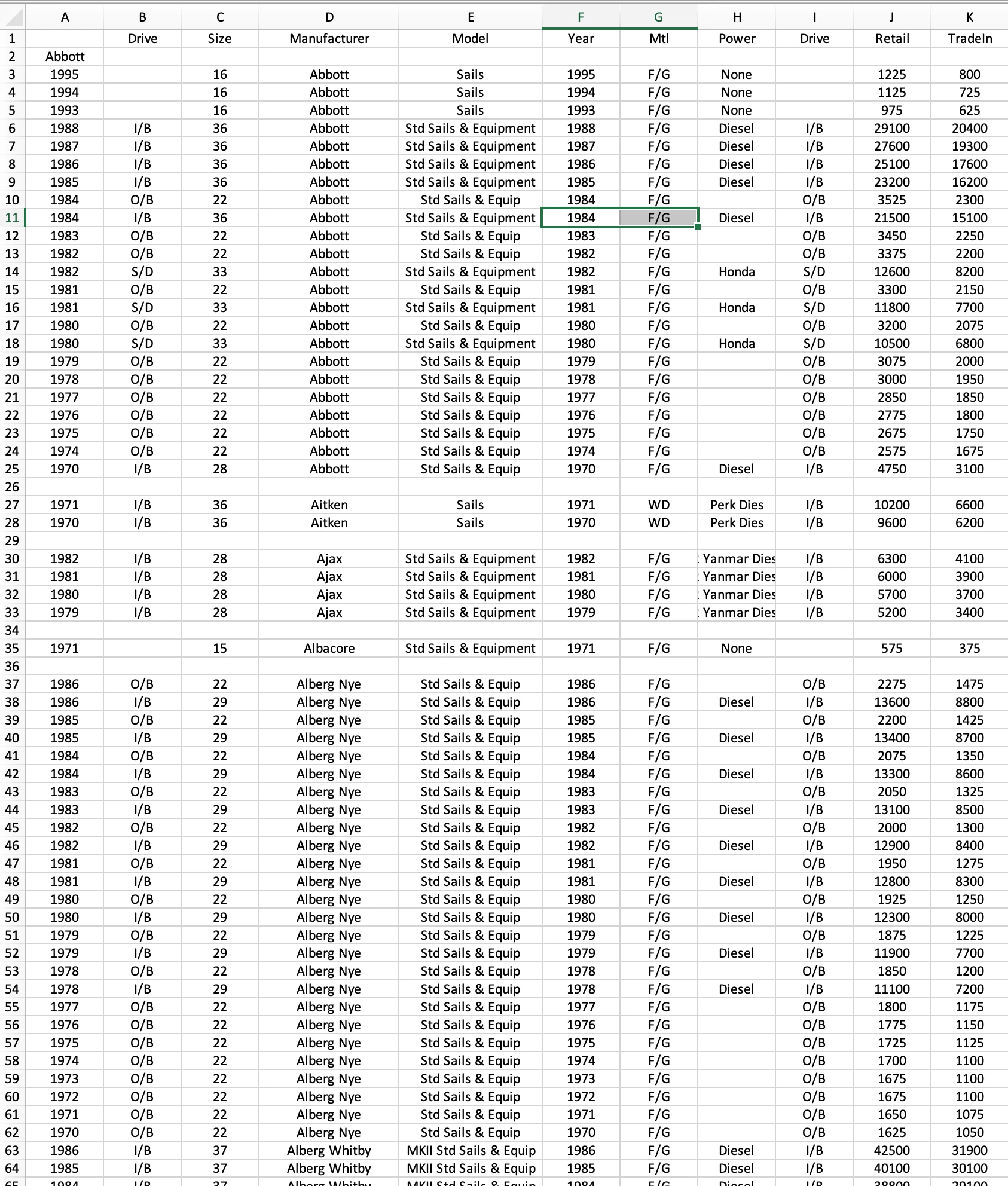
Adding a row above the first new Manufacturer and inserting the Manufacturer's name. For instance, I've manually added rows in above the for first few Manufacturers and copied and pasted the Manufacturer's name. I have thousands of rows to go through and was hoping to automate this if possible.


Any assistance is greatly appreciated.


Peter
 

This topic has been closed for replies.

1 reply

brian_p_dts
Community Expert
Community Expert
December 9, 2019

Assuming this is the only table in your doc, and that you're doing this with a placed table in InDesign, not Excel. Delete extra/blank rows you've added manually and try this: 


var table = app.documents[0].stories.everyItem().tables[0];

var tableRows = table.rows.everyItem().getElements();

//get the model of the last row; ensure there are no blank rows at end of table

var matchStr = tableRows[tableRows.length-1].cells[3].contents;

//skip the first header row

for (var i = tableRows.length-1; i >=1; i--) {

     if (tableRows[i].cells[3].contents !== matchStr) {

           table.rows.add(LocationOptions.AFTER, tableRows[i]);

           tableRows[i+1].cells[0].contents = matchStr;

           matchStr = tableRows[i].cells[3].contents;

     }

}


TYPE AAuthor
Inspiring
December 9, 2019

I appreciate the quick response and the script. When I ran it I got this error response and how I have the script setup:


var table = app.documents[0].stories.everyItem().tables[0];


var tableRows = table.rows.everyItem().getElements();


//get the model of the last row; ensure there are no blank rows at end of table


var matchStr = tableRows[tableRows.length-1].cells[3].contents;


//skip the first header row


for (var i = tableRows.length-1; i >=1; i--) {


     if (tableRows[i].cells[3].contents !== matchStr) {


           table.rows.add(LocationOptions.AFTER, tableRows[i]);


           tableRows[i+1].cells[0].contents = matchStr;


           matchStr = tableRows[i].cells[3].contents;


     }


}


brian_p_dts
Community Expert
Community Expert
December 9, 2019

Hmm, check the .jsx file to ensure you didn't copy that "{\rtf\..." path into it? What you copied should be exactly what's in the script. Are you using a different script to call this script, or have other startup scripts at play?