


- Home
- InDesign
- Discussions
- Re: Script to automatically make an imdl every tim...
- Re: Script to automatically make an imdl every tim...

Copy link to clipboard
Copied
Hello,
I work at a publisher house where all of my co-workers are on 2015 ( single install, no subscription so they can't update or have access to the conversion service). i am on 2017. is there a script that i can run that would allow me to make a legacy file every time i save the file or make a new .pdf.
I make lots of edits to lots of jobs and it would be great to make a legacy file automatically as i made edits and make new proofs to send out so co-workers can open the legacy if they want to make edits to the file themselves.
Thank you


 1 Correct answer


Hi Jonathan,
we could do another thing.
Do not test for value of property format of the event, because it's a string that seems to be locale dependent or a bit insecure…
Instead hunt for value of property fullName that returns the file that is about to be exported.
There you could check for its suffix. If a file with suffix .pdf is exported, only then an IDML file will be exported as well.
To the same folder where the pdf file goes.
This code is tested with CS6 8.1.0 on OSX 10.6.8. Should work with CC
...
 26
Replies
26
26
Replies
26


Copy link to clipboard
Copied
Jonathan:
I don't know if there is a prepackaged script, but I think one could be written. The afterSave event listener would be one tool you could employ; it could create or update an idml file every time you save the master file.
I don't have any personal experience with this part, but creating or replacing the idml seems to be simple enough:
app.activeDocument.exportFile(ExportFormat.INDESIGN_MARKUP, referenceToTheIDMLfile);
I do wonder if the idml document itself is going to be enough. My own experience says you might need a Package that includes an idml file plus any linked image files. If so, you just tell your event-listener to make the package. I found an example here: generating package from indesign
Not sure just how time-consuming this might be, so my first suggestion would be to leave the event-listener out of the picture at first. Just create a script that you can run from the Scripts panel to make the idml whenever you choose. Put a timer in it so that you can measure exactly what it's costing you. If it's more than you care to wait after every save, then maybe you'd want to listen instead for the menuEvent that you use to export the PDF.
Bob

Copy link to clipboard
Copied
Here's a code to get you started:
#targetengine "Kasyan"
var eventListener = app.addEventListener("beforeExport", exportIDML, false);
function exportIDML(event) {
try {
if (event.format == "Adobe PDF (Print)" || event.format == "Adobe PDF (Interactive)") {
var doc = event.parent;
var idmlFile = new File("~/Desktop/" + doc.name.replace(/indd$/, "idml"));
doc.asynchronousExportFile(ExportFormat.INDESIGN_MARKUP, idmlFile, false);
}
}
catch(err) {
$.writeln(err.message + ", line: " + err.line);
}
}
This is a start up script so place it into the Adobe InDesign XX\Scripts\startup scripts folder and restart InDesign.
After that, every time you export a document to PDF (either Print, or Interactive), it will export an IDML-file (in the background) to the desktop using the same base name.
Hope it helps!
— Kas
Copy link to clipboard
Copied
pardon my ignorance, first time using scripts.
How do i save this code? how do i import it to indesign, and how do i run it?
I have been a marketing and now publishing designer for 7 years and have never used a script.
Copy link to clipboard
Copied
- Copy the code
- Create a new file in a plain text editor: e.g. Notepad (PC) or TextEdit (Mac). Don't use Word, etc.
- Paste the code and save the file into the startup scripts folder. (It's created on install in recent InDesign versions, but you have to create it manually, say, in CS3). More details are here.
- Restart InDesign to load the script. From now on, when you export a file to PDF-file, an IDML-file with the same name should be exported to the desktop
To uninstall: delete/move the script to another location and restart InDesign.
— Kas
Copy link to clipboard
Copied
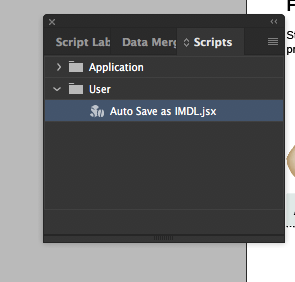
hmm.. it does not work, i have it in the panel, i restarted indesign. I am on cc indesign 2017, does that makes a difference?
Copy link to clipboard
Copied
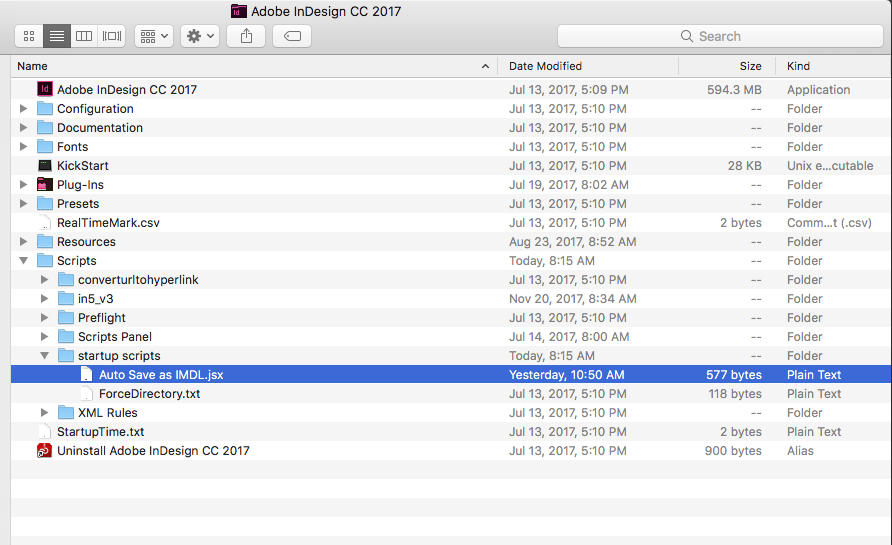
Of course, it won't work: you put it in a wrong location! Read my posts again — carefully.
Did I tell to place it in the Scripts Panel folder? — No. Move it into the startup scripts.

— Kas
Copy link to clipboard
Copied
Ok, yes, i placed it in that folder. see below. i quit indesign, re-opened, tried to make a .pdf, but the imdl file was not created.

Copy link to clipboard
Copied
Bonjour,
Pour le script, j'ai du changer le titre du menu (poste en FR).
la ligne en EN
if (event.format == "Adobe PDF (Print)" || event.format == "Adobe PDF (Interactive)") {
la ligne en FR
if (event.format == "Adobe PDF (impression)" || event.format == "Adobe PDF (interactif)") {
Bonne journée à vous
Copy link to clipboard
Copied
Indesign version FR?
Copy link to clipboard
Copied
indesign 2017 Mac
Copy link to clipboard
Copied
I am trying to know if the interface of your Indesign CC 2017 is in French language?
//-------------------------
Je cherche à savoir si l'interface de votre Indesign CC 2017 est en langue française ?
Copy link to clipboard
Copied
OH.. LOL.. no. english. i am in the USA.
Copy link to clipboard
Copied
I just tested on a CC2017 version, it function.
Can you make a screenshot when you make your PDF (see example)
//--------
Je viens de test sur une version CC2017, il fonction.
Pouvez-vous me faire une capture écran quand vous faite votre PDF (voir exemple)

Copy link to clipboard
Copied
i go to file, export, interactive .pdf, see below:
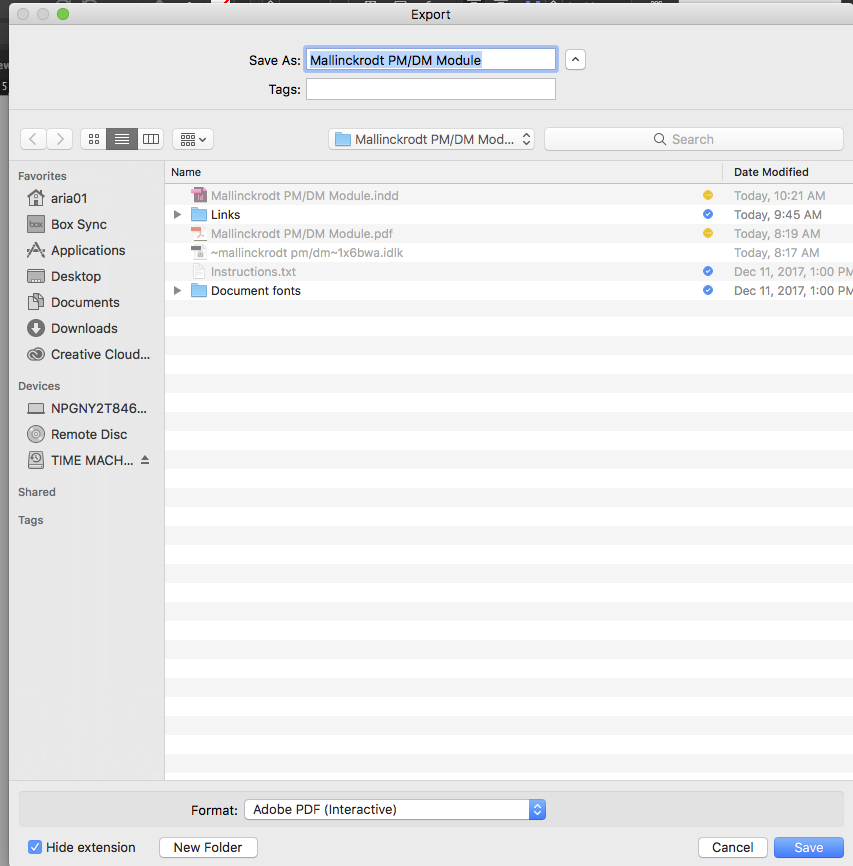
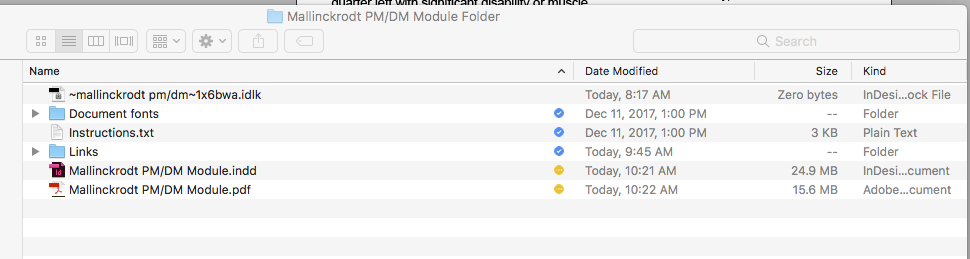
it makes the .pdf but the imdl is not there.. see below:
Copy link to clipboard
Copied
I think Kasyan's script is saving the .pdf to your desktop.
Copy link to clipboard
Copied
Its not. i checked that when you mentioned it. the script works for all of you but me? if so than i am doing something wrong.
Copy link to clipboard
Copied
Her'e a way to test:
In the the exportIDML function, add this line at the top:
alert (event.format);
If you don't see any alert, that means the script is not "hearing" the beforeExport event.
Copy link to clipboard
Copied
i added that code and restarted indesign and i now get this error:

You know what. don't worry about it. this is way more involved than i though it would be. Thanks. no need to spend more time on this.
Copy link to clipboard
Copied
Don't give up. What you just found out is that the beforeExport listener is not getting any event at all. That's a puzzle I can't answer because I've never tried to tap into it.
My suggestion: Shelve the event-listener for now and concentrate on getting a script that works when you run it from the Scripts Panel. Once you get both .pdf and and .idml files in the desired form you can worry about how to make it automagical.
Copy link to clipboard
Copied
Hi Jonathan,
we could do another thing.
Do not test for value of property format of the event, because it's a string that seems to be locale dependent or a bit insecure…
Instead hunt for value of property fullName that returns the file that is about to be exported.
There you could check for its suffix. If a file with suffix .pdf is exported, only then an IDML file will be exported as well.
To the same folder where the pdf file goes.
This code is tested with CS6 8.1.0 on OSX 10.6.8. Should work with CC 2017.1 as well:
// Export-IDML-after-export-to-PDF.jsx
( function()
{
#targetengine "Kasyan-Uwe"
var eventListenerName = "Export-IDML-after-export-to-PDF";
var eventListener = app.eventListeners.itemByName( eventListenerName );
if( eventListener.isValid )
{
eventListener.remove();
alert
(
eventListenerName +"\r"+
"Script was canceled."+"\r"+
"Note: To start the script, double-click it again." +"\r"+
"It's a toggle function."
);
return;
};
var eventListener = app.addEventListener("beforeExport", exportIDMLafterPDFexport, false);
eventListener.name = eventListenerName;
alert
(
eventListenerName +"\r"+
"Script was started."+"\r"+
"Note: To cancel the script, double-click it again." +"\r"+
"It's a toggle function."
);
function exportIDMLafterPDFexport(event)
{
var exportedFile = event.fullName;
var exportFolder = exportedFile.parent;
var doc = event.parent;
var idmlFileName = doc.name.replace(/\.indd$/, ".idml" );
var idmlFile = File(exportFolder+"/"+idmlFileName);
if( exportedFile.name.match(/\.pdf$/i))
{
doc.asynchronousExportFile( ExportFormat.INDESIGN_MARKUP , idmlFile , false );
};
}
}() )
This event driven script will work like a toggle:
To start it (the event listener will be added) just double-click the name of the installed script in the Scripts panel of InDesign.
Read the alert message, press OK. The script is ready, lurks in the background for an export. It sees into the file name of the exported file. If this file name has suffix .pdf it will export an IDML file to the same folder of the PDF.
To cancel the script—the event listener will be removed—just double-click it again and watch the alert message.
Press OK and go on working…
Please test the script also with the packaging functionality of InDesign.
But I suggest, you will cancel the script before packaging.
Also note: The name of the exported IDML file will follow the name of the InDesign document.
It does not necessarilly follow the name of the exported PDF.
You may change that, if you wish…
Regards,
Uwe
Copy link to clipboard
Copied
Yes, this did it. i received the notice when i double click on it. it tells me is now active. to double click on it to turn it off. i made the .pdf and made the legacy file all in the same location. I did fix the "/" and the blank space in all of the folders that file resides in.
Copy link to clipboard
Copied
I'll test it later today -- when I get to work -- on my Mac in CC 2017. Maybe this is a Mac-PC difference. Sometimes it happens: something that works on PC doesn't work on Mac and vice versa. 
— Kas
Copy link to clipboard
Copied
Hello everyone/Bonjour à tous
I just retest your code on MAC with Indesign CC2017.1, it functions very well, the only thing I had to do, is the names of the menus, as explained above.
Je viens de retester votre code sur MAC avec Indesign CC2017.1, il fonction très bien, les seul chagement que j'ai du faire, se son les nom des menu, comme expliqué plus haut.
Here is the code (your Kasyan code):
Voici le code (votre code Kasyan):
#targetengine "Kasyan"
var eventListener = app.addEventListener("beforeExport", exportIDML, false);
function exportIDML(event) {
try {
if (event.format == "Adobe PDF (impression)" || event.format == "Adobe PDF (interactif)") {
var doc = event.parent;
var idmlFile = new File("~/Desktop/" + doc.name.replace(/indd$/, "idml"));
doc.asynchronousExportFile(ExportFormat.INDESIGN_MARKUP, idmlFile, false);
}
}
catch(err) {
$.writeln(err.message + ", line: " + err.line);
}
}
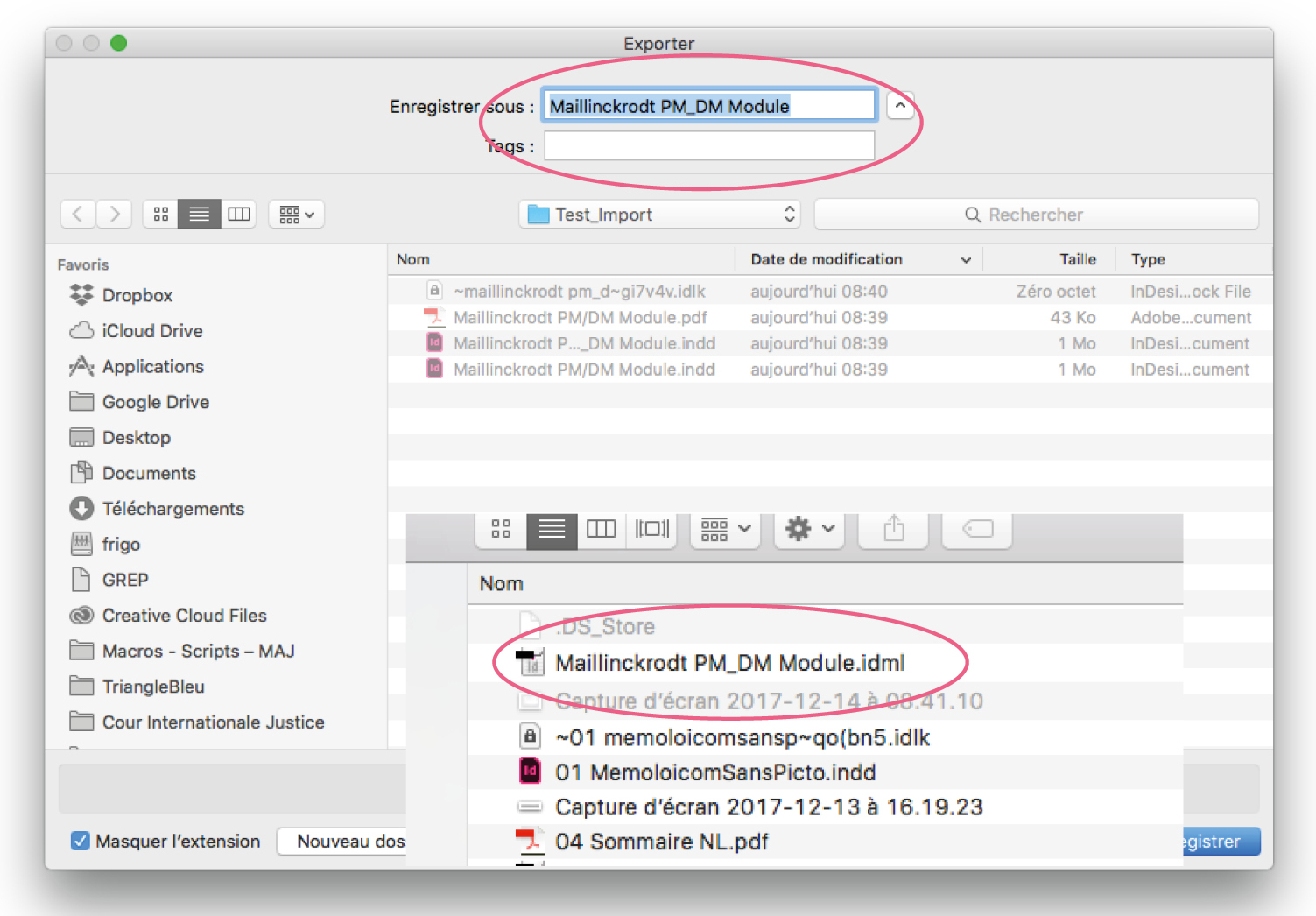
And my conclusion, the base script works but the file name can not contain "/" because it looks for an additional directory, in the end the "filePath" is "~Desktop/Maillinckrodt PM/DM Module.indd", it looks for a folder that calls "Maillinckrodt PM" and that does not exist so it does not create a file.
Et ma conclusion le script base fonctionne mais le nom du fichier ne peut contenir de "/", car il recherche un répertoire supplémentaire, au final le "filePath" est "~Desktop/Maillinckrodt PM/DM Module.indd", il cherche un dossier qui d’appel "Maillinckrodt PM" et qui n'existe pas donc il ne créé pas de fichier.
With replacing "/" with "_", it's OK.
Avec le remplacement du "/" par "_", c'est OK.
Copy link to clipboard
Copied
Good evening,
The script saves on the desktop even though it happens
//-----------------------------------------------
Bonsoir,
Le script sauve sur le bureau quoiqu'il arrive
var idmlFile = new File("~/Desktop/" + doc.name.replace(/indd$/, "idml"));
But it seems to me that the name of the file "Maillinckrodt PM/DM Module.indd" is problem, test without putting "/". and check on the MAC desktop ("~/Desktop/").
Mais il me semble que le nom du fichier "Maillinckrodt PM/DM Module.indd" est problème, tester sans mettre de "/". et vérifier sur le bureau du MAC.
A+

-
- 1
- 2

Get ready! An upgraded Adobe Community experience is coming in January.
Learn more
 AdChoices