
Inspiring
May 24, 2018
Answered

Script to convert text to foot note with "*"

  • May 24, 2018
  • 2 replies
  • 2692 views

Hi,

I am trying to use the following script to convert all those text which have " * " to footnotes:

var  

    myDoc = app.activeDocument, 

mStory = app.selection[0].texts[0].parentStory, 

    mEndNotes = myDoc.textFrames.add( {name:"EndNotes"} ), 

    k, len, cIP, currPara, currFoot, mMarkers; 


app.findGrepPreferences = app.changeGrepPreferences = null; 

//--------------------------------------------- 

// edit doc.footnoteOption here 

with (myDoc.footnoteOptions)  

    { 

    showPrefixSuffix = FootnotePrefixSuffix.PREFIX_SUFFIX_BOTH; 

    prefix = "["; 

    suffix = "]"; 

    separatorText = "\t"; 

    markerPositioning = FootnoteMarkerPositioning.NORMAL_MARKER; 

    } 

//------------------------------------------------------------ 

// move endnotes to a separate textFrame 

for (k=mStory.paragraphs.length - 1; k >=0; k--)  

    { 

    if (mStory.paragraphs.contents.search(/^\[\d+\]/) == 0)  

        { 

        currPara = mStory.paragraphs.move(LocationOptions.AT_BEGINNING, mEndNotes.parentStory); 

        currPara.words[0].remove(); 

        } 

    } 

//-------------------------------------- 

// create footnote markers 

app.findGrepPreferences.findWhat = "\*+"; 

mMarkers = mStory.findGrep(); 

len = mMarkers.length; 

while (len-->0) { 

    cIP = mMarkers[len].insertionPoints[0].index; 

    mMarkers[len].remove(); 

    mStory.footnotes.add( LocationOptions.AFTER, mStory.insertionPoints[cIP] ); 

    } 

//------------------------------------------------------- 

// fill footnote contents with proper text 

for (k=0; k < mStory.footnotes.length; k++) { 

    currFoot = mStory.footnotes

    mEndNotes.paragraphs[0].texts[0].move(LocationOptions.AT_END, currFoot.texts[0]); 

    if (mStory.footnotes.characters[-1].contents == "\r") mStory.footnotes.characters[-1].remove(); 

    } 


mEndNotes.remove();

However, the script does not seem to work. Could any one help me regarding the same? How do I make the script search * text references and put them as footnotes.

I have attached a snap for better clarity, as well.
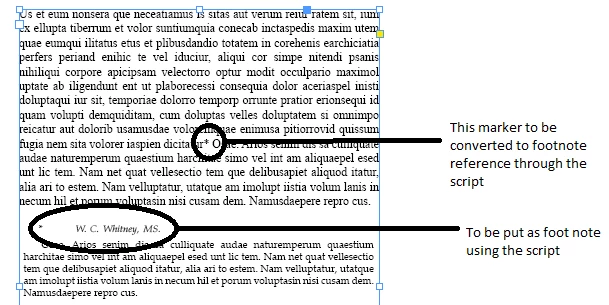
Any help, would be greatly appreciated.

Regards,

Aman Mittal

This topic has been closed for replies.
Correct answer amanm5143

var  

    myDoc = app.activeDocument, 

mStory = app.selection[0].texts[0].parentStory, 

    mEndNotes = myDoc.textFrames.add( {name:"EndNotes"} ), 

    k, len, cIP, currPara, currFoot, mMarkers; 


app.findGrepPreferences = app.changeGrepPreferences = null; 

//--------------------------------------------- 

// edit doc.footnoteOption here 

with (myDoc.footnoteOptions)  

    { 

    showPrefixSuffix = FootnotePrefixSuffix.PREFIX_SUFFIX_BOTH; 

    prefix = "["; 

    suffix = "]"; 

    separatorText = "\t"; 

    markerPositioning = FootnoteMarkerPositioning.NORMAL_MARKER; 

    } 

//------------------------------------------------------------ 

// move endnotes to a separate textFrame 

for (k=mStory.paragraphs.length - 1; k >=0; k--)  

    { 

    if (mStory.paragraphs.contents.search(/^\*+/) == 0)  

        { 

        currPara = mStory.paragraphs.move(LocationOptions.AT_BEGINNING, mEndNotes.parentStory); 

        currPara.words[0].remove(); 

        } 

    } 

//-------------------------------------- 

// create footnote markers 

app.findGrepPreferences.findWhat = "\\*+"; 

mMarkers = mStory.findGrep(); 

len = mMarkers.length; 

while (len-->0) { 

    cIP = mMarkers[len].insertionPoints[0].index; 

    mMarkers[len].remove(); 

    mStory.footnotes.add( LocationOptions.AFTER, mStory.insertionPoints[cIP] ); 

    } 

//------------------------------------------------------- 

// fill footnote contents with proper text 

for (k=0; k < mStory.footnotes.length; k++) { 

    currFoot = mStory.footnotes

    mEndNotes.paragraphs[0].texts[0].move(LocationOptions.AT_END, currFoot.texts[0]); 

    if (mStory.footnotes.characters[-1].contents == "\r") mStory.footnotes.characters[-1].remove(); 

    } 


mEndNotes.remove(); 

2 replies

amanm5143AuthorCorrect answer
Inspiring
May 28, 2018

var  

    myDoc = app.activeDocument, 

mStory = app.selection[0].texts[0].parentStory, 

    mEndNotes = myDoc.textFrames.add( {name:"EndNotes"} ), 

    k, len, cIP, currPara, currFoot, mMarkers; 


app.findGrepPreferences = app.changeGrepPreferences = null; 

//--------------------------------------------- 

// edit doc.footnoteOption here 

with (myDoc.footnoteOptions)  

    { 

    showPrefixSuffix = FootnotePrefixSuffix.PREFIX_SUFFIX_BOTH; 

    prefix = "["; 

    suffix = "]"; 

    separatorText = "\t"; 

    markerPositioning = FootnoteMarkerPositioning.NORMAL_MARKER; 

    } 

//------------------------------------------------------------ 

// move endnotes to a separate textFrame 

for (k=mStory.paragraphs.length - 1; k >=0; k--)  

    { 

    if (mStory.paragraphs.contents.search(/^\*+/) == 0)  

        { 

        currPara = mStory.paragraphs.move(LocationOptions.AT_BEGINNING, mEndNotes.parentStory); 

        currPara.words[0].remove(); 

        } 

    } 

//-------------------------------------- 

// create footnote markers 

app.findGrepPreferences.findWhat = "\\*+"; 

mMarkers = mStory.findGrep(); 

len = mMarkers.length; 

while (len-->0) { 

    cIP = mMarkers[len].insertionPoints[0].index; 

    mMarkers[len].remove(); 

    mStory.footnotes.add( LocationOptions.AFTER, mStory.insertionPoints[cIP] ); 

    } 

//------------------------------------------------------- 

// fill footnote contents with proper text 

for (k=0; k < mStory.footnotes.length; k++) { 

    currFoot = mStory.footnotes

    mEndNotes.paragraphs[0].texts[0].move(LocationOptions.AT_END, currFoot.texts[0]); 

    if (mStory.footnotes.characters[-1].contents == "\r") mStory.footnotes.characters[-1].remove(); 

    } 


mEndNotes.remove(); 

Community Expert
May 24, 2018

Hi Aman,

how do you know where the footnote text starts and ends?

Regards,
Uwe

amanm5143Author
Inspiring
May 24, 2018

All the footnotes start with " * " followed by a tab or space and end with a paragraph break.

amanm5143Author
Inspiring
May 24, 2018

Hi Aman,

if the footnote's text would have its own paragraph style, then we could identify the text perfectly.

Important note on the Find code: Add the footnotes from the end of the found text to the beginning, because you are shuffling paragraphs around and the found text index will change if you move text after the first found entry.

Regards,
Uwe


Hi Uwe,

I understand your points. I am new to scripting thing so any idea where I should start to include your suggestions?

Regards,

Aman