henum87248073
Participant
December 22, 2016
Answered

Script to place small circle on a curve line with several nodes

  • December 22, 2016
  • 1 reply
  • 2228 views

Hi,

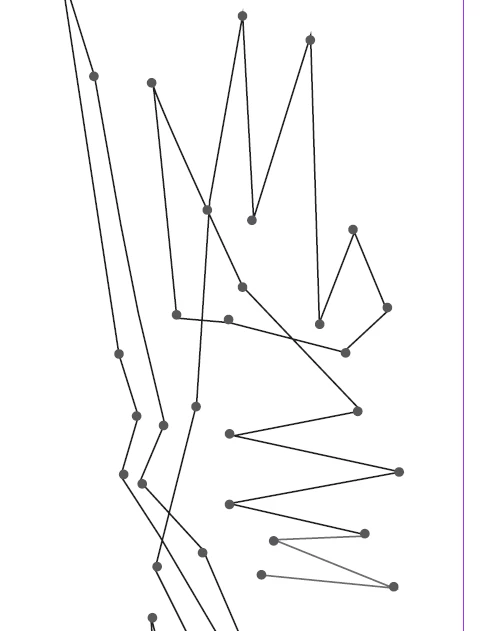
I am using Indesign CS6 (Windows Version) and looking for a script to add small circles on a curve with several nodes on it starting from node 1 as shown in the below picture.

The curve is single continuous line .... is there any that this can be possible...

This topic has been closed for replies.
Correct answer Marc Autret

Hi henum,

Try something like this:

// YOUR SETTINGS

// ====================================

const RADIUS = '1mm';

const CIRCLE_PROPS = {

    fillColor:       'Black',

    strokeColor:     'None',

    // Etc... but don't change the line below.

    geometricBounds: ['-'+RADIUS,'-'+RADIUS,'+'+RADIUS,'+'+RADIUS],

    };

const parentSpread = function F(/*DOM*/o,  p)

//-------------------------------------- 

// Get the parent spread of this DOM object, or NULL.

{

    p = o && o.parent; 

    if( (!p) || (p instanceof Document) ) return null; 

    return ( (p instanceof Spread) || (p instanceof MasterSpread) ) ? p : F(p); 

};

(function(/*?DOM[]*/a,  o,t,u)

//-------------------------------------- 

// Place circles on the selected curve.

{

    // Check.

    // ---

    if( !a || 1 != a.length ) { alert( "Please select one object!" ); return; }

    if( !('paths' in (a=a[0])) ){ alert( "Please select a spline item!" ); return; }

    if( !(o=parentSpread(a)) ){ alert( "No parent spread found!" ); return; }

    // Create the template circle at [0,0] (ruler space.)

    // ---

    o = o.ovals.add(CIRCLE_PROPS);

    // Flat array of all pathpoints coordinates.

    // a :: [x,y] | [[lx,ly],[x,y],[rx,ry]]

    // ---

    a = [].concat.apply([],a.paths.everyItem().entirePath);

    // Duplicate the template at each point.

    // ---

    for( ; t=a.pop() ; o.duplicate(u,'number'== typeof t[0] ? t : t[1]) );


    // Remove the template.

    // ---

    o.remove();

})(app.properties.selection);

@+

Marc

1 reply

Marc Autret
Marc AutretCorrect answer
Legend
December 22, 2016

Hi henum,

Try something like this:

// YOUR SETTINGS

// ====================================

const RADIUS = '1mm';

const CIRCLE_PROPS = {

    fillColor:       'Black',

    strokeColor:     'None',

    // Etc... but don't change the line below.

    geometricBounds: ['-'+RADIUS,'-'+RADIUS,'+'+RADIUS,'+'+RADIUS],

    };

const parentSpread = function F(/*DOM*/o,  p)

//-------------------------------------- 

// Get the parent spread of this DOM object, or NULL.

{

    p = o && o.parent; 

    if( (!p) || (p instanceof Document) ) return null; 

    return ( (p instanceof Spread) || (p instanceof MasterSpread) ) ? p : F(p); 

};

(function(/*?DOM[]*/a,  o,t,u)

//-------------------------------------- 

// Place circles on the selected curve.

{

    // Check.

    // ---

    if( !a || 1 != a.length ) { alert( "Please select one object!" ); return; }

    if( !('paths' in (a=a[0])) ){ alert( "Please select a spline item!" ); return; }

    if( !(o=parentSpread(a)) ){ alert( "No parent spread found!" ); return; }

    // Create the template circle at [0,0] (ruler space.)

    // ---

    o = o.ovals.add(CIRCLE_PROPS);

    // Flat array of all pathpoints coordinates.

    // a :: [x,y] | [[lx,ly],[x,y],[rx,ry]]

    // ---

    a = [].concat.apply([],a.paths.everyItem().entirePath);

    // Duplicate the template at each point.

    // ---

    for( ; t=a.pop() ; o.duplicate(u,'number'== typeof t[0] ? t : t[1]) );


    // Remove the template.

    // ---

    o.remove();

})(app.properties.selection);

@+

Marc

henum87248073
Participant
December 23, 2016

Hi Marc

This really works... thank you very much...

I have one more point... though the script gives the desired result but is this possible to have the circles created on a new layer....

thanx again....

Rakesh

henum87248073
Participant
December 23, 2016

Hi Marc

Also, is there a way to set the size of the dots as the dots created using the scripts are about 2 mm each. The change in const RADIUS = '1mm';  seems does not working....

Is there any solution to this?

Thanx

Rakesh