Inspiring
May 29, 2015
Answered

Scripts For indesign

  • May 29, 2015
  • 2 replies
  • 1916 views

Hello all.  I'm wondering if there is a script for indesign that allow me to put the file name/ and Color Identifiers at the bottom of the Document.  Also that will all me to place the information Where i want it.  For ex....   I want to Send a job to plates and rather than Manually entering the Filename - Date and time - and Colors on the Bottom of the Plate/FIle.  I know that when i go to export a file or print a file there is Check box to put the page information on the file and it does what i want however it put the information too far down on the Plate.  It adds the information down in the bend area of the plate and that does not get Burnt or Processed in that area.  I need a script to move the information up so we can read it. 
This topic has been closed for replies.
Correct answer samba22ras

Hi cbishop01,

First, I would not recommend looking into sending your files out of Indesign as postscript if your normal process is a PDF workflow. Postscript does not support certain features on various output devices.When outputting postscript from Indesign you may run into issues in CMYK printing when dealing with pdfs and other artwork that contain certain transparency effects and blending modes which may not be interpreted well by the postscript or may not flatten correctly.

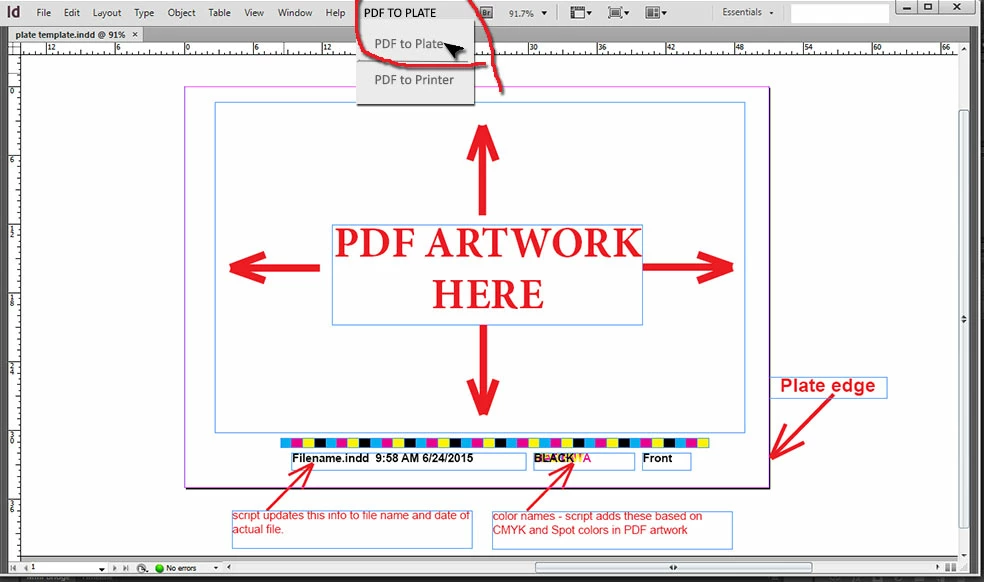
My employer uses an Indesign script we developed that may be something similar to what you are looking to accomplish. If your plate files are always the same dimension you can create an imposition template file in Indesign with job info, color swatch, date and time and what ever else you would like build into the imposition template. You can use an Indesign script to automatically update the template each time you print to PDF (which can be done by adding a custom menu item for ease).

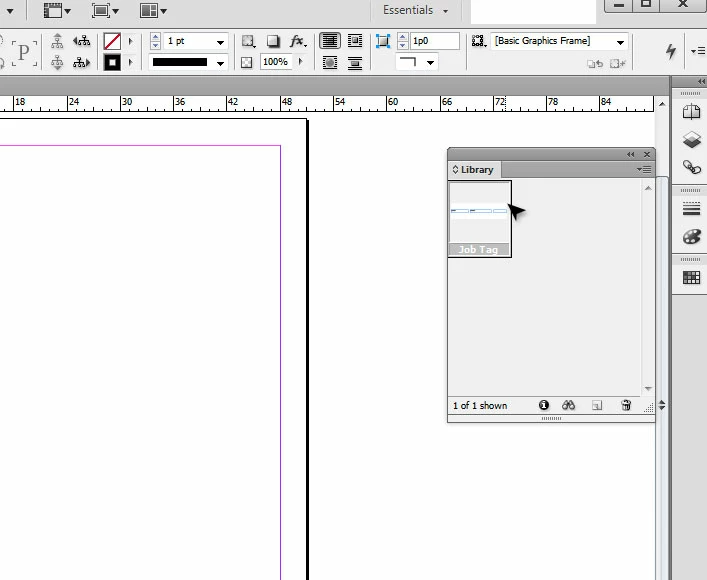
If the plate files vary from file to file you can convert the file name, time, color name text frames into an Indesign library item and just drop it into the desired position on each individual plate setup.You won't have to edit those items, you will only be placing one grouped element where you want it to go.

Is this something that will work for you?

(example of a plate file template)

(example of color slug library element)

2 replies

samba22ras
samba22rasCorrect answer
Participant
June 25, 2015

Hi cbishop01,

First, I would not recommend looking into sending your files out of Indesign as postscript if your normal process is a PDF workflow. Postscript does not support certain features on various output devices.When outputting postscript from Indesign you may run into issues in CMYK printing when dealing with pdfs and other artwork that contain certain transparency effects and blending modes which may not be interpreted well by the postscript or may not flatten correctly.

My employer uses an Indesign script we developed that may be something similar to what you are looking to accomplish. If your plate files are always the same dimension you can create an imposition template file in Indesign with job info, color swatch, date and time and what ever else you would like build into the imposition template. You can use an Indesign script to automatically update the template each time you print to PDF (which can be done by adding a custom menu item for ease).

If the plate files vary from file to file you can convert the file name, time, color name text frames into an Indesign library item and just drop it into the desired position on each individual plate setup.You won't have to edit those items, you will only be placing one grouped element where you want it to go.

Is this something that will work for you?

(example of a plate file template)

(example of color slug library element)

cbishop01Author
Inspiring
June 25, 2015

That is exactly what i'm wanting to do.

cbishop01Author
Inspiring
May 29, 2015

Ok i finally got the Page info to show up correctly.  Now is there a script to show the Colors on the files. at the bottom of the plate?  I can enter them manually and thats not a problem it would just be faster and more efficient if Indesign would do it automatically.

Daniel Sterchi
Inspiring
May 29, 2015

Hi cbishop01

Do you have an example of what you want to achieve (screenshots)?

kind regards

Daniel (from Switzerland)