


- Home
- InDesign
- Discussions
- Re: ScriptUI : edittext live modifications problem
- Re: ScriptUI : edittext live modifications problem
ScriptUI : edittext live modifications problem

Copy link to clipboard
Copied
Hi,
I set a scriptUI interface.

I have two buttons :
- one has to add a carriage return on the edittext field
- one has to add tab.
I am using textselection property of the edittext object.
On Mac it works very fine.
On Windows, it just go crazy. Sometimes, it just ignores the click, other times, it adds the element unexpectingly.
ie tab or carriage return are placed everywhere but where I want it.
What do I do wrong ?
TIA Loic


 30
Replies
30
30
Replies
30



Copy link to clipboard
Copied
Can you post your code?
Copy link to clipboard
Copied
Try to insert in the text box \n for return and \t for tab
Copy link to clipboard
Copied
Thanks S.
Indeed, this is what I do and it works well on Mac but not so well in Windows :-S
// Properties for rapidDlg.StaticText1
    rapidDlg.Group0 = rapidDlg.add('group',undefined);
    rapidDlg.Group0.returnButton = rapidDlg.Group0.add('button',undefined,"Return");

    rapidDlg.Group0.tabButton = rapidDlg.Group0.add('button',undefined,"Tab");

// Properties for rapidDlg.EditText1
    rapidDlg.EditText1 = rapidDlg.add('edittext',undefined,"//Put some script below\n", {multiline:true, scrollable:false});
    rapidDlg.EditText1.minimumSize.height = 250;
    rapidDlg.EditText1.minimumSize.width = 290;

    rapidDlg.Group0.returnButton.onClick=function() {
                                                                rapidDlg.EditText1.textselection="\n";
                                                                }
    rapidDlg.Group0.tabButton.onClick=function() {
                                                                rapidDlg.EditText1.textselection="\t";
                                                                }


Copy link to clipboard
Copied
Loic,
You do nothing wrong. It's due to a (confirmed) bug in textselection. (I didn't know that it was Windows only.) I've had the same problem, and solved it as in http://www.kahrel.plus.com/indesign/grep_edit_alt.html. As a solution it's pretty hopeless but at least I got it to work.
Peter
Copy link to clipboard
Copied
Hi Peter,
Thanks a lot for your input. I suspected a bug but I was hoping it wasn't.
I will think about something like you propose.
Thanks a lot.
Loic
Copy link to clipboard
Copied
Ok,
Thanks to Peter, I "solved" the problem.
Here is the result 🙂
http://www.loicaigon.com/en/auto.php?goTo=2

Copy link to clipboard
Copied
What happened to this QuickScript tool? The link appears to now go to CustomExport.
I was thinking about porting Jesse Ruderman's Javascript shell to InDesign, but it looks like you've basically done the work?
Copy link to clipboard
Copied
Hi,
I finally remove it as I wasn' certain that anyone ever need it. If you want the sources, let me know.
However, I strongly encourage you to have a look at scriptBay from harbs which is 100x more advanced 
http://in-tools.com/article/script-bay/script-panel-replacement-for-the-entire-creative-suite/
Loic
Copy link to clipboard
Copied
Wow, I had no idea about Script Bay! I'm not sure how I missed that.
Unfortunately, it doesn't have the functionality I want -- to be able to type into a window and get multiple lines of output. I guess I'll probably keep going with the Javascript shell, I almost have it where I want it... Script Bay seems to only give one line of output in the status line, and requires a mouseclick to run the script. Basically I'd like the ESTK's Javascript Console without the rest of the ESTK, and perhaps with a few other features.
Anyhow, thanks for the pointer to Script Bay. It looks quite useful (though not for this application).

Copy link to clipboard
Copied
Hi John,
Just catching up on the forums after being away...
Interesting tool there!
What kind of output would you like to see?
Implementing stepping through scripts in Script Bay would be very difficult to implement although it might be possible. (Although I have no idea how I could handle code blocks, loops, functions and the like...) How important is such a feature?
What might be easier would be to implement a console section which could be populated via functions similar to $.writeln. I hope to implement some global functions in ScriptBay, and console functionality might be a good fit.
The next version of Script Bay will probably not be released before InDesign 7.0.4 due to a bug in InDesign that causes InDesign to crash when a new (as yet unreleased) feature is accessed. The bug will be fixed in the next InDesign update... 
Harbs
Copy link to clipboard
Copied
I've got the javascript shell to where it works for me, but it has horrible UI issues. If I fix them I'll post it.
I want to see the output from my script. I want a fast window where I can do oneliners like:
r=app.activeDocument.rectangles; for (i=0; i<r.length; i++) {
$.writeln("rect i starts at "+r.visibleBounds[0]); }
and see the output and cut-and-paste it. I don't want to pop up a modal dialog, I want to see what I typed and its output at the same time, and be able to refine the code I typed ("oops, there's a typo!") quickly.
The ESTK sucks for this both because (1) You have to wait for it (2) You have to switch away from InDesign, which is frustrating for quick things, and sometiems annoying if you want to look at the document while evaluating the output of the script.
I don't really care about singlestepping at all, I'd use this for oneliners.
(Yeah, I know, that's two lines above. Because I don't want to makeyou scroll on the forum. And also beacuse of the DOM is too verbose...
I had forgotten about Fiddlescript. It doesn't really do what I want...since it does nothing with the output, and the window goes away when you run the script. (Philosophically, I'm kind of against .jsxbin stuff for free software. It might've been easier to extend Fiddlescript to do what I wanted, but instead I just started from the Javascript shell, since Fiddlescript's source isn't available. Good thing Ruderman's code was available though. On the other hand, it is filled with browser-specific code that I had to fight against. Maybe starting from scratch would have been faster...)
Copy link to clipboard
Copied
In case you missed it, I offered you to get my sources for quickrun
Copy link to clipboard
Copied
Thanks, Loic!
Copy link to clipboard
Copied
I'm trying to brainstorm on how to add this functionality to Script Bay.
I'd love to get feedback on this! I started a topic on my forum here:
http://in-tools.com/learning/forum/creative-suite-scripting/script-bay-console/
Harbs
Copy link to clipboard
Copied
FWIW I had a simpler script similar to Loic's quickscript here (for older version of InDesign).
http://in-tools.com/article/fiddlescript-indesign-scripting-simplified/
Harbs

Copy link to clipboard
Copied
Looks like I am a bit late to the party, but the reason it does not work properly on Windows is because you're only adding an LF character. Windows uses CRLF for new line in text files and as I found myself yesterday requires it for ScriptUI EditText fields as well, so when on Windows you need to add \r\n rather than just \n. Also a more elegant method for adding linefeeds is to patch the EditText prototype function onEnterKey.
In my current project I add a whole bunch of prototype functions to various objects. Here are just the relevant parts for dealing with linefeeds in mulitiline EditText fields:
EditText.prototype.onEnterKey = function (event) { if (this.properties.multiline) this.textselection = String.linebreak, this.dispatchEvent(new UIEvent('changing', false, false, this, null)), this.dispatchEvent(new UIEvent('change', false, false, this, null)); }
ScriptUI.system = function (name) {return typeof(name) == 'string' ? !Boolean($.os.toLowerCase().indexOf(name.toLowerCase())) : null; }String.linebreak = ScriptUI.system('Win') ? '\r\n' : '\n';
Unfortunately my workplace is still stuck on CS3 only so I haven't tested this code with CS4/CS5, but it does work nicely in both Macintosh and Windows versions of CS3.

Copy link to clipboard
Copied
Hi Mayhem,
I love the way you inject your hack 🙂
Unfortunately it does not seem to work over the 2nd line of the edittext (tested in CS4, but please make also a try in CS3 with more than 3 lines).
I think that your assumption is correct: ScriptUI —versions 3, 4, 5...— does not deal with the fact that new line consumes 2 characters in Windows. But in addition —or as a consequence— the edittext widget has a serious problem in updating the textselection property in a multiline context. All behaves as if characters were no more indexed accordingly. Each new line causes a wrong offset in the internal string.
Then the hack sounds to work with the 1st and the 2nd line but —at least in CS4— the textselection position is no more attainable when the user put the pointer at the end of a 3+ lines text. In this case, resetting textselection simply has no effect (the characters are seen as out of range or something). I look for a solution (for years!), but never found a way to compensate this internal error.
Considering that the Ctrl+Enter shortcut works for the user (in Windows), my hope was to emulate this keyboard event from the script, but I'm not very familiar with this kind of events and all my attempts were unsuccessful. Although we can create and dispatch a custom Keyboard event, it does not actually 'occur' in the system, so nothing happens.
I'm really interested to know the results you get in CS3.
Thanks a lot.
Marc
Copy link to clipboard
Copied
You may be right. I haven't been able to do extensive testing on Windows yet, all development has been on CS3 Mac where the hack appears to perform perfectly. I didn't try it on Windows until the other day when I among other issues noticed the EditText multiline linebreaks acting strange. On a hunch I tried the \r\n solution, some quick tests and it seemed to work fine so I didn't think more of it at the time. I'll try to do more extensive tests when I get back to work on Monday, at home I only have access to the Mac version.
But since you say pressing Ctrl+Enter works fine for adding linebreaks in Windows... What do you see in the console when doing $.writeln(<EditText>.text.toSource()) on an EditText field with a Ctrl+Enter linebreak? \n? \r\n? Something else entirely?
I am also very much interested in sending keyboard commands to InDesign, but not for the same reason: I want to send a Tab keypress in order to hide the InDesign UI and only display my own ScriptUI along with a specially prepared template. Sending a Tab keypress on the Mac by way of AppleScript and System Events work fine, but I need a VBScript solution for when the script runs on Windows as well...
Copy link to clipboard
Copied
Mayhem SWE wrote:
(...)
But since you say pressing Ctrl+Enter works fine for adding linebreaks in Windows... What do you see in the console when doing $.writeln(<EditText>.text.toSource()) on an EditText field with a Ctrl+Enter linebreak? \n? \r\n? Something else entirely?
(...)
AFAIK, on Windows platforms linebreaks are finally encoded as \n in the EditText widget when the user use the Ctrl+Enter trick. Interestingly, the textselection property always returns an empty string in CS3 and CS4 —whatever the text which actually is selected— while it returns the correct string in CS5.
This morning I ran the following test from WinXP with ID CS3, CS4, and CS5:
var w = new Window('dialog');

var e1 = w.add('edittext', [0,0,200,100], '', {multiline:true}),
     b1 = w.add('button', [0,0,350,20], ""),
     b2 = w.add('button', [0,0,350,20], "");

b1.onClick = function()
     {
     var ts = e1.textselection,
          t = e1.text;

     b1.text = "EditText.text = " + t.toSource();
     b2.text = "EditText.textselection = " + ts.toSource();

     e1.active = true;
     };

w.show();
Here is the result:
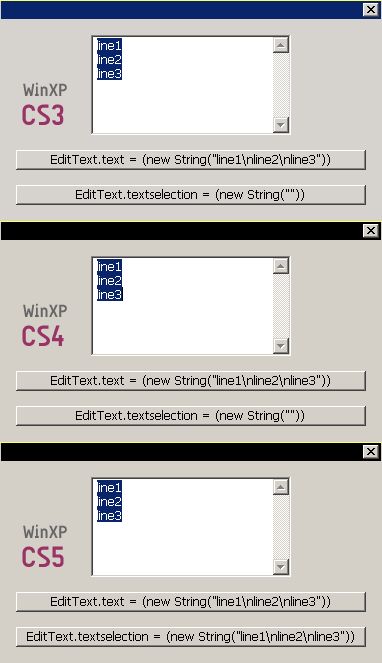
(To have the 3 lines I keyed: line1 CTRL ENTER line2 CTRL ENTER line3.)
@+
Marc
Copy link to clipboard
Copied
Mayhem SWE wrote:
(...)I am also very much interested in sending keyboard commands to InDesign (...)
I finally discovered a way to get linebreaks in multiline edittext when the user presses ENTER on Windows platform, provided that the window is nonmodal.
The trick is to change ENTER into CTRL ENTER by catching the event (though the onEnterKey handler) and then sending a CTRL ENTER though SendKeys (VB). The reason why it does not work in modal windows (i.e. 'dialog') is that app.doScript() is not available when the dialog has the focus.
Let's try this sample code:
#targetengine 'TestEnterInMultilineEditText'

var WIN_PLATFORM = 0<=$.os.toLowerCase().indexOf('windows');

var sendKeys = WIN_PLATFORM?
     function(k)
     {
     app.doScript([
          // VB CODE
          'set WshShell = CreateObject("WScript.Shell")',
          'WshShell.SendKeys("'+k+'")'
          // ---
          ].join('\n'),
          ScriptLanguage.visualBasic
          );
     }:
     function(){};


// Test
// ---

var w = new Window('palette');

var e1 = w.add('edittext', [0,0,200,100], '', {multiline:true});

e1.onEnterKey = function(ev)
     {
     // Works ONLY if the Window is not modal (=not a 'dialog')
     // Otherwise app.doScript throws an error
     sendKeys("^{ENTER}");
     };

w.onShow = function()
     {
     // Works whatever the Window type
     // because w is NOT YET active => app is available
     sendKeys("line1^{ENTER}line2^{ENTER}line3{LEFT}");
     }

e1.active = true;

w.show();
Now it would be great to have:
— the alternate hack for Mac platforms,
— a solution to run VB SendKeys() without app.doScript() on Win platforms.
Any idea?
@+
Marc
Copy link to clipboard
Copied
> Any idea?
Nag the Adobe engineers until they get so sick of us that they'll fix it just to be rid of us. Post bug reports, send requests! To arms!
Peter
Copy link to clipboard
Copied
pkahrel wrote:
Nag the Adobe engineers until they get so sick of us that they'll fix it just to be rid of us. Post bug reports, send requests! To arms!
I totally agree with you, Peter.
But whatever the future of InDesign our scripts still need to work in older versions, don't they?
@+
Marc
Copy link to clipboard
Copied
You were right, my \r\n solution works only with a single manual linebreak. Add more than that and InDesign starts acting weird. As my current work in progress only uses multiline EditText fields on a floating palette your current VBScript workaround works for me, with the Mac version remaining as is (setting textselection to \n) since control+enter does not work to input linebreaks on a Mac anyway.
If you're still looking to implement a Mac equivalent, AppleScript through System Events provide two methods for emulating keyboard input: keystroke can only send keys which characters which can be typed (but can send multiple characters at once) while key code must be used to send for example the cursor keys (and only one at a time). Modifier keys are not part of the keystring but specified afterwards. Examples:
Command + S
tell application "System Events" to keystroke "s" using command down
Shift + Arrow Right
tell application "System Events" to key code 124 using shift down
There will be some work required to translate keys from one system to the other, so the best solution may be to create your own language to use as a source which is then translated into appropriate codes for VBScript and AppleScript.
Copy link to clipboard
Copied
Hi Mayhem.
Thanks for the information.
If I understand your tests there is no need to send keystroke via AS since you original onEnterKey handler works for Mac, right? Can you confirm that it works whatever the number of lines in the EditText and for ID CS3/CS4/CS5? (I think your workaround is the best for Mac platforms since it also supports modal dialogs.)
In conclusion, we can use this strategy:
#targetengine 'EditTextLineBreaksInNonModalUI'

var WIN_PLATFORM = 0<=$.os.toLowerCase().indexOf('windows');

var sendKeys = WIN_PLATFORM?
     function(k)
     {
     app.doScript([
          // VB CODE
          'set WshShell = CreateObject("WScript.Shell")',
          'WshShell.SendKeys("'+k+'")'
          // ---
          ].join('\n'),
          ScriptLanguage.visualBasic
          );
     }:
     null;

var onEnterKeyHandler = WIN_PLATFORM?
     function(/*ev*/)
     { // Windows workaround
     sendKeys("^{ENTER}");
     }:
     function(/*ev*/)
     { // Mac workaround
     this.textselection = '\n';
     this.dispatchEvent(new UIEvent('changing', false, false, this, null));
     this.dispatchEvent(new UIEvent('change', false, false, this, null));
     };


// Test
// ---

var w = new Window('palette'),
     e1 = w.add('edittext', [0,0,200,100], '', {multiline:true});

e1.onEnterKey = onEnterKeyHandler;
w.show();
If the above solution works then the original question is 75% answered!
Now we need to find a way to send CTRL ENTER to a modal dialog in Windows...
@+
Marc

-
- 1
- 2

Get ready! An upgraded Adobe Community experience is coming in January.
Learn more
 AdChoices