

Robert at ID-Tasker
Legend
July 25, 2023
Question

Select Path / PathPoint from script ...

  • July 25, 2023
  • 2 replies
  • 507 views

Hi,


Found this thread made by @Peter Kahrel 


https://community.adobe.com/t5/indesign-discussions/js-selected-pathpoint/m-p/5981281/thread-id/385787#M385798


Anyone found a way to select entire Path or individual PathPoint ?

Moving them is not a problem.


I can read info about Paths and PathPoints:
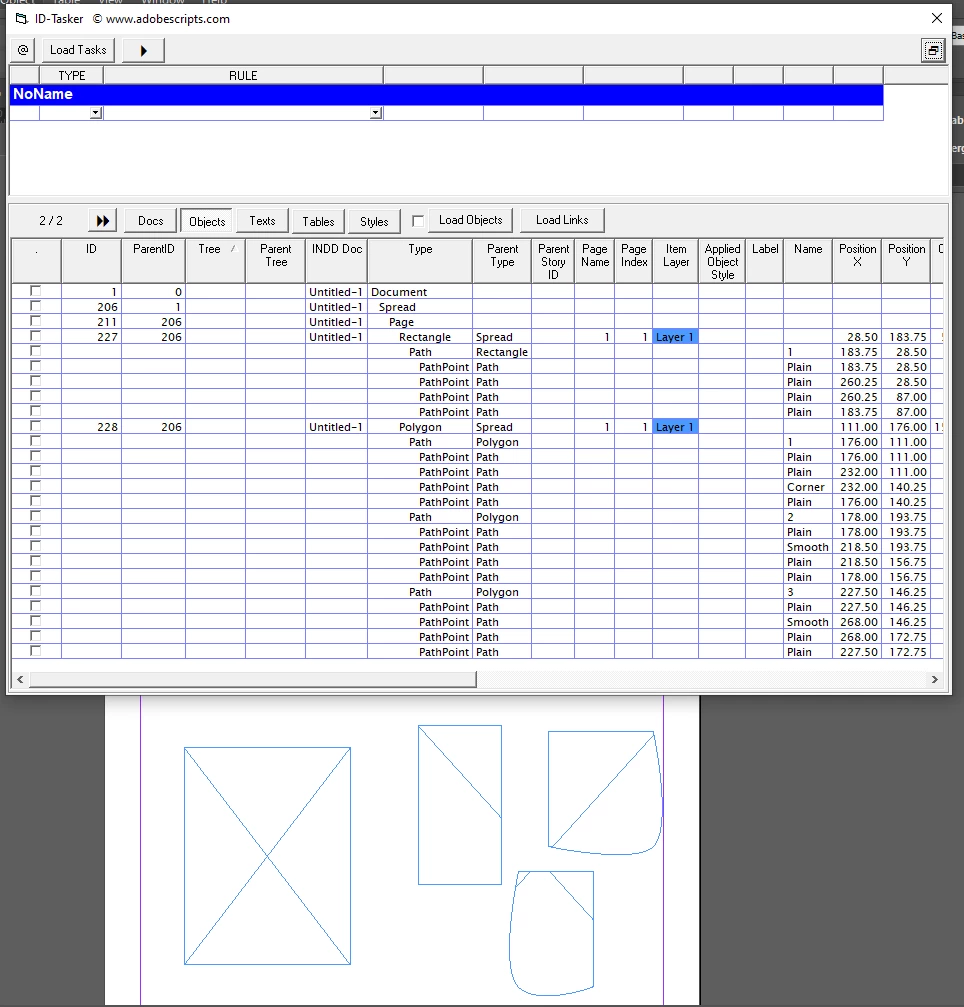


but can't select any of them ...


Error message is the same:

"Invalid value for parameter 'SelectableItems' of method 'Select'. Expected Object, Array of Objects, idNothingEnum enumerator or idSelectAll enumerator, but received Path (PathPoint)."


I think the problem is because there is no "ID" for the Path nor PathPoint ...


This topic has been closed for replies.

2 replies

Community Expert
July 26, 2023

Hi @Robert at ID-Tasker ,

to select all path points of a given object goes like this:


Make sure you have the Selection tool enabled.

Select the object.

Switch tools to the Direct Selection tool.


app.select( null );

app.toolBoxTools.currentTool = UITools.SELECTION_TOOL;
app.select( app.documents[0].rectangles[0] );

app.toolBoxTools.currentTool = UITools.DIRECT_SELECTION_TOOL;


Regards,
Uwe Laubender
( Adobe Community Expert )

Robert at ID-Tasker
Legend
July 26, 2023

I don't need to select ALL PathPoints - I would like to be able to select only some of them - or one of the Paths of the more complicated object - on my screenshot there are two objects with their structure - part of the Polygon are three objects on the right. 


But I think it's no longer a problem - for me...

As I'm already able to load info about the Paths and PathPoints and show it to the user - and I can manipulate them anyway - it just would be more convenient to show which one is beeing manipulated.


Loic.Aigon
Legend
July 26, 2023
quote

I don't need to select ALL PathPoints - I would like to be able to select only some of them - or one of the Paths of the more complicated object 


By @Robert at ID-Tasker

Yes I think I got you right 😉

Loic.Aigon
Legend
July 26, 2023

I think you reached a limit of InDesign. A simple test is UI selecting a point and ask for current selection constructor.
While you would expect "PathPoint", you get "Polygon". 

So basically the concept of selection seems to stop at the pageItem level.

Unless I am wrong.

Loic