
Inspiring
January 1, 2023
Answered

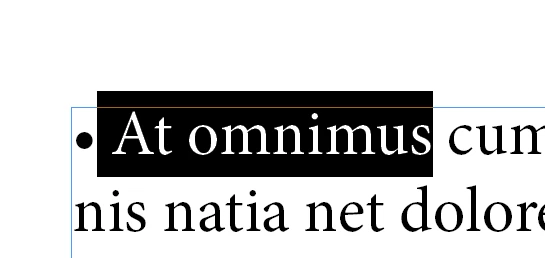
Select the text after a • but not the •

  • January 1, 2023
  • 4 replies
  • 427 views

I'm trying to select the first to words after each • but not include the •. I'm not having any luck. It always selects the • too. Is there any way to do this?


var cStyle = curDoc.characterStyles.item("Style");
var curSel = app.selection[0];

app.findGrepPreferences = NothingEnum.nothing;
app.findGrepPreferences.findWhat = "•\\s\\S+\\s\\S+";
app.changeGrepPreferences.appliedCharacterStyle = cStyle;
curSel.changeGrep();
This topic has been closed for replies.
Correct answer Robert at ID-Tasker

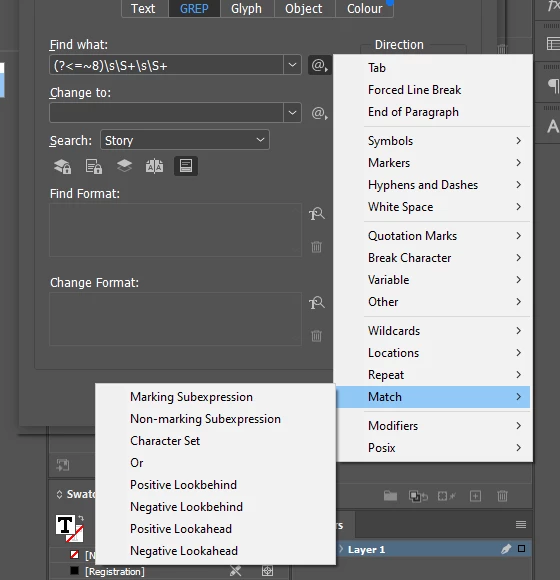
It's called "Positive Look Behind"


(?<=•)\\s\\S+\\s\\S+


4 replies

pixxxelschubser
Community Expert
Community Expert
January 4, 2023

Such a grep should also work without problems - and can be adapted relatively easily to new requirements.

•\K(\h\w+){2}

 😉

pixxxelschubser
Community Expert
Community Expert
January 1, 2023

Screenshot submitted later


pixxxelschubser
Community Expert
Community Expert
January 1, 2023
quote

I'm trying to select the first to words after each • but not include the •


By @davidn5918184


Do you perhaps mean: "I try to select the first two words after each •" …


And one more question: These "•" are not automatically bullet points - right?

Please show a screenshot with visible hidden characters.


Normally, greps like the following should work in most cases:

•(\t|\h)\K\w+\h\w+


Robert at ID-Tasker
Robert at ID-TaskerCorrect answer
Legend
January 1, 2023

It's called "Positive Look Behind"


(?<=•)\\s\\S+\\s\\S+


Inspiring
January 1, 2023

Success! Thank you so much.