
Participating Frequently
June 13, 2023
Answered

Selecting "all instances" characters with variable numbers at the end

  • June 13, 2023
  • 2 replies
  • 552 views

Hello! 


I have a 400page plus document and I would like to find all instances of "W: $??????" where the question marks are variable numbers, (for the sake of explaining here), up to 6 character but could be as few as 2 numbers. The "W: $" remain the same in all instances.


I need to find all of these instances and delete. Is there a way to find this when there are variable numbers at the end?


Thanks for helping!
This topic has been closed for replies.
Correct answer Barb Binder

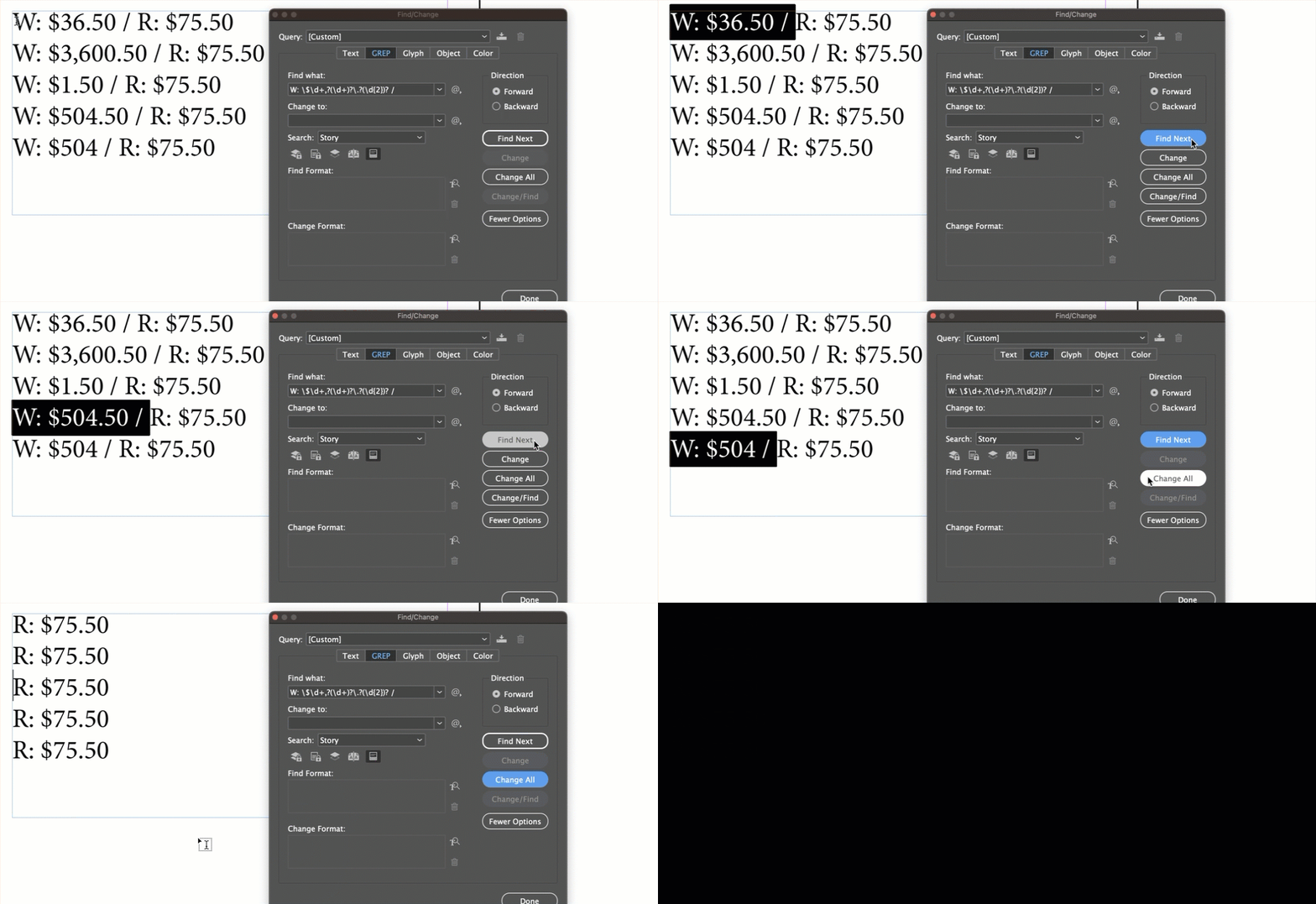
So how about?

Find: 

W: \$\d+,?(\d+)?\.?(\d{2})? / 

(with a space before and after the slash at the end)


But here's another idea. InDesign has a feature called conditional text. You could find the wholesale numbers as shown above and then assign a condition tag called wholesale that you can show and hide. That way you could have one document that has both sets of numbers, but at any point you can click off the eyeball for conditional text and it would hide the wholesale numbers automatically. One more click would show them again.


~Barb

2 replies

Barb Binder
Community Expert
Barb BinderCommunity ExpertCorrect answer
Community Expert
June 14, 2023

So how about?

Find: 

W: \$\d+,?(\d+)?\.?(\d{2})? / 

(with a space before and after the slash at the end)


But here's another idea. InDesign has a feature called conditional text. You could find the wholesale numbers as shown above and then assign a condition tag called wholesale that you can show and hide. That way you could have one document that has both sets of numbers, but at any point you can click off the eyeball for conditional text and it would hide the wholesale numbers automatically. One more click would show them again.


~Barb

~Barb at Rocky Mountain Training
Participating Frequently
June 14, 2023

Thank you!

Barb Binder
Community Expert
Community Expert
June 14, 2023

You are welcome. I realized after setting it up that you don't get into the thousands so you could reduce it to:


Find:

W: \$\d+\.?(\d{2})? / 

(again a space before and after the final /)


~Barb

~Barb at Rocky Mountain Training
Peter Spier
Community Expert
Community Expert
June 13, 2023

Find  W: \$\d{2,6}

Leave the change field blank

Peter Spier
Community Expert
Community Expert
June 13, 2023

Edit: This will find the first six digits in a seven-or longer sequence so if that's a problem you'll need to modify in some way.

In fact, you'll probably want to modify anyway to remove a space before or after the deleted text as well. Can you show us some examples of what the text looks like so we can suggest a way to do that?

Participating Frequently
June 13, 2023

Here is what the text box looks like. There is a wholesale price and retail price. I need to remove the wholesale price and the slash and space after. Prices can vary from ones, tens and hundreds. Some don't have the .00 after the dollar amount. Thank you for your help!