
Copy link to clipboard
Copied
Win 10.
My account with Adobe, the Products page, looks like this:
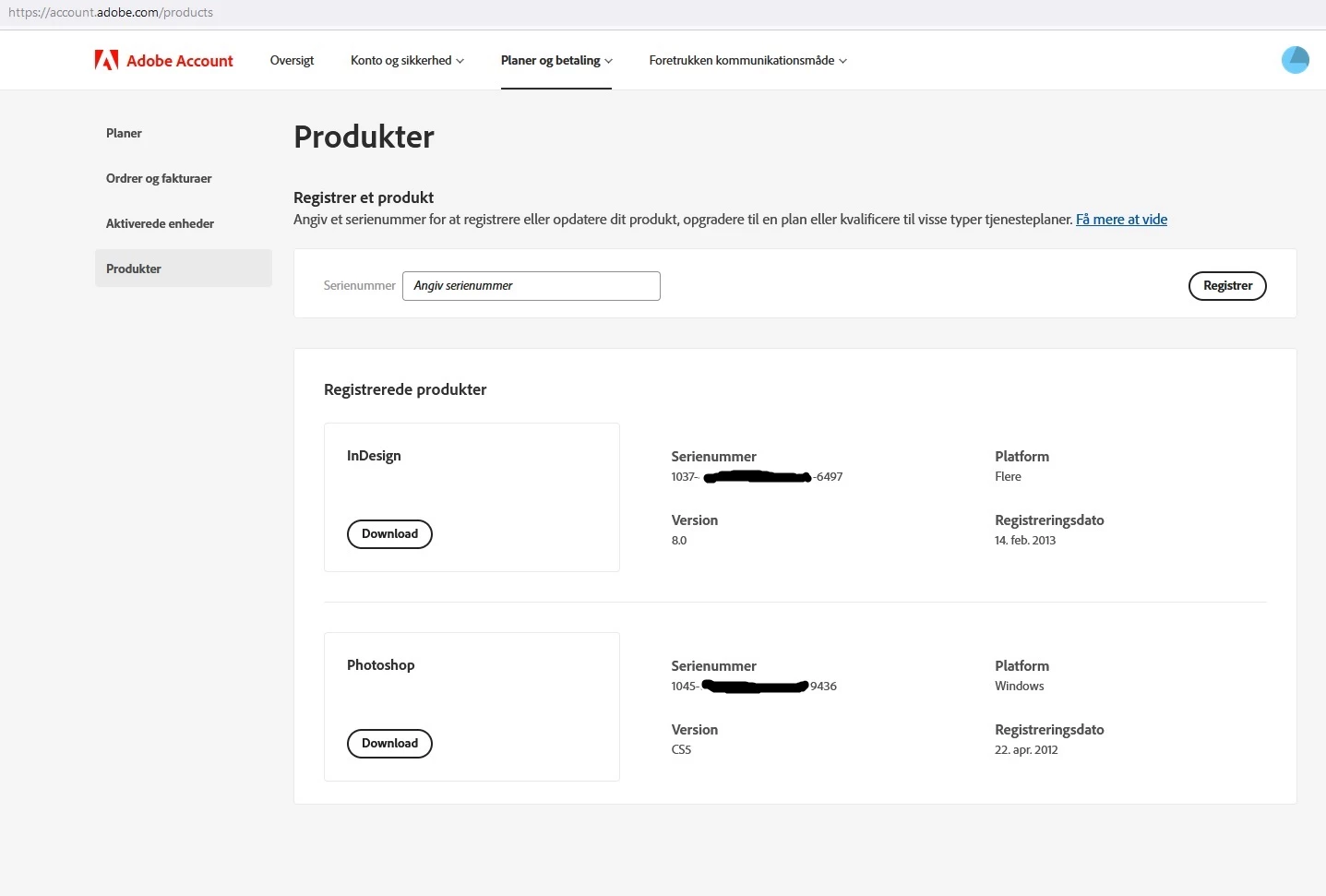
When I download any of the versions available from this Products side - in this case it would be the English version - OR one including my native language - in both cases I get the 'invalid serial number' message, and please contact SUPPORT ))), which notoriously is very hard to get in touch with.
Should it ever happen, I would like to ask the good service providers there, how this can be possible - that two original components from the same product page don't match each other?
And that's the question I have to ask here in the forum (while Adobe likes to be left alone).
I had help from Adobe Chat to solve this issue.
They supplied a new serialnumber and set of installation files.
The problem seems to be that the order in which certain installation files must be chosen and activated isn't explained on the Product sides. I hope Adobe will add the same explanation in general as I receuved with the specific instructions.
But now it works for me, and I thank support for the help.
Case closed.
Copy link to clipboard
Copied
Do you see this mesatge when you try to download or when you try to install?
If the latter, then most likely the serial number doen't match the language version.
Copy link to clipboard
Copied
Yes, sorry - it's during installation. And you are probably right, but I have downloaded the likely versions - the remaining are simply not what I would buy. I prefer English versions for all IT - or Danish if the translations are ok - or the offer is irresistable. Actually I think the version in question is in Danish, so there are not many chances to make it wrong.
Is it possible to write to Adobe directly?
Copy link to clipboard
Copied
Hi @Eigil Skovgaard ,
Sorry to hear about the trouble. Please try the suggestions shared by Peter and if it still doesn't work, please contact us directly using this link.
Thanks
Rishabh
Copy link to clipboard
Copied
Ok, I'll make a new attempt within the next three days and be back with the result.
Copy link to clipboard
Copied
Hi Rishabh,
The possible versions, which either must work as an English or Danish version are the following:
They add up to 4 possible installations.
I have tried them all with identical result:
So, this is my contact to Customer support.
Copy link to clipboard
Copied
Just to be clear: posting in the forum is NOT Contacting Adobe Customer Support. Not that they are likely to help; CS5 support ended years ago, you needed to keep your installer safe.
Copy link to clipboard
Copied
My reply was for Rishabh.
Copy link to clipboard
Copied
Hi @Eigil Skovgaard ,
did you ever ran InDesign CS6 version 8.0 together with a newer version of InDesign CC on the same machine?
If this was the case the installation of the cloud version of InDesign did overwrite the serial number from the old perpetual version that was once installed with an installer medium like a DVD.
To remedy the situation, you could uninstall all Creative Cloud stuff with the Creative Cloud Cleaner Tool plus the currently installed CS6. Then reinstall CS6 from DVD. The old serial number should be valid again.
Here a link to the Creative Cloud Cleaner Tool:
https://helpx.adobe.com/creative-cloud/kb/cc-cleaner-tool-installation-problems.html
FWIW: Before you doing all this do a backup of your harddisk so you can go back anytime.
Regards,
Uwe Laubender
( Adobe Community Expert )
Copy link to clipboard
Copied
Hi Laubender,
Have you read this tread from the beginning. The serial number I use is from my Adobe account from which I also (concurrently) have downloaded the installation files that don't accept that same serial number. I don't understand how that binding can be out of sync?
I have no InDesign software installed - and haven't had for a couple of years. But as I have a lifelong license for InDesign 8, I thought I would use it, rather than buy Affinity's software which might not be compatible with my old InDesign data files.
So, I don't think a cleaner tool will help much, as no InDesign version ever has been installed on my current PC.
The old InDesign 8 was downloaded from Adobe, so no disc either.
I have just been through a parallel 'exercise' with Photoshop CS5, and everything played fine together.
Copy link to clipboard
Copied
"So, I don't think a cleaner tool will help much, as no InDesign version ever has been installed on my current PC."
Ok. That I did not know. I only guessed that you perhaps had InDesign CS6 installed. And later had the CC version on the disk, perhaps as a trial. So in the end you are right; CC Cleaner is not much of use here.
Hm.
Was the purchase of InDesign CS6 done before Creative Cloud came out?
In 2012 perhaps? Or was it later? In any case this is something Adobe Support should resolve.
Regards,
Uwe Laubender
( Adobe Community Expert )
Copy link to clipboard
Copied
Close, Uwe, my InDesign license was registered 14. February 2013.
I have tried Rishabh's link, but I end nowhere as usual, when I try to reach Adobes customer support.
Is there a more direct link without all the 'often asked questions' lists?
Copy link to clipboard
Copied
I had help from Adobe Chat to solve this issue.
They supplied a new serialnumber and set of installation files.
The problem seems to be that the order in which certain installation files must be chosen and activated isn't explained on the Product sides. I hope Adobe will add the same explanation in general as I receuved with the specific instructions.
But now it works for me, and I thank support for the help.
Case closed.
Get ready! An upgraded Adobe Community experience is coming in January.
Learn more