

apa68177991
Inspiring
November 25, 2023
Answered

Set a Rendering Intent for Objects in InDesign

  • November 25, 2023
  • 2 replies
  • 1789 views

Hello everyone,

I’m currently working on a project in Adobe InDesign and I’ve come across a challenge that I’m hoping someone here might be able to help with.

I’m trying to determine the rendering intent for vector objects, or objects in the LAB color space, so that it can be included in the output PDF. I know that for bitmap images, there’s a similar feature where you can select Image Color Settings from the Object menu and choose the rendering intent.

However, I’m struggling to find a similar option for vector objects or objects in the LAB color space. Does anyone know if this is possible in InDesign or do you have any alternative solutions? Any guidance or suggestions would be greatly appreciated.

Thank you in advance for your help!
This topic has been closed for replies.
Correct answer Brad @ Roaring Mouse

I hope I have understood your question correctly. My aim is to have a master file that will later be adapted to various output conditions. Therefore, I would like to have the option to control whether graphics come as close as possible to a color or whether saturation is the priority. In Acrobat, I can then take into account the respective rendering intents and convert them into a specific color space. It is not necessarily about sending it directly to an end device.


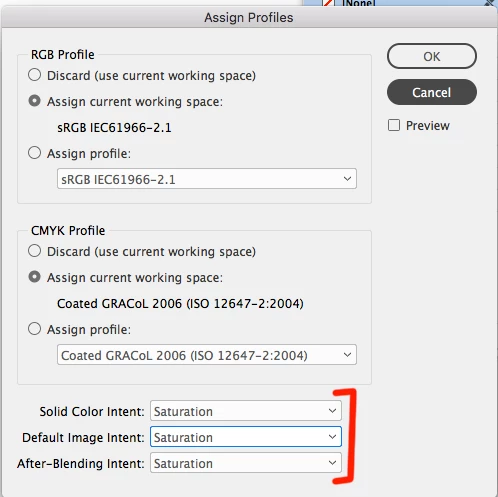
Once you Assign a rendering intent in the ID document, it should carry through.

Here's a simple test. Make a couple of files from a document with some LAB values you want to test.

It doesn't matter so much what your specific Color Settings rendering intents are (usually Relative Colorimetric), as you can override them in Assign Profile.

File 1, leave as default. Under Assign Profle leave the rendering intents as they are.

File 2, change the Rendering Intent to one you want to test, say Saturation. If you are only concerned about ID's object colors, just change the first item.

File 3, change to another, say Perceptual.

Export PDFs, No Conversion.

Even in Acrobat you will see the difference between the three files when you Preview selecting the Output Destination you desire. You can also test-render them into Photoshop to CMYK, as CMYK is pretty much where you are really concerned about how things convert.

2 replies

Lukas Engqvist
Community Expert
Community Expert
November 27, 2023

LAB rendering intent is set in the Colour settings, note that this is for new documents and that when you open a document this may have other settings and you may want to  look at the Assign Document Profiles. The Solid colour rednering intent and the After-Blending intent both play in. 

I would recommend using Perceptual for Solid intet if you have LAB since I don't see an option for Black Point Complensation. After Blending intent comes into paly when you have transparent objects. It is complicated and many parameters. 

Brad @ Roaring Mouse
Community Expert
Community Expert
November 25, 2023

If you are looking for an object-by-object setting I don't think so, The rendering intent is incorporated in your Color Settings > Conversion Options, and, depending on how you Assign Profile (or not) will define whether the document uses those settings or is set to something different to override it. You do have the option in Assign Profiles to change the intent for different types of objects, but as far as I know, that's it. Of course, any externally placed image/object/vector with a differently assigned profile, will pass on the Engine and Intent defined in that profile.


apa68177991
Inspiring
November 25, 2023

too bad but thank you for the answer!

Brad @ Roaring Mouse
Community Expert
Community Expert
November 27, 2023

At the end of the day, I'm not sure how useful this "master" document will be for you. Unless you actually have printed samples of the end result of any of these conversions, anything you do on the screen is just simulated anyway.