
Participant
March 14, 2017
Answered

Setting up an InDesign document for 4-up printing.

  • March 14, 2017
  • 4 replies
  • 22212 views

Hey,

Recently I designed a card/promotional flyer that is 5.5 x 4.25. I've been asked to set it up for "4-up" printing on an 8.5 x 11 sheet of paper. Each card has a front and back. I'm relatively inexperienced with InDesign and even more inexperienced with setting up documents for printing such as this. Could someone be so kind as to instruct me how to do so? I think I'm on the right track but I don't want to mess it up.

Thanks!
This topic has been closed for replies.
Correct answer joet082964

If you have the choice, choose another printer. If not, you are simply laying out 4 cards on a page.  If you have bleeds, that causes an issue.

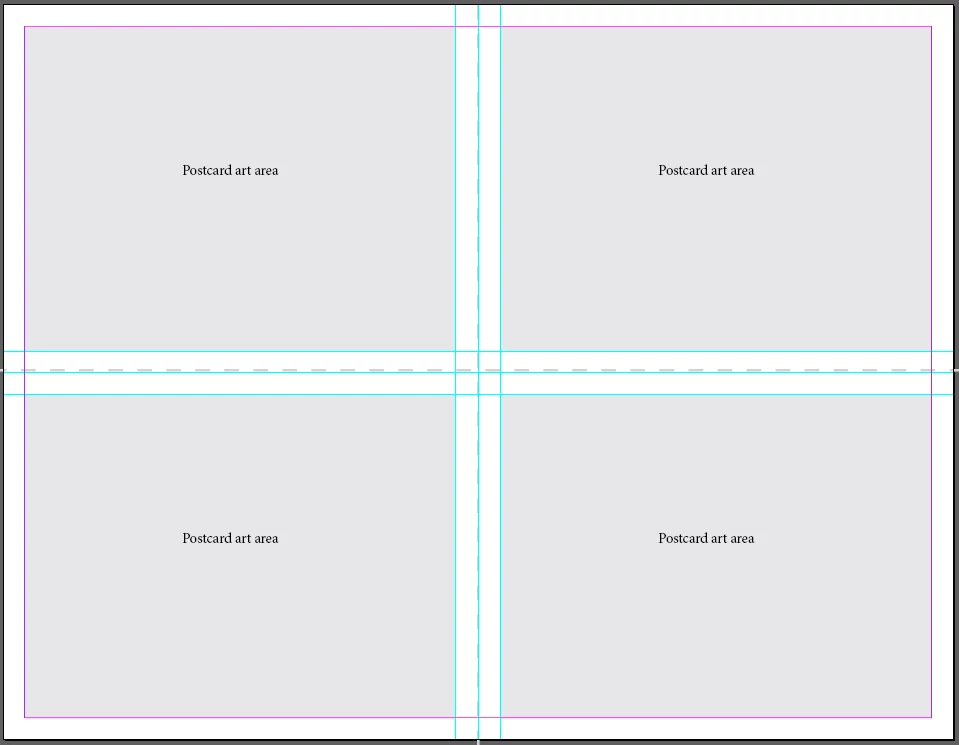
Here is what you page might look like if you are not using bleeds. You can use the gray areas as your allowable artwork region, then when finished, copy and paste your artwork and place into the other three regions. The printer would then print the full sheet and cut along the dashed lines (which are only shown for reference.) You can see that I set up guides for size consistency.

4 replies

Participating Frequently
May 26, 2023

You can place your original PDFs 4-up into a new InDesign document.


When you open the original with `File > Place`, before you select the file, make sure 'Show Import Options' is selected in the 'file open' dialog.  In the 'import options', you need `Crop to` set to `Media`, otherwise it will be misaligned.


Click away from the imported PDF to deselect it.  Rinse and repeat.  You should find that the green guidelines find their slot to line up.  (If the cropping import setting is not changed from the default, you'll end up with a mess, unless the imported file has content extending to all edges.)


Repeat for the back, this time selecting page 2 in the import options.


Took me hours to figure out how to do it, and just a couple of minutes once I had.


HTH someone, though obviously too late for the OP.

rob day
Community Expert
Community Expert
March 14, 2017

You can place an InDesign file on a page the same way you would with an image file. So you can design the postcard and place it 4 times in a separate InDesign file for the imposition repeat. The advantage is you can make corrections to the postcard file then update the imposition file and you won't have to make corrections 4 times. If you really are limited to the 8.5x11 page for the 4-up imposition, the postcard can't bleed.

Derek Cross
Community Expert
Community Expert
March 14, 2017

Don't forget it's two-sided printing, so it's sheet work – he has to work to a lay edge and ensure the registration for the reverse side is spot on.

Known Participant
April 11, 2018

Hi Derek,

what do you mean by this? This may be the answer to my question. I have a double sided DL voucher (210 w X 99 h) and I need to set it up as a 3-UP print file. But I am a bit stuck as it is double sided and am unsure of how to do this. It is to be set up on an A4 document.

Do I include bleed?

thanks!

joet082964
joet082964Correct answer
Inspiring
March 14, 2017

If you have the choice, choose another printer. If not, you are simply laying out 4 cards on a page.  If you have bleeds, that causes an issue.

Here is what you page might look like if you are not using bleeds. You can use the gray areas as your allowable artwork region, then when finished, copy and paste your artwork and place into the other three regions. The printer would then print the full sheet and cut along the dashed lines (which are only shown for reference.) You can see that I set up guides for size consistency.

Participating Frequently
May 25, 2023

I have the same problem.

I thought it would be simple to place the pages 4-up in a document exactly twice the size in both dimensions.  But when I place the PDFs from the original, InDesign decides, for no reason I can fathom, to remove a portion of whitespace from the bottom of the PDF, and also offset the placed second pages to the left.  This makes it impossible to get the 4-up version lined up.

The original is a two-page document with 'facing pages' unchecked.  There was a default non-zero gutter setting when I created it which I did not change, and cannot now find how to.  I don't know which document I need to change the gutter setting on, or even if that will help.


I've had the same issue placing a single page PDF created with InDesign back into InDesign for 4-up or any other purpose.  But I've not had this issue with a placed PDF from InDesign back into InDesign which has artwork right to the edges.

I think this is a bug in InDesign (2014+).  It fails to work out the actual extents of the placed PDF (even though they're defined in the PDF), in the course of trying and failing to do something clever.  Maybe if I place four small white squares in each corner of the original, it will work?

I am printing at home.  None of the (other) comments saying to choose another printer are helpful at all.

Participating Frequently
May 26, 2023

Finally solved my case.  The default PDF import option in InDesign is to 'crop to bounding box (visible layers only)', which is entirely unsuitable here.

Derek Cross
Community Expert
Community Expert
March 14, 2017

Commercial printers normally do the imposition – it might be worth looking for another printer.