
Answered
Setting up full page Magazine Ad
Here's what I was given:
BLEED: 9.25" X 11.125"
NON BLEED: 8.375” X 10.375”
FINAL PAGE TRIM SIZE: 9" X 10.875"
SAFE AREA: 8.375” X 10.375”
How do I set this up in InDesign CC 2019???

Here's what I was given:
BLEED: 9.25" X 11.125"
NON BLEED: 8.375” X 10.375”
FINAL PAGE TRIM SIZE: 9" X 10.875"
SAFE AREA: 8.375” X 10.375”
How do I set this up in InDesign CC 2019???
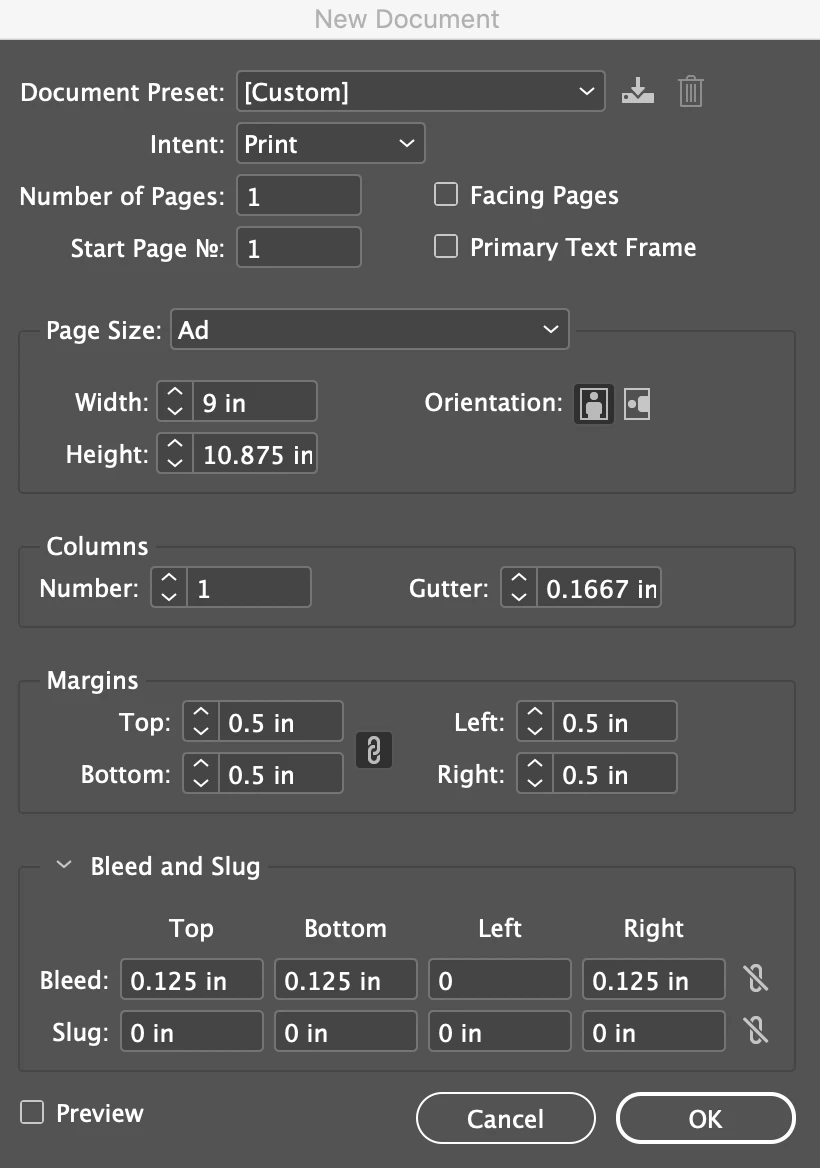
Set up a new page 9" x 10.875" (no facing pages) add 1/8 for bleed to the top and bottom and 1/8" to one side, depending on whether it's a right-hand or left-hand page. You can add margins for the "safe" area or you might prefer larger margins, it's a matter of taste. The example below is for a right-hand page.
Already have an account? Login
Enter your E-mail address. We'll send you an e-mail with instructions to reset your password.
 AdChoices