Participant
July 19, 2022
Answered

Side by side numbering - Translation Text

  • July 19, 2022
  • 1 reply
  • 337 views

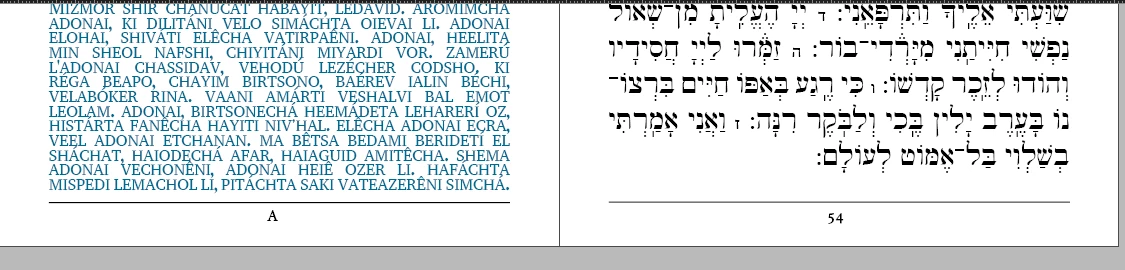
Hi, I'm working on a book with a Hebrew to Latin text, and I was requested to set the same numbering for each facing pages, like 1:1, 2:2, 3:3. I tried to insert it like an A:A inside my master but it's not working. How can I do that?


This topic has been closed for replies.
Correct answer Willi Adelberger

I suppose that this is text from the Bible, Latin Vulgata on the left and Hebrew on the right.

I do not understand what the numbering is? The same passage in Latin uses much less space as the Hebrew text. In the image you show us a transcription of the Hebrew text to latin letters, not Latin itself.

On the master should not be anything which belongs to the content. 

I think you want to get it synchronized. There must be done some workarounds on a spread.

It is not ideal, but I would start like this:

  1. Set uo 2 documents: 1 in the size of your pages and with page number placeholder on the master. The other in the size of the spread, no page numbers.
  2. Work on the 2nd document. Create guide lines, where the colums end.
  3. Create a 3 column table, latin—empty for the spine—Hebrew and insert the content.
  4. Place that document into the other document.


Work with an ME enabled InDesign.

1 reply

Willi Adelberger
Community Expert
Willi AdelbergerCommunity ExpertCorrect answer
Community Expert
July 19, 2022

I suppose that this is text from the Bible, Latin Vulgata on the left and Hebrew on the right.

I do not understand what the numbering is? The same passage in Latin uses much less space as the Hebrew text. In the image you show us a transcription of the Hebrew text to latin letters, not Latin itself.

On the master should not be anything which belongs to the content. 

I think you want to get it synchronized. There must be done some workarounds on a spread.

It is not ideal, but I would start like this:

  1. Set uo 2 documents: 1 in the size of your pages and with page number placeholder on the master. The other in the size of the spread, no page numbers.
  2. Work on the 2nd document. Create guide lines, where the colums end.
  3. Create a 3 column table, latin—empty for the spine—Hebrew and insert the content.
  4. Place that document into the other document.


Work with an ME enabled InDesign.
Participant
August 25, 2022

I have a picture that a book that does depict exactly what I'd like to make, it should be like that (look that there is 319 in both pages, that is what I want to do in my project)