jenp3
Participating Frequently
October 18, 2019
Answered

Size footnote number

  • October 18, 2019
  • 3 replies
  • 1846 views

Hi! 

How do I change the size of the footnote number in the footnote (not the superscript in text)?

Size it is now (same as text)

Size I would like, smaller than text.


Warm regards,

Jenna

    This topic has been closed for replies.
    Correct answer Barb Binder

    Hi Jenna:


    You accomplish this task by added a nested character style (that controls the look of the number) to a paragraph style. 


    The footnotes that appear at the bottom of the column can be assigned a paragraph style via Type > Footnote Options. I usually use the name Footnote.
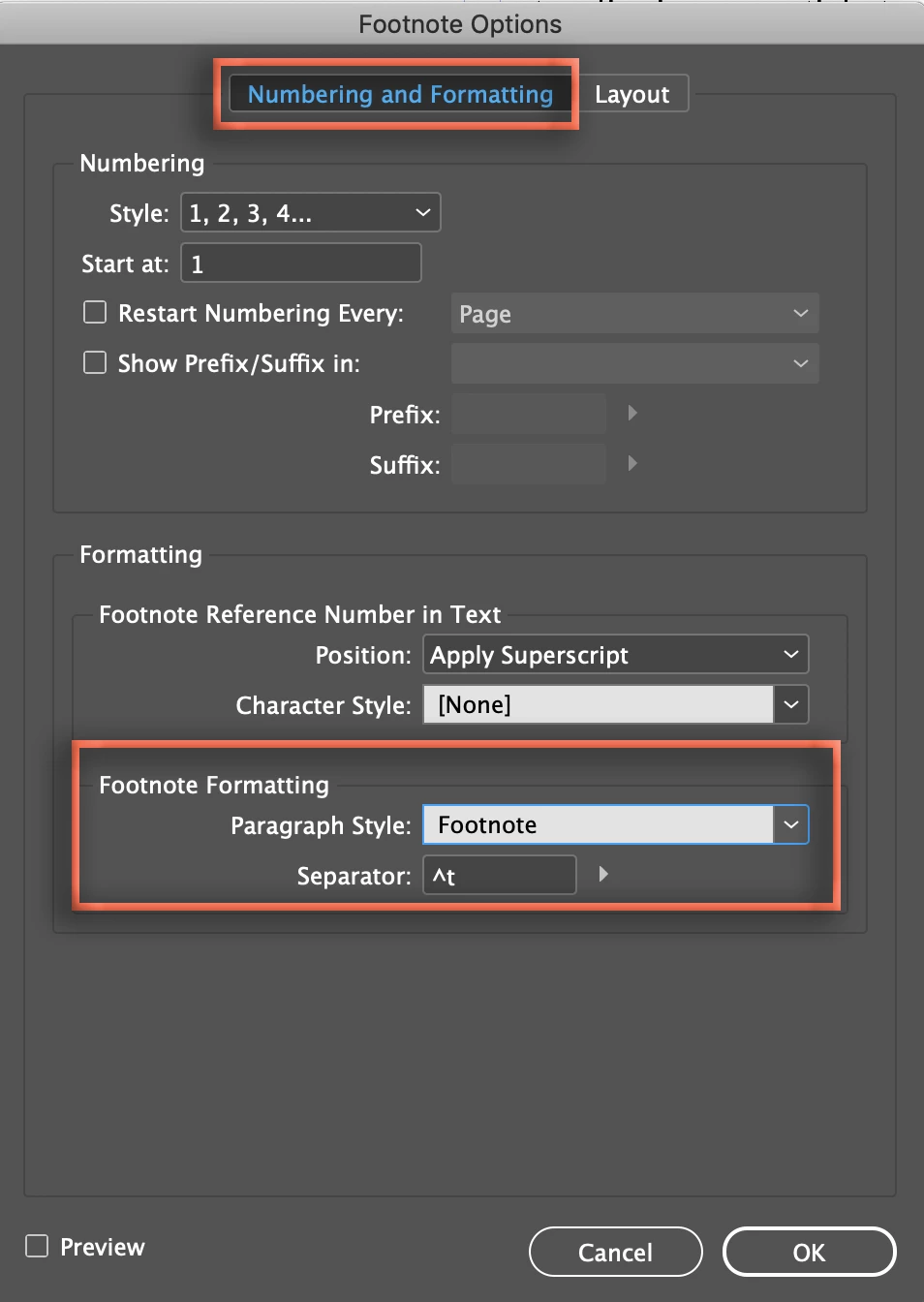
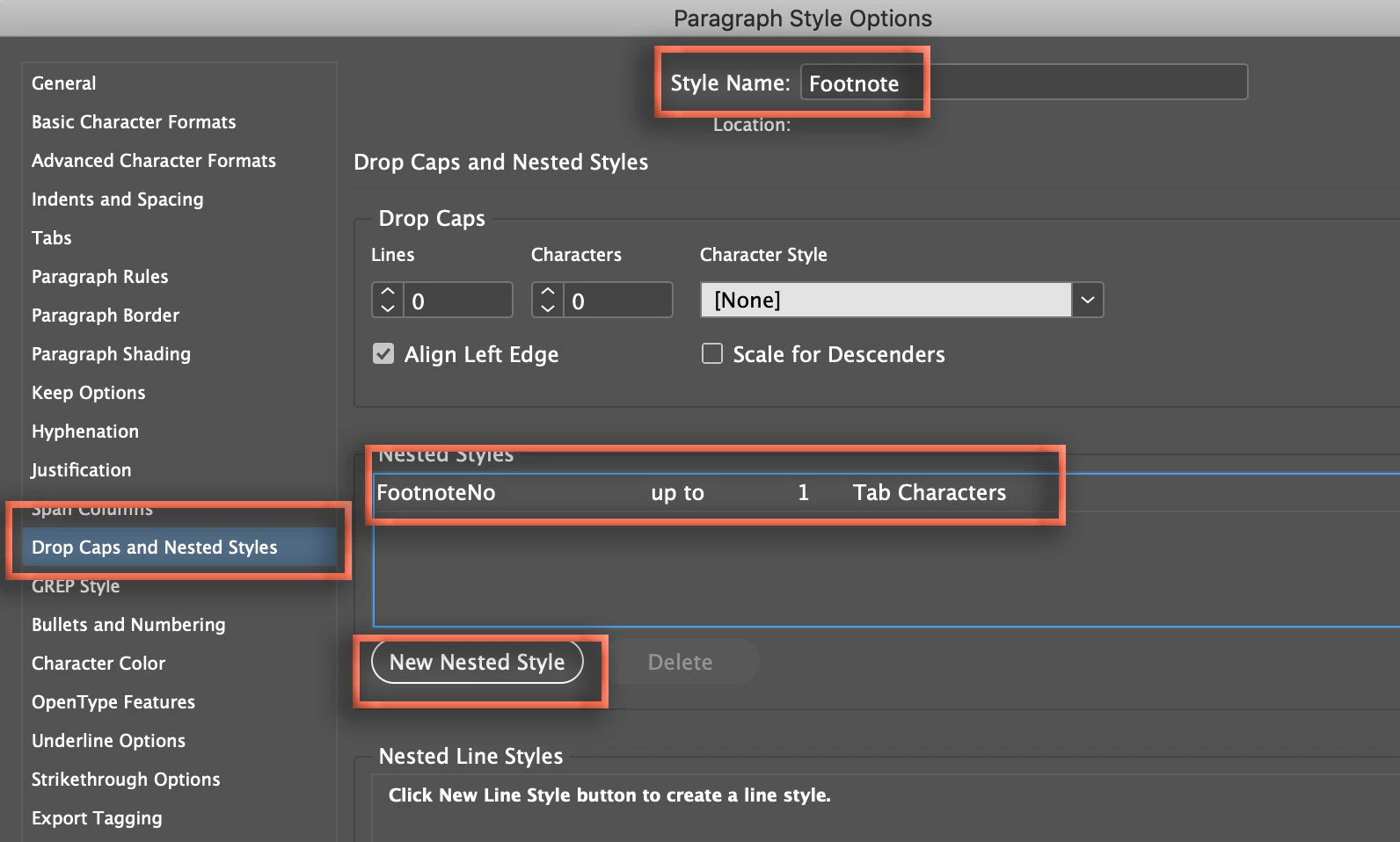
    Once assigned, edit the footnote paragraph style and add a nested character style to control the footnote number and apply it to up to 1 Tab characters.
    ~Barb

    3 replies

    Barb Binder
    Community Expert
    Community Expert
    October 19, 2019

    Hi Jenna: If you have inline formatting (i.e., bold and italic on words within a paragraph), you will want to make and assign character styles before removing the paragraph overrides.


    It's easier than you might think. First, create the necessary character styles, for example, make one for italics. Apply it manually to one or two occurences of inline formatting to make sure that it is working correctly:


    Once you establish that your style is working, use Find/Change to find all manual italics and replace with the character style. Repeat for the other inline formats. Then remove the paragraph overrides.


    ~Barb


    ~Barb at Rocky Mountain Training
    jenp3
    jenp3Author
    Participating Frequently
    October 19, 2019

    Got it! Thanks again 😄 

    Barb Binder
    Community Expert
    Community Expert
    October 19, 2019

    Hi Jenna: The plus after the style name means there is an override on the text, which is what you are describing. Click an insertion point in the footnote, hold Alt (Opt on a Mac) and click the style name footnote to remove the override.


    ~Barb

    ~Barb at Rocky Mountain Training
    jenp3
    jenp3Author
    Participating Frequently
    October 19, 2019

    Hi Barb,


    Thank you for your reply. It does work but it removes italics and bolds if I do that. 

    Could there be an other way?

    Barb Binder
    Community Expert
    Barb BinderCommunity ExpertCorrect answer
    Community Expert
    October 18, 2019

    Hi Jenna:


    You accomplish this task by added a nested character style (that controls the look of the number) to a paragraph style. 


    The footnotes that appear at the bottom of the column can be assigned a paragraph style via Type > Footnote Options. I usually use the name Footnote.

    Once assigned, edit the footnote paragraph style and add a nested character style to control the footnote number and apply it to up to 1 Tab characters.

    ~Barb

    ~Barb at Rocky Mountain Training
    jenp3
    jenp3Author
    Participating Frequently
    October 19, 2019

    Perfect, thanks a lot! 


    One last question about footnotes. When I add the paragraphstyle to my footnote the font doesn't change, it stays like to font in the word file. The paragraph style adds a + in the name, so footnote+ instead of footnote. 

    In the paragrahpstyle the font setting is right and in the Footnote document options I've added the paragrahpstyle Footnote.

    Do you know what I am doing wrong here?