SuzzyFlamingo
Inspiring
March 10, 2024
Answered

Slightly Newbee here - Question on Style

  • March 10, 2024
  • 1 reply
  • 515 views

Hi friends!

Have been away from ID for a very long time and am trying to make a comeback!!


I have a paragraph formatted with a paragraph style - "MyPStyle". In that paragraph, there are strings of text all between a period and a colon, i.e .HelloWorld:

I want to apply a character style to the entire string (including the period and colon). How could I do this automatically for the entire paragraph? Grep? (What do I write for the above example?)

Thank you and have a good day!

Susan Flamingo
This topic has been closed for replies.
Correct answer Eugene Tyson

Thank you for your attention!

But the text strings i want to format are inside the greater paragraph:

----->

Lorem ipsum dolor sit amet, consectetuer adipiscing elit. Maecenas porttitor congue massa. Fusce posuere, magna sed pulvinar ultricies, purus: lectus malesuada. libero, sit amet commodo magna eros quis urna.

<-----

So don't understand how what you wrote would work?


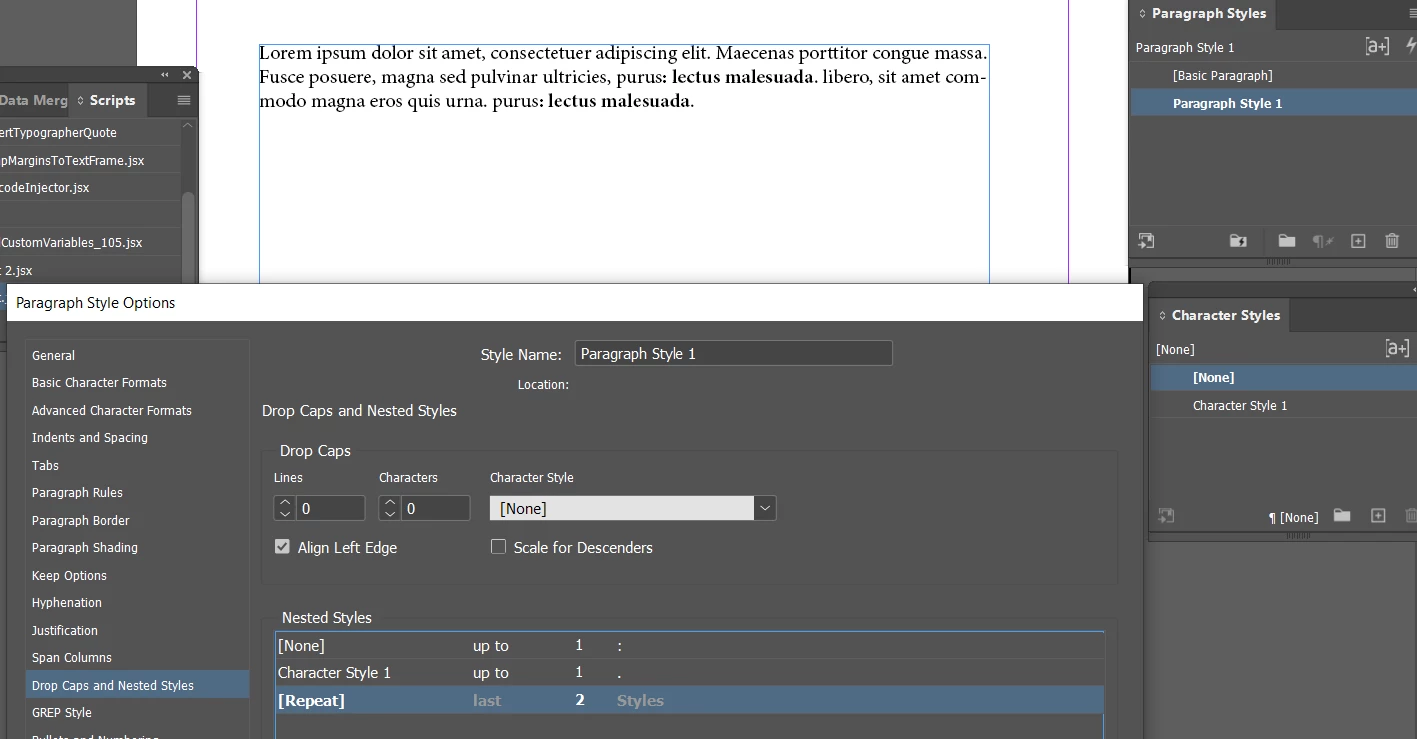
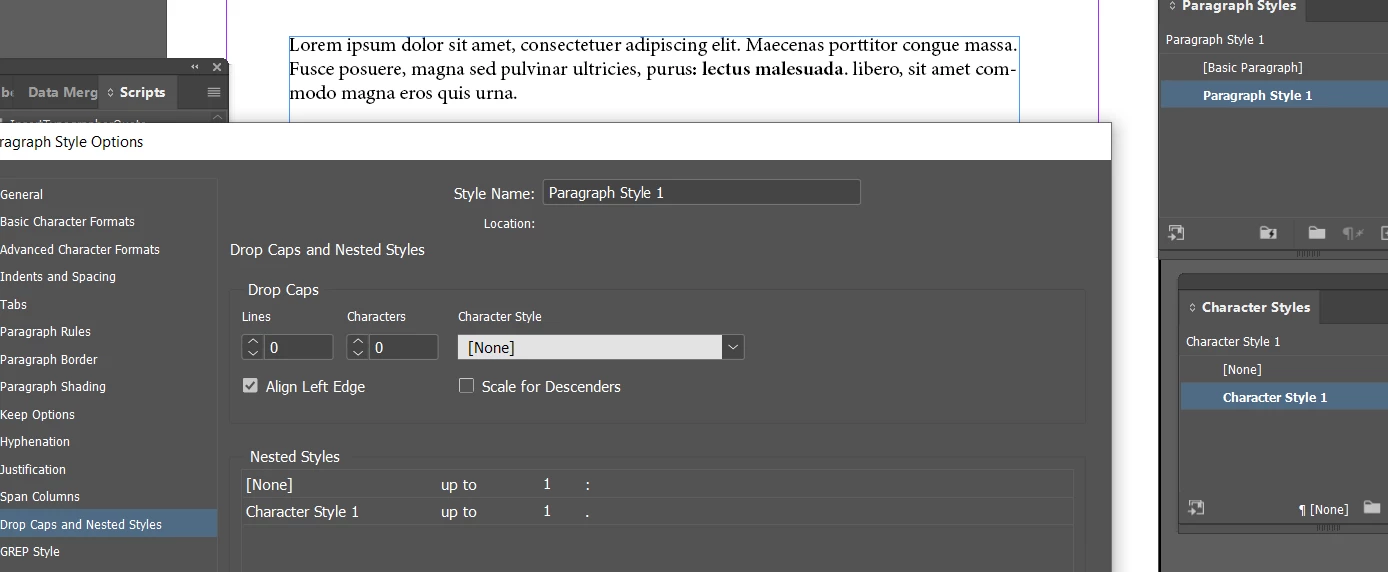
Create a Paragraph Style - this is for the entire paragraph

Then create the Character Style


Inside the Paragraph Style - go to the Nested Styles

And then insert

None> up to> and insert the character :

Character Style>Bold> up to > . 


https://helpx.adobe.com/ie/indesign/using/drop-caps-nested-styles.html


In your example


If there's a 2nd instance - you can choose a repeat function


1 reply

SuzzyFlamingo
Inspiring
March 10, 2024

I did not word the question exactly:

correction:

The text string i want to format with my charstyle is between a colon and a space on one side (before the string) and a period at the end. Like this ": Hello World."

Sorry for the mistake


Willi Adelberger
Community Expert
Community Expert
March 10, 2024

You need no character style here. You need 2 paragraph styles and a return and define the second paragraph style as next paragraph in the first style. So you can select both paragraphs and with right click on the style entry appy style and next style. You can define in an object style also a paragraph style and next style for fast apply. 

Eugene TysonCommunity ExpertCorrect answer
Community Expert
March 10, 2024

Thank you for your attention!

But the text strings i want to format are inside the greater paragraph:

----->

Lorem ipsum dolor sit amet, consectetuer adipiscing elit. Maecenas porttitor congue massa. Fusce posuere, magna sed pulvinar ultricies, purus: lectus malesuada. libero, sit amet commodo magna eros quis urna.

<-----

So don't understand how what you wrote would work?


Create a Paragraph Style - this is for the entire paragraph

Then create the Character Style


Inside the Paragraph Style - go to the Nested Styles

And then insert

None> up to> and insert the character :

Character Style>Bold> up to > . 


https://helpx.adobe.com/ie/indesign/using/drop-caps-nested-styles.html


In your example


If there's a 2nd instance - you can choose a repeat function