- Home
- InDesign
- Discussions
- Slow performance in InDesign v16.3.2 on Mac OS Big...
- Slow performance in InDesign v16.3.2 on Mac OS Big...
Slow performance in InDesign v16.3.2 on Mac OS Big Sur v11.5.1 - Spinning Beach Ball

Copy link to clipboard
Copied
To my great dissapointment and frustration InDesign has a very slow performance.
Every time I try to do any action/move/ absolutely anything the "beach ball" appears and stalls me for 5-10 seconds.
So far I have tried, unistalling-installing the program, resetting prefereces changing color profiles and monitor settings and absolutely NOTHING works.
Please Adobe... find a solution!!!
Im running InDesign 2021 (16.3.2) on Mac OS Big Sur (11.5.1) annoying slow performance
{Renamed by MOD}


 36
Replies
36
36
Replies
36


Copy link to clipboard
Copied
It would help if you'd let us know what kind of a system you're using and what its specifications are, as well as what kind of documents you're working on when these delays are occurring.
There could be any of a number of causes for your issues. Knowing what you're doing, and what kind of system you're doing it with, will help us determine how we may be able to help you.
Randy

Copy link to clipboard
Copied
I'm experiencing just the opposite on my new iMac M1. InDesign launches in three seconds. Amazing. I'm curious to follow this thread, nonetheless, as ID on my late 2017 iMac (Intel) is a bit of a dog these days.

Copy link to clipboard
Copied
I agree with Randy. We need more information about your system.
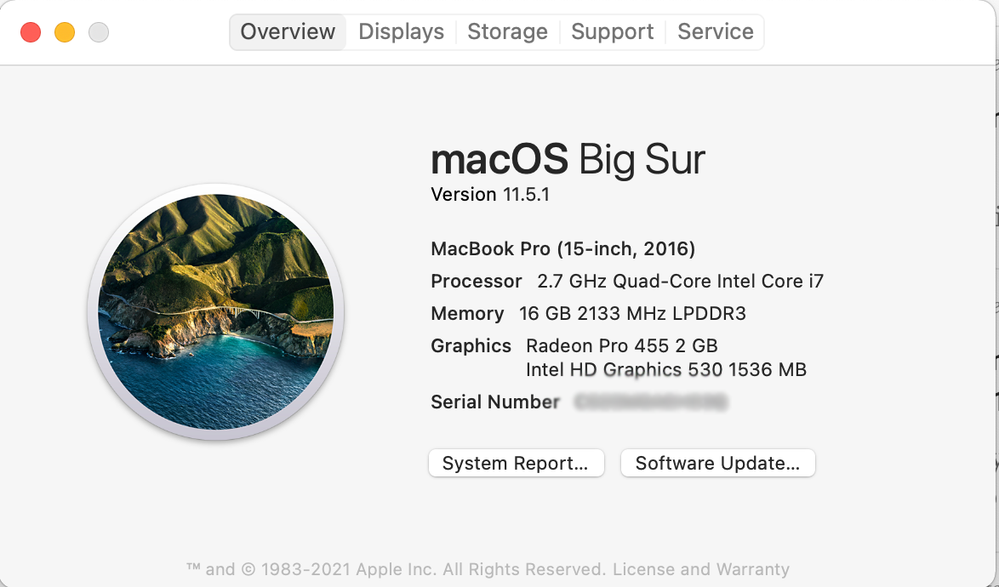
I'm using the same version of Big Sur as you and the same version of InDesign. I have a 2016 MacBook Pro (specs attached). InDesign launches in 6 seconds and never get "beach balls".
Copy link to clipboard
Copied

These are my systems requirments...
Copy link to clipboard
Copied
That helps a lot. Thanks for getting back with us. What kind of work are you doing with InDesign?
We're happy to help as we can.
Randy
Copy link to clipboard
Copied
Thanks for quick response... Its Brochures im designing. From single to multiple pages. All saved in system HDD. No external links.

Copy link to clipboard
Copied
Have you tried this troubleshooting information?
Copy link to clipboard
Copied
Hi Mike,
Thank you for your response. I have already tried most of the things in list with no results unfortunately
😞

Copy link to clipboard
Copied
Mike, this is great! Very helpful.
Copy link to clipboard
Copied
Jeff, that list is a compilation from all of you folks long-time on the forum. Thank you!

Copy link to clipboard
Copied
Mike, are you a real person? So many "community expert" profiles like yours that simply reference Adobe Inc's useless troubleshooting. You appear to be a construct.
Copy link to clipboard
Copied
I can assure you that Mike is a real person, as are the rest of us with the Community Expert notation.
We're volunteers corraled by Adobe to provide support where the company doesn't offer direct support itself.


Copy link to clipboard
Copied
Hi there,
Sorry about the trouble you are facing. I understand your frustration. Could you please share a few more details:
- Does InDesign slow down while working on a specific document? If yes, could you please share that document with us? You can upload it to the Creative Cloud (https://helpx.adobe.com/in/creative-cloud/help/share.html) and share the download link.
- Where are you saving the files (Network Drive/ System HDD/ Shared Folder on System / External HDD)?
- When did this start happening? Are there any recent changes made to your system? For example, any antivirus, system updates, or web extensions installed recently.
- Are you using TimeMachine? If yes, please try disabling it as multiple users have reported that TimeMachine has slowed down some apps while they were working.
- Does turning off Automatic Graphics Switching from Macbook settings (Both Battery and Power adapter) helps to resolve the issue? (https://support.apple.com/en-us/HT202043)
We are here to help, just need more info.
Thanks & Regards,
Anshul Saini
Copy link to clipboard
Copied
Thank you so much for your response.. will try to answer in between your questions..
- Does InDesign slow down while working on a specific document? If yes, could you please share that document with us? You can upload it to the Creative Cloud (https://helpx.adobe.com/in/creative-cloud/help/share.html) and share the download link.
InDesign slows down in any document. Old or new, small in file size or big, single page or multipage. Unfortunately i cannot upload the file due to GDPR restrictions. - Where are you saving the files (Network Drive/ System HDD/ Shared Folder on System / External HDD)?
- Generally all files are saved in system HDD. There are no links in network drives. Brochures include texts with either Adobe or Google fonts.
- When did this start happening? Are there any recent changes made to your system? For example, any antivirus, system updates, or web extensions installed recently.
It started about a month ago but back then i didnt pay much attention to it. Now that iam in high need to finish the project im with tied hands - Are you using TimeMachine? If yes, please try disabling it as multiple users have reported that TimeMachine has slowed down some apps while they were working.
I have Time Machine on Synology Nas Server Drive, installed on June the 4th 2021. Will disable it and see how it goes. - Does turning off Automatic Graphics Switching from Macbook settings (Both Battery and Power adapter) helps to resolve the issue? (https://support.apple.com/en-us/HT202043)
Im actually running an iMac with the system specs i attach bellow.
Once again thank you for your response. Will give you feedback on disabling Time Machine later on.

Copy link to clipboard
Copied
- Same problem here on my iMac. So it‘s not an macBook issue.
- it appears if I try to place eg. pictures, try to move placed graphics or logos, select new Fonts etc … moving or scaling a logo created with the latest AI, chrash sometimes AID as well.
- Placed Logos and Images are from internal or external USB-C drive (LaCie BigDock 8TB). Makes no difference
Switch off Timemachine??? Are you sure, man? So switch off imac would solve this problem too (sry for the joke! but this not really an option cause it‘s saving my work) - No, it is not only if I work on a specific document. It's always. Even if I start the program it‘s slower than in the former versions. It‘s not just "a certain feeling" …
I cleard all prefs and caches … I installed it completly new. Same story.
Copy link to clipboard
Copied
Hi all,
Thank you for sharing the details.
Just following up, does turning off TimeMachine improves the performance of InDesign for you all? I would request you all to please try this out once if you haven't yet. If this doesn't improve the performance, you may try the suggestions shared on this page (https://community.adobe.com/t5/indesign/resolve-slow-performance-and-unexpected-behavior-of-indesign...) step by step and share your observations with us.
Regards,
Anshul Saini

Copy link to clipboard
Copied
I have the same problem!

Copy link to clipboard
Copied
I have the exact same problem!!! I tried a lot of things and I still can't work without frustration with that spinning rainbow ball between every tiny action!
Copy link to clipboard
Copied
Not sure if this was mentioned or not.
Turn off Preflight in the Preflight panel. Preflight is constantly checking your document, which sometimes can bring everything to a halt. It can be maddening!
Copy link to clipboard
Copied
Hi all,
I would like to know if the steps suggested above by @Jeff Witchel, ACI worked for you all? If not, please try the following and share your observation with us:
- Turn off wifi
- Turn off change tracking (https://helpx.adobe.com/ca/indesign/using/tracking-reviewing-changes.html) if you are using it.
- Uninstall any third-party plugin or extension or font manager tool if you are using it.
Regards,
Anshul Saini
Copy link to clipboard
Copied
Hi to all.
Sorry for my late response.
Unfortunately none of the above has worked. Therefore we run several tests with my IT Manager and got InDesign running normally by excuding my computer from firewall restrictions. So my question to Adobe is this: Are there any certain website addresses that Adobe In Design uses so we can excluded those from firewalling? If yes can you provide me them to me?
Thank you in advance
Copy link to clipboard
Copied
UPDATE....
My computer was set to have a certain IP address and tha IP adress was set to be excluded from firewall settings.
It worked well for a week.. and then InDesign started stalling me again. Why on earth is this happening?
Why software is running normally when my iMac is off the internet (ethernet or WiFi)?
This is tottaly unbearable.

Copy link to clipboard
Copied
All of this failed to fix the problem for me also.
Copy link to clipboard
Copied
Thank you for sharing the details, @George Del. As asked, here are some network endpoints (https://helpx.adobe.com/enterprise/kb/network-endpoints.html) which Adobe product used. You can share it with your IT team, try excluding all the Adobe processes and services from your firewall and let us know how it goes.
I will be looking forward to you response.
Reagrds,
Anshul Saini

-
- 1
- 2

Get ready! An upgraded Adobe Community experience is coming in January.
Learn more
 AdChoices