
Participant
August 8, 2018
Answered

Somer packaged fonts are zero K (frutiger) InDesign

  • August 8, 2018
  • 4 replies
  • 7106 views

Hi,

Someone from a mac sent me packaged fonts and some are there and some are zero K. (I have a PC)
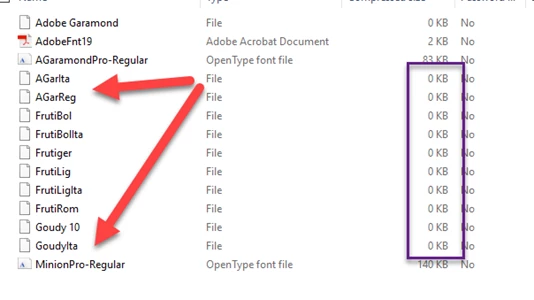
I tried this that I found in another forum and it didn't work either: Any other suggestions?

At my workplace we ran into some problems where a couple fonts were not syncing properly via Dropbox. After a little digging, I found the problem: The fonts were old Mac “suitcase” fonts in PostScript Type 1 format. The suitcase font format stores some of its font data as a file system resource, instead as a regular file, and apparently Dropbox has a problem with that. The person receiving the font files would see that some were 0 KB and were unusable. If we zipped these fonts, and synced them across Dropbox that way, they could be used.

    This topic has been closed for replies.
    Correct answer BobLevine

    This isn't really about them being Type 1 fonts.

    Mac fonts (type 1, truetype and dfont) cannot be used on Windows. Using a font manager will not change that.

    The OP will have to buy OpenType versions of those fonts. Text wrap will probably change a bit.

    4 replies

    Participant
    August 8, 2018

    Thank you for all your insights!!!! I appreciate learning why I have been pulling my hair out for the last day or two. It has been a learning experience.

    I went ahead and bought the fonts. Hair will remain on my head.

    Participant
    November 14, 2019

    This might be a dead thread, but I have something similar. My issue isn't so much a font issue between Mac and PC, but I noticed that when I packaged my files, ziped my font folder and share it with a freelancer over email, Onedrive, Drop box or We Transfer, the files get "zeroed" out. 


    Is the process of transferring my fonts causing it to go through the "Window" process that was previously discussed? I've never encountered this before. 


    Even as a test, I dragged the fonts to Outlook and it gets "zeroed out" as soon as it hits. 


    I'm working on a Mac and I tested downloading fonts to a Mac. No PC involved at this point. 


    See the images below. Thanks for your help. 


    BobLevine
    Community Expert
    Community Expert
    November 14, 2019

    My experience is that Onedrive and Dropbox do not do a good job with Mac only files. Onedrive will at least give you a warning about. Dropbox, at least the last time I looked, would not.

    I'm not sure what's up with Outlook but you might try Apple Mail to see it if gets treated any differently.

    But...I would not, even in a Mac only workflow use anything but Opentype fonts at this point in time.

    Participant
    August 8, 2018

    Thank you all for your help!

    I just went ahead and spent some $ and bought the fonts. Nothing else seemed to work, so, there we go!

    BobLevine
    Community Expert
    Community Expert
    August 9, 2018

    While I have a Mac at my disposal, I am primarily a Windows user. Whenever I take on a project, I make it clear that the cost of any fonts need to be covered.

    BobLevine
    Community Expert
    BobLevineCommunity ExpertCorrect answer
    Community Expert
    August 8, 2018

    This isn't really about them being Type 1 fonts.

    Mac fonts (type 1, truetype and dfont) cannot be used on Windows. Using a font manager will not change that.

    The OP will have to buy OpenType versions of those fonts. Text wrap will probably change a bit.

    JonathanArias
    Legend
    August 8, 2018

    Even if they could not install it the file would have a size to it.

    Why would the file size be 0k than?

    winterm
    Legend
    August 8, 2018

    In short: the resource fork of these fonts is where all of the font data is stored. Since there is no way to store resource data natively on a Windows formatted disk, it's lost, that's why zero size. Normal and expected behavior.

    Whatever, as Bob already said, your best bet is just abandon that ancient format and switch to OpenType alternatives, which are truly cross-platform.

    JonathanArias
    Legend
    August 8, 2018

    i have had exactly the same issue in the past. Post script fonts loose data when you move them around.  Ask the person that sent you the fonts to zip them on their own folder. that worked for me.

    I use suitcase fusion for my font management and they helped me figure that out. Their explanation was the postscript fonts loose their data when you move them to shared drives or box or whatever is not local within your drive.

    Once i did this the issue stopped.