Exit
  • Global community
    • Language:
      • Deutsch
      • English
      • Español
      • Français
      • Português
  • 日本語コミュニティ
  • 한국 커뮤니티
0

Something wrong when I'm printing

New Here ,
Feb 10, 2022 Feb 10, 2022

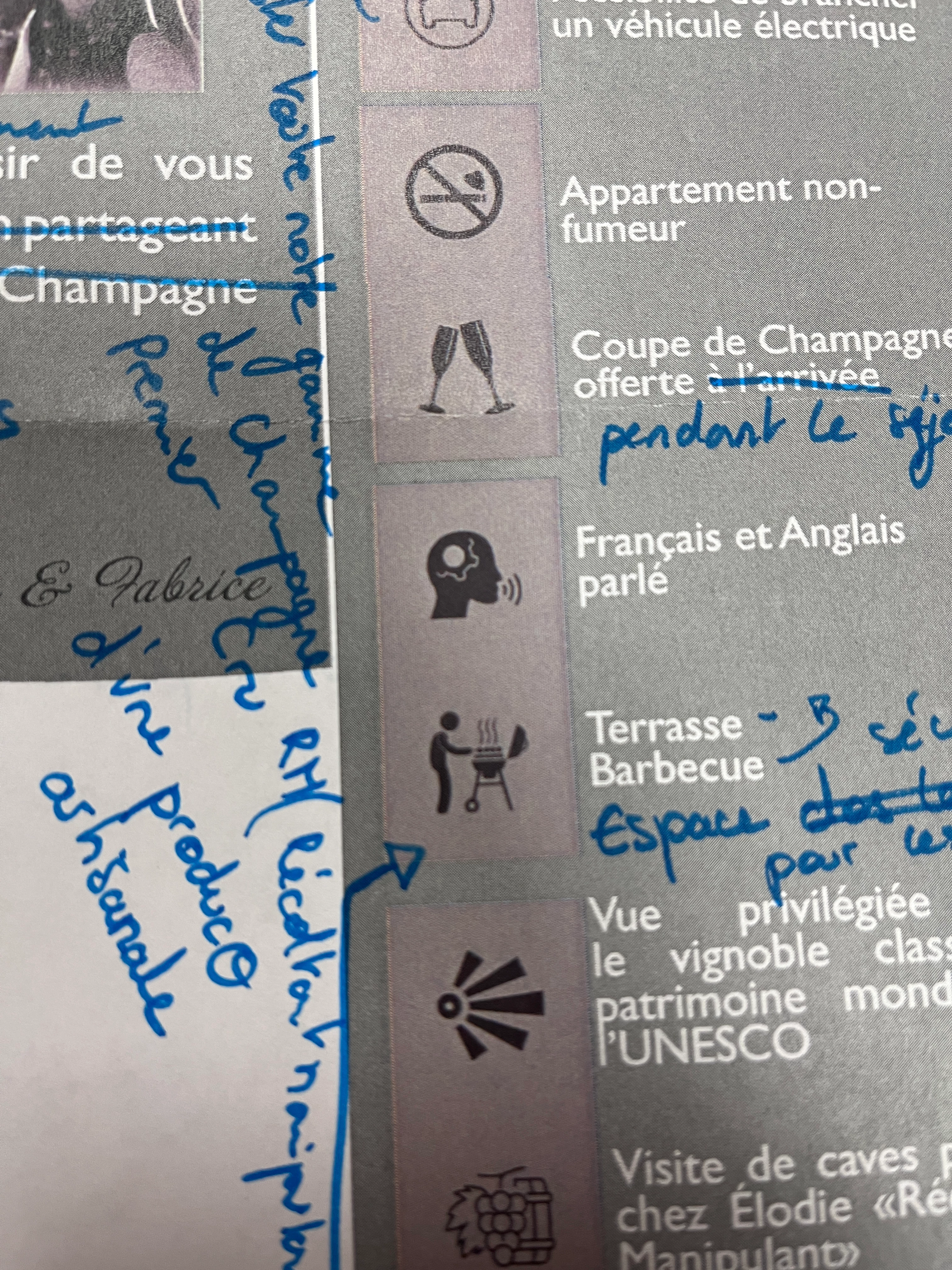
I have a problem when I export my doc in PDF. There are blocks around my pictures (see the photo attached). What it is ? Thanks for your help !

IMG_0907.JPG

TOPICS
Bug , Import and export , Print
336
Translate
Report
Community guidelines
Be kind and respectful, give credit to the original source of content, and search for duplicates before posting. Learn more
community guidelines
Community Expert ,
Feb 11, 2022 Feb 11, 2022

Can you please show us screen captures of the InDesign file and the PDF as well?

Is the image on a colored background, or transparent?

Translate
Report
Community guidelines
Be kind and respectful, give credit to the original source of content, and search for duplicates before posting. Learn more
community guidelines
Community Expert ,
Feb 11, 2022 Feb 11, 2022

And how is this printed? Digital print or press?

Translate
Report
Community guidelines
Be kind and respectful, give credit to the original source of content, and search for duplicates before posting. Learn more
community guidelines
New Here ,
Feb 11, 2022 Feb 11, 2022
It's from digital print
Translate
Report
Community guidelines
Be kind and respectful, give credit to the original source of content, and search for duplicates before posting. Learn more
community guidelines
New Here ,
Feb 11, 2022 Feb 11, 2022
Thanks for your message. I attached two photos. First one is from Indesign, the other one is from PDF. The background is transparent.
Translate
Report
Community guidelines
Be kind and respectful, give credit to the original source of content, and search for duplicates before posting. Learn more
community guidelines
Community Expert ,
Feb 11, 2022 Feb 11, 2022

Your images didn't show up. I suspect you might be responding by email and need to return to the forum to post them.

Again, is the background color part of the image or are they transparent?

Translate
Report
Community guidelines
Be kind and respectful, give credit to the original source of content, and search for duplicates before posting. Learn more
community guidelines
Community Expert ,
Feb 11, 2022 Feb 11, 2022
LATEST

I agree with Peter Spier, check the transparency or if the background has color.

Lee- Graphic Designer, Print Specialist, Photographer
Translate
Report
Community guidelines
Be kind and respectful, give credit to the original source of content, and search for duplicates before posting. Learn more
community guidelines
Community Expert ,
Feb 11, 2022 Feb 11, 2022

Explication ici :

https://creativepro.com/eliminating-ydb-yucky-discolored-box-syndrome/


Et si je peux me permettre, attention aux erreurs typographiques (espace après le guillemet ouvrant et avant le fermant, pas de majuscule à anglais) et aux problèmes de justification (paragraphe « vue privilégiée »).

Translate
Report
Community guidelines
Be kind and respectful, give credit to the original source of content, and search for duplicates before posting. Learn more
community guidelines
Community Expert ,
Feb 11, 2022 Feb 11, 2022

Composite printers usually have RGB drivers and don’t always handle transparency flattening correctly. Try Exporting the PDF to DocumentRGB with profiles, and from Acrobat Print As Image:


Screen Shot 25.pngScreen Shot 26.png

Translate
Report
Community guidelines
Be kind and respectful, give credit to the original source of content, and search for duplicates before posting. Learn more
community guidelines