on5lb
Participating Frequently
March 31, 2012
Answered

Space between paragraphes

  • March 31, 2012
  • 3 replies
  • 50336 views

Hello,

Long time i used InDesign CS4, and wonder if there is a solution on my question ?

I started a digital book where I use Garamond Premier Pro Medium 14pt with an interline of 16.

In certain conditions, i like to double "Enter" between two paragraphs, but the space is to big !

Can i reduce the space between two paragraphs ?

Thanks to let me know, and please, tel me how to proceed .

Regards,

Jean
    This topic has been closed for replies.
    Correct answer Steve Werner

    You don't put your mouse between two paragraphs. You select one of the paragraphs (the one above or the one below), and you use the Space Above or Space Below attribute. It's actually done very similarly in Microsoft Word.

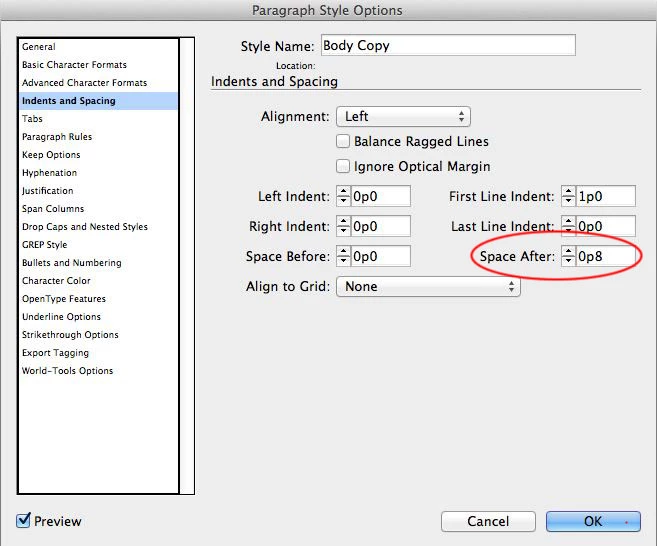
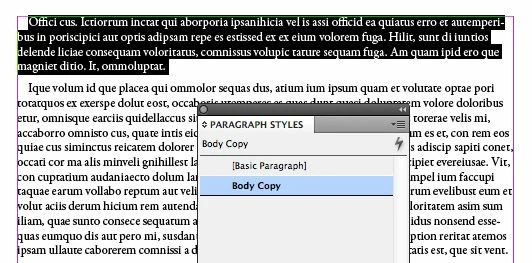
    Here are a couple pictures. Select a paragraph. Create its attributes for font size, leading (what you call "interline"), maybe a first line indent. From the Paragraph Styles panel, choose New Paragraph Style. I called mine Body Copy.

    To add the space between paragraphs, go to the Indents and Spacing panel (on the left). Set the Space Below value as shown below:

    I'm using picas and points (default in the US), but it would be the same if you were specifying millimeters or centimeters.

    3 replies

    Peter Spier
    Community Expert
    Community Expert
    March 31, 2012

    If you don't want to add space to all paragraphs of a particular style, you can do it as a local override setting from either the Paragraph panel or the Control Panel:

    Space before or afer are set in either the Patagraph panel or the Control panel paragraph fields. I've highlighted both in the illustration above.

    Steve Werner
    Community Expert
    Community Expert
    March 31, 2012

    If you're creating an eBook (exporting to EPUB—or Adobe Digital Editions as I think it reads in CS4), you should do most of our formatting with paragraph and character styles.

    When exported to EPUB (or to HTML for that matter), all multiple paragraph returns are reduced to one, and all spaces are reduced to one.

    As "jmlevy" pointed out, you want to use the Space Before and Space After attributes in your paragraph style to adjust the spacing.

    jmlevy
    Community Expert
    Community Expert
    March 31, 2012

    Instead of typing the enter key twice, use “space after” or “space before” that you can find in the paragraph panel or (better) in your paragraph style panel. You will be able to control exactly the space you wish between paragraphs.

    on5lb
    on5lbAuthor
    Participating Frequently
    March 31, 2012

    Thanks jmlevy, for your help.

    Actually, i'm not starting an eBook, but a technical manual (about 70 pages !) which i'll convert into PDF.

    I'm not sure in understand exactly the procedure. (i'm from Belgium !).

    Can you fing the time to show me the way to (step by step ?) using the paragraph style panel (which i did already).

    It should be nice if could put the mouse between two paragraphs and adjusting the space by modifying the interline !

    And thanks to Steve as well for his support.

    Regards,

    Jean

    Steve Werner
    Community Expert
    Steve WernerCommunity ExpertCorrect answer
    Community Expert
    March 31, 2012

    You don't put your mouse between two paragraphs. You select one of the paragraphs (the one above or the one below), and you use the Space Above or Space Below attribute. It's actually done very similarly in Microsoft Word.

    Here are a couple pictures. Select a paragraph. Create its attributes for font size, leading (what you call "interline"), maybe a first line indent. From the Paragraph Styles panel, choose New Paragraph Style. I called mine Body Copy.

    To add the space between paragraphs, go to the Indents and Spacing panel (on the left). Set the Space Below value as shown below:

    I'm using picas and points (default in the US), but it would be the same if you were specifying millimeters or centimeters.