
Inspiring
December 14, 2018
Question

Spacing options locked/greyed out...?

  • December 14, 2018
  • 10 replies
  • 17152 views

I upgraded to InDesign 2019 and have an odd problem I never had before: every now and then the spacing option to align objects is suddenly locked:
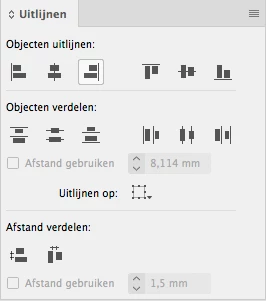
Sometimes the option because editable again but at this moment I am stuck because I can't select and/or change either option (Afstand gebruiken)! I never ever had this in previous versions of InDesign where these options were ALWAYS available. Is this something new in ID 2019...? How can I unlock and use these options again? I need that option badly but can't use it at all right now!

    10 replies

    New Participant
    February 17, 2021

    I'm having the same problem- but in Illustrator 2020 rather than Indesign 2019. I've noticed it with the distribute spacing tool and have just been ignoring it and working around it- but today I realized the issue was occurring with the pattern tool as well, which is causing real problems! I'm just adding a comment to this thread since it seems to be a persistent bug. 

    bob_hopfner_az
    New Participant
    April 9, 2019

    Hi All, I was having this same trouble but if I select all my items and then click on the group again to wear the thick blue line forms - THEN the option to do a measured space (i wanted 0.0 in.) works. I don't know if it is the way it is supposed to work but I don't know what the purpose/significance of the thick blue line is either. I hope this helps you folks.

    Community Expert
    April 16, 2019

    bob_hopfner_az  wrote

    …but I don't know what the purpose/significance of the thick blue line is either…

    Hi Bob,

    I think, you are seeing the Key Object.

    You can define a key object in your range of selected objects.

    Just click into it. Frame edges will show a thicker line.

    Some screenshots to illustrate this below.

    Align to Selection. No key object visible and set.

    Change that to Align to Key Object:

    Just click a different object in your selection to change the key object:

    Example for Distribute Vertically with a distance from object to object of 4 mm using Align to Key Object:

    The key object did not move, all other objects moved according to Distribute Vertically.

    Regards,
    Uwe

    StickySteve
    Known Participant
    March 13, 2019

    Its looking for a master item to measure from ( A bit like Illustrator in some ways) Select items, then Apple click another (this becomes the Master to align too) item and all becomes clear and selectable again. This way you can align from a certain object, not just the top item as an example .

    tophermcclinton
    New Participant
    March 9, 2019

    Okay, I’m not losing my mind. That other folks are dealing with this is oddly reassuring.

    Anyway, when I have multiple items selected, then click one of them while holding down command... sometimes the spacing option becomes selectable.

    New Participant
    March 4, 2019

    I, too, have had this issue, but I think I figured out the root cause...

    In my case, I had several items for which I was creating specific spacing distribution. However, I think the hangup occurs when you apply spacing distribution to items, group them, and then try to apply additional items to the spacing distribution. I found that when I ungrouped all items in my design, the "Use Spacing" checkbox and sizing buttons unlocked.

    Hope this helps.

    Steve Werner
    Community Expert
    March 4, 2019

    There is a new build being tested in Prerelease which may fix the problem:

    Crash on using Align Distribute option – Adobe InDesign Feedback

    New Participant
    April 1, 2020

    Hi all, 

    I have a little goaround that works everytime and unlocks bugged greyed out Distribute spacing. But only if the checkbox is greyed out not the number itself. Maybe to try with both problems. 

    1. Select any 2-3 objects and align them with Distribute spacing with the number thet is currently inputed.

    2. Scroll on the next page and change the number value of the Distribute spacing

    This should unlock the check box for Distribute spacing. So you can turn it on and off. 

    Let me know if this helps! 

    Best regards, mimi.

    Participating Frequently
    January 28, 2019

    I'm having the same issue. I have reset preferences twice which works, but Use Spacing goes back to being greyed out as soon as I've used it once.

    Thanks joevangundy , your solution does work, but I have to choose a key object, unselect it, choose a different key object then unselect that one too. It then makes the Use Spacing available for a short time but it seems each time I go back to use it it's greyed out again - It's a pain in the a**!

    Community Expert
    January 28, 2019

    Can we agree that this issue is with InDesign on Mac OS X and not with the Windows version?

    FWIW: I'm on InDesign CC 2019 14.0.1.209 on Windows 10 and cannot see the issue.

    Tested a lot with all possible Align To: options.

    All is working as expected.

    Just like in my CS6 version on the same machine.

    Regards,
    Uwe

    Participating Frequently
    January 29, 2019

    I'm on InDesign CC 2019 14.0.1 on Windows 7 Professional so not it's not just affecting Mac

    New Participant
    December 31, 2018

    I was able to get the distribute spacing ~use spacing~ to not be grayed out by selecting my objects then selecting a target object.  Hope that help.

    svenb73649804
    New Participant
    January 24, 2019

    This worked for me aswell.
    Selecting a key object from all the objects you have selected, by clicking on it and then clicking it again to deselect it, made the option to use spacing available again.

    This does seem like a bug though!

    BigSchofy
    Participating Frequently
    December 18, 2018

    Actually, come to think of it I think you're right J van E. I've can confirm I've trashed and remade the prefs for two others in the same studio after the update. Just assumed mine had escaped this as it hadn't shown any similar symptoms to the others. Sigh.

    J van EAuthor
    Inspiring
    December 18, 2018

    Well, SCRAP THAT! I just wanted to align some objects and everything is GREYED OUT AGAIN! **** This really sucks. I spend half the morning with Adobe support on Chat and they decided that trashing the prefs was the only option. **** I am really screwed here.

    BigSchofy
    Participating Frequently
    December 18, 2018

    Oops. Darn it, I thought that was a solution. Will try some options out myself when I get time. Thanks for spending your time with Adobe tho. Adobe - sigh.

    BigSchofy
    Participating Frequently
    December 18, 2018

    Same problem here. Upgraded to 14.0.1 few days ago and just noticed the issue. Also hiding/showing options in the Align Palette made the 'Use Spacing' tick box available again. This will be an ok workaround for now but... Adobe, seriously?!

    J van EAuthor
    Inspiring
    December 18, 2018

    Seems the only solution is to trash your prefs and set everything up from scratch again. That seemed to have solved the problem on my Mac, at least for now. Seems something goes wrong with the automatic import of previous prefs.

    J van EAuthor
    Inspiring
    December 15, 2018

    No one...? I use this option A LOT and this problem might make me reinstall CC2018 and forget about CC 2019 for now. Maybe I'd better contact Adobe support directly.

    Community Expert
    December 15, 2018

    Hi,

    I cannot see this issue with my German InDesign CC 2019 14.0.1.209 on Windows 10.

    So I can only suspect, that perhaps trashing preferences or cache files will bring you back the functionality.

    And yes: It's always good to have older versions of InDesign at hand.

    On my PC I have installed all versions from CS6, CC, CC 2014 up to CC 2019.

    On my Mac, that currently has an older OS X installed and cannot run CC 2019, I went so far to install every version of InDesign from CS3 up to CC 2018.1.

    Regards,
    Uwe

    J van EAuthor
    Inspiring
    December 15, 2018

    Ok, no issue on your PC so apparently it isn't a new option I wasn't aware off... I thought that maybe I did something to cause these options to get locked. Very odd. I am running CC 2019 on a Mac with 10.13.6 (afaik the latest Sierra OS).

    I'd hate having to trash my preferences because it takes quite some time to set everything up again: my prefs are heavily edited from default. I will see if trashing the cache helps.

    The odd thing though is that the option may SUDDENLY become available again! It's as if something is triggering the option on and off all the time. At one time simply hiding and showing the options part of the alignement window triggered the spacing option to become available again! Which is why I thought that maybe there is a new option/key to turn the spacing option on or off... It's a mystery to me...

    coldjtf is having the exact same issue, I see, so I am not the only one...