


- Home
- InDesign
- Discussions
- Span columns not working in ID CC 2019
- Span columns not working in ID CC 2019

Copy link to clipboard
Copied
Hello, I installed InDesign CC 2019, but span columns doesn't work. Split columns works perfectly. When I have 2 or 3 columns text andtry to create a headline with span columns (across 2 or all columns) nothing happens. Does anybody can help? Or is there any existing script available which can span columns text? Please help, it is quite frustrating. I used 2 computers and it is not working. Thank you in advance.


 2 Correct answers


The key is using a multi-column frame. I made the text frame a light yellow so that you can see it, then defined a second column. Span doesn't work with two threaded frames sitting side-by-side.
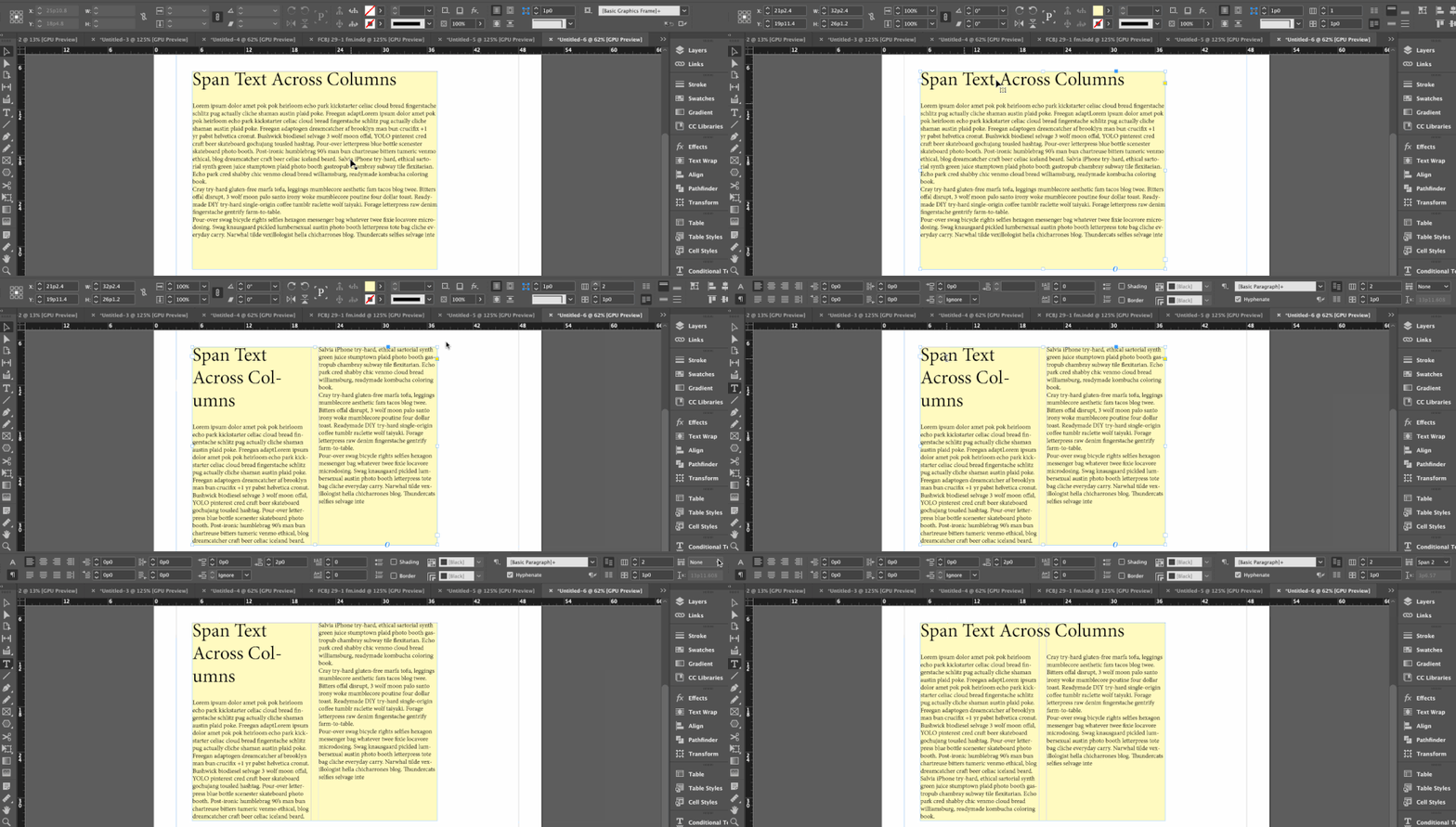
~Barb

Yes, it does. But it looks like "1. Introduction" appears to be in its own frame. It needs it be included in the text flow. For this feature to work you need to have one frame (primary or not), set to two columns. Not two frames sitting side-by-side.

~Barb
 12
Replies
12
12
Replies
12

Copy link to clipboard
Copied
The key is using a multi-column frame. I made the text frame a light yellow so that you can see it, then defined a second column. Span doesn't work with two threaded frames sitting side-by-side.
~Barb
Copy link to clipboard
Copied
Hi Barb, thanks a million! Your advice works perfectly. Unfoftunately I had not found the info that it is not working with two or more threaded frames before you posted your advice. Thank you again, you are my life saver. Tom.

Copy link to clipboard
Copied
Hi Tom,
it is very strange. I've just made so in my 2019 on mac and it works.
Here is my screen.
regards M.
Copy link to clipboard
Copied
You didn't include your image, but I went back to clarify my answer, which may help. Span works the same way in all versions of InDesign, Mac or Windows.
If you want to share an image, use the button outlined in orange, below:

~Barb
Copy link to clipboard
Copied
Hi Barb,
I've seen your impressive film answer :).
I use to choose the icon you point on, but nothing happend at all. I don't know why 😞
regards M.
Copy link to clipboard
Copied
Hi Tom:
I use to choose the icon you point on
Which icon? The one to add the image to your post? The one to change the frame in InDesign to two columns? Or the one tell InDesign that the paragraph needs to span two columns?
~Barb
Copy link to clipboard
Copied
So you do have one frame with the text frame set to two columns? Can you share an image with the frame selected?
~Barb
Copy link to clipboard
Copied
2023 version here, does it work if you use a primary text frame set to 2 columns? That's the only thing I can think of. 😞

Copy link to clipboard
Copied
Yes, it does. But it looks like "1. Introduction" appears to be in its own frame. It needs it be included in the text flow. For this feature to work you need to have one frame (primary or not), set to two columns. Not two frames sitting side-by-side.
~Barb

Copy link to clipboard
Copied
Hi Barb
Thanks for your instructions. I have followed the steps, but for some reason my bodytext does not automatically revert to two columns, even though it is set up as such in the paragraphs styles (I am using one text frame across both columns). I must have a setting somewhere which overrides these specification. Can you perhaps suggest a checklist to find the culprit?
Thanks
Doret
Copy link to clipboard
Copied

Copy link to clipboard
Copied


Get ready! An upgraded Adobe Community experience is coming in January.
Learn more
 AdChoices

