

EYMER Brand Laboratories
Participant
May 2, 2023
Answered

Spellcheck Dictionary defaults to Dutch Reform

  • May 2, 2023
  • 3 replies
  • 1326 views

Each time I go to spellcheck a file, the dictionary defaults to Dutch Reform. I have tried resetting the preferred language (English USA) in preferences, but it immediately returns to Dutch Reform. How can I fix this?
 

This topic has been closed for replies.
Correct answer Steve Werner

@SJRiegel is correct.


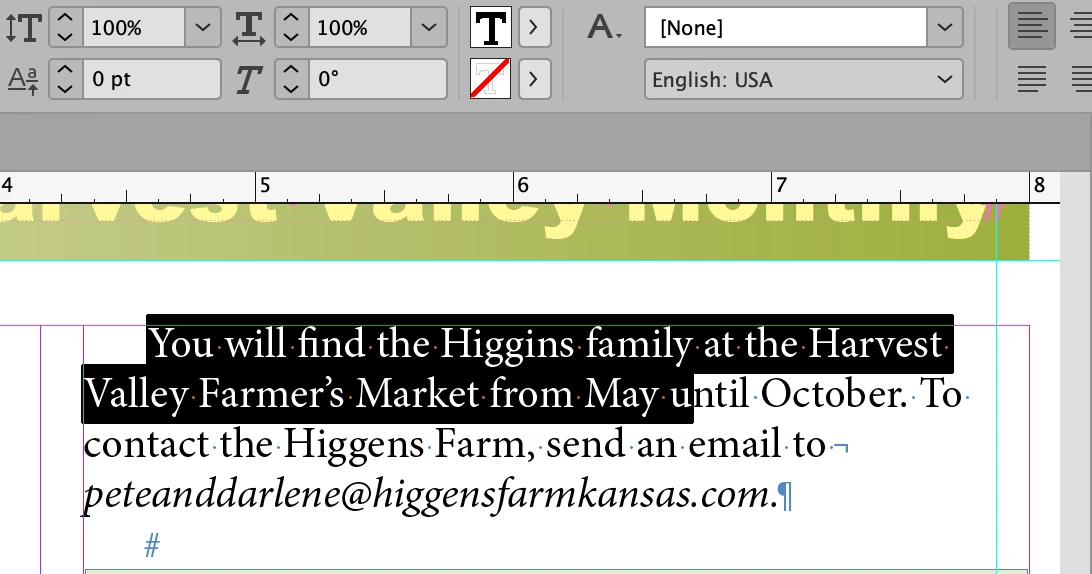
And if you're not using a paragraph or character style, then you choose it in the Control panel (as shown in the illustration belowwhere it is set to English:USA ) or Character panel.


3 replies

Willi Adelberger
Community Expert
Community Expert
May 2, 2023

In preferences you choose the dictionary for all languages. The language is specified in extended character properties, best to be definied in Paragraph Styles and exceptions in Character Style.

All styles are set to default for all new documents when they are set up with no document open. There you can set up the default styles for any new document.

EYMER Brand Laboratories
Participant
May 3, 2023

Willi, thank you!

Steve Werner
Community Expert
Steve WernerCommunity ExpertCorrect answer
Community Expert
May 2, 2023

@SJRiegel is correct.


And if you're not using a paragraph or character style, then you choose it in the Control panel (as shown in the illustration belowwhere it is set to English:USA ) or Character panel.


EYMER Brand Laboratories
Participant
May 3, 2023

Thanks, Steve!

Legend
May 2, 2023

Spell check language is not global -- it is determined by the Language applied to the text itself. 

If you have used styles, check the Language in the paragraph- and character styles. 

EYMER Brand Laboratories
Participant
May 3, 2023

Thank you!