Copy link to clipboard
Copied
Hi everyone,
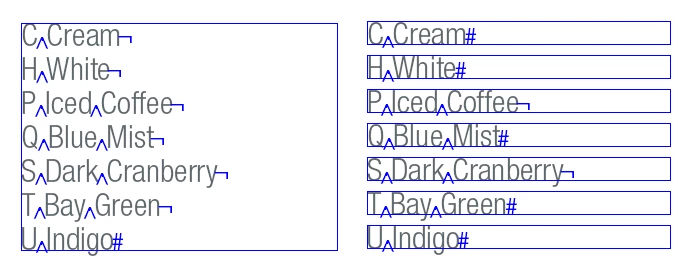
Was wondering if you guys could help me out. I'm trying to automate the process of taking each line in a paragraph (separated by forced line breaks) and giving it its own text frame, so that I can move them around independently. This is best illustrated in the screenshot attached.

Do you think this is possible via a script?
Thank you in advance!
Lewis
Message was edited by: GD_lewis
Okay, that image helped a lot in providing context!
Does this work for you? Select a number of words; these will be split by its regular spaces (I use a slightly different GREP, hope it's of no consequence), then moved into frames of their own alongside your current text frame.
Then it creates a new text frame and inserts tomorrow's lottery numbers ... oh wait, I'm still working on that.
Don't try running this from inside a table or a footnote or really anything at all more complicated than a simpl
...Copy link to clipboard
Copied
Possible? Sure -- but it depends on how closely you want the slivers match the original text layout.
This script is based on my CopyCutter; it splits a text frame into its component lines.
//DESCRIPTION:CopyCutter 2 — Cut your Copy into Slivers
// Jongware, 3-Jun-2010
if (app.selection.length == 1 && app.selection[0] instanceof TextFrame)
{
f = app.selection[0];
for (i=0; i<f.lines.length; i++)
{
newf = f.duplicate();
newf.texts[0].remove();
f.lines.duplicate (LocationOptions.BEFORE,newf.lines[0]);
if (i > 0)
top = f.lines[i-1].baseline;
else
top = f.geometricBounds[0];
bot = f.lines.baseline;
newf.geometricBounds = [ top, f.geometricBounds[1], bot, f.geometricBounds[3] ];
}
f.remove();
}
Copy link to clipboard
Copied
[Jongware], as ever... you've hit the nail on the head.
Thank you!
Copy link to clipboard
Copied
I'm going to stop asking if things are possible or not, as with you most things seem to be!
Are you able to extend the copy cutter script to help me achieve what is being shown here: http://cl.ly/f8bac5b91811b35fec3e ?
The diagram is quite descriptive but one thing it doesn't show is that I'd like it to cut the selected text as opposed to just copying it.
Thanks in advance,
Lewis
Copy link to clipboard
Copied
Okay, that image helped a lot in providing context!
Does this work for you? Select a number of words; these will be split by its regular spaces (I use a slightly different GREP, hope it's of no consequence), then moved into frames of their own alongside your current text frame.
Then it creates a new text frame and inserts tomorrow's lottery numbers ... oh wait, I'm still working on that.
Don't try running this from inside a table or a footnote or really anything at all more complicated than a simple text frame. It'll most likely do something but I'm not sure what.
if (app.selection.length == 1 && app.selection[0].hasOwnProperty("baseline") && app.selection[0].length > 1)
{
app.selection[0].insertionPoints[0].contents = "\r";
app.selection[0].insertionPoints[-1].contents = "\r";
app.findGrepPreferences = null;
app.changeGrepPreferences = null;
app.findGrepPreferences.findWhat = " +";
app.changeGrepPreferences.changeTo = "\\r";
app.selection[0].changeGrep();p = app.selection[0].parentTextFrames[0];
lh = (p.lines[-1].baseline - p.lines[0].baseline) / (p.lines.length-1);
top = app.selection[0].lines[0].baseline - lh;
while (app.selection[0].length > 0)
{
f = app.activeDocument.layoutWindows[0].activePage.textFrames.add ({geometricBounds:[top, p.geometricBounds[3]+2*lh, top+lh, 2*(lh+p.geometricBounds[3])-p.geometricBounds[1] ]});
app.selection[0].lines[0].move (LocationOptions.AFTER, f.texts[0]);
top += lh;
}
app.selection[0].insertionPoints[-1].contents = "";
} else
alert ("please select some text to shred");

Copy link to clipboard
Copied
Thank you so much [Jongware]! You're a legend.

Copy link to clipboard
Copied
What if I wanted to do something similar, but instead of breaking into separate text boxes, I wanted to separately load each line of text onto my cursor?
Copy link to clipboard
Copied
The only other thing I would require from the splitter script is to select multiple text frames with various lines of copy, color names in my workflow, and split all text frames at once into individual text frames. Right now I have to select each one individually, which gets the job done, but yeah, the next level would be doing exactly the same but affecting more text frames at once.
Something tells me it has to do with the instances of [0] in the script, just not entirely clear on how I would manipulate that to get the effect I’m after...beyond that, great script, has already helped me out a lot. Cheers.
Get ready! An upgraded Adobe Community experience is coming in January.
Learn more