
Legend
September 3, 2021
Answered

Splitting a paragraph across columns

  • September 3, 2021
  • 3 replies
  • 497 views

Hi.InDesign 16.4 on Win10 (but I don't think that matters here).

I'm working on a multicolumn layout with spanning heads. Tabs is one of those heads and Guidelines another. Each spans 2 cols. The Guidelines head falls after the bulleted paragraphs in the text stream and everything works -- more or less -- as I would expect.



In order go give myself more room for Guidelines copy, I want to break the big bulleted paragraph in such a way that it evens the two columns out (again, more or less, it doesn't have to be exact) and the Guidelines head would then move up... JUST that little bit.


I have been playing aroound in the Paragraph | Keep dialog, but haven't hit on the right settings. I've tried soft and hard carriage returns in the big bulleted paragraph, and neither of those had the desired effect.


Again, I don't want to MOVE the big bulleted paragraph to the upper right -- that's easy. I want to split it so that the columns are more-or-less even. I can achieve this with anchored frame and text wrap... but that makes the eventual TOC much more difficult.


Suggestoins? Thanks to the community as always.


-j
This topic has been closed for replies.
Correct answer Barb Binder

Hi @Nedlaw:


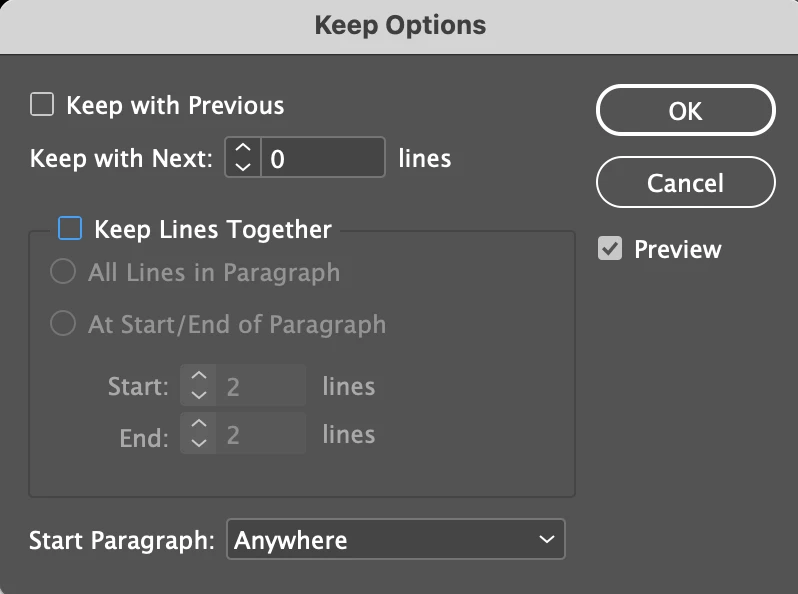
If you have been playing with this for a while, there's no telling which paragraphs are now causing the problem. I would select all of the body text and then disable everything in Keep Options, as shown below.


~Barb

3 replies

Barb Binder
Community Expert
Community Expert
September 3, 2021

Great news, and happy Friday! 😊


~Barb 

~Barb at Rocky Mountain Training
Barb Binder
Community Expert
Barb BinderCommunity ExpertCorrect answer
Community Expert
September 3, 2021

Hi @Nedlaw:


If you have been playing with this for a while, there's no telling which paragraphs are now causing the problem. I would select all of the body text and then disable everything in Keep Options, as shown below.


~Barb

~Barb at Rocky Mountain Training
NedlawAuthor
Legend
September 3, 2021

That did it!!

One of the paragraphs was set to start in next column -- not the big paragraph. Setting that to Anywhere allowed the columns to balance. Ta-DA!

Brad @ Roaring Mouse
Community Expert
Community Expert
September 3, 2021

Change your Keep Options for that paragraph. It appears you have "Keep All Lines Together" applied.