
Known Participant
August 27, 2013
Question

Spot-to-CMYK conversion: Pantone vs. ID

  • August 27, 2013
  • 5 replies
  • 29844 views

I know this is not a new issue, and was discussed here, but more from the point of view of the visual aspect of colors on one's screen.

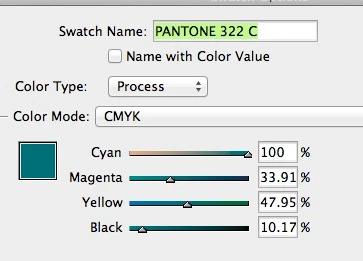
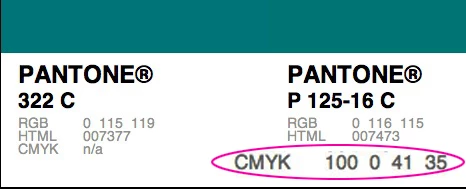
I'm baffled as to the conversion of spot colors for printing purposes (sheet-fed).... My client wants me to use PMS 322c in a CMYK job, and she's been always very picky about colors and the way they print.  The difference in the conversion formulas between ID and using Pantone's website -- is striking.... See how ID has a significant amount of M, yet low K, while Panton suggests ZERO M and lots of K.... So I'm asking, WHO CAN I TRUST???....
This topic has been closed for replies.

5 replies

Dov Isaacs
Legend
August 28, 2013

Some responses to posts made while I was offline (yes, I do stay off the d*mned machine for at least a few hours each day):

With regards to color settings, Edit=>Color Settings is indeed to set the default color spaces for InDesign and thus the color spaces for whatever new documents you create. To change the color settings of the currently open document, you must go to Edit=>Assign Profiles which assigns the designated profiles as the working space profiles for the currently open document or Edit=>Convert to Profile which not only assigns new profiles but does an actual conversion of color space. The latter can be really problematic for conversion from one CMYK profile to another; InDesign does not use device link profiles for such conversions and purity of primary colors (such as pure C, pure M, pure Y, and pure K) can and probably will be lost.

In terms of CMYK press profiles, each of these represent a press printing condition which may or may not directly correlate to whether the printing is sheet-fed, web, digital, or whatever. Especially with digital printers, the device can simulate any number of such printing conditions. That is why it is important to have such a discussion with one's print service provider. As shown by Rob above, depending upon which CMYK printing condition and profile you use, the LAB values for Pantone 322C will differ significantly. (That is also the best argument for leaving the spot color “alternate color space” as LAB; you can change the output profile and the spot color rendition using process colors will automatically adapt at the RIP!)

          - Dov

- Dov Isaacs, former Adobe Principal Scientist (April 30, 1990 - May 30, 2021)
AmikoeAuthor
Known Participant
August 28, 2013

3 questions:

1.  Since I never use web-printers, only sheet-fed (my clients and quantities are both not large enough...), why not just go with "US Sheetfed Coated v2" instead of the SWOP?

2.  Are the rest of my setting in the Edit > Color Setting that I showed above -- OK?

3.  As for the future: Starting any next NEW projects, what should I be doing when working on a (1) spot-color project, vs. (2) pure 4-color project, vs. (3) 4-color based on solid colors (like this current one)? What are the settings I s.b. carefully taking care of before starting each of those kinds of projects?

rob day
Community Expert
Community Expert
August 28, 2013

If you don't have contact with the printer then the profile selection is a guess—there's nothing magic about the default SWOP that makes it the correct profile. I think US Sheetfed is a better guess, but there's also Coated GRACoL, which I've started using when the destination is an unknown US Sheetfed press.

You might consider using AdobeRGB as the RGB space in ID and PS. Color gamuts go both ways—there are CMYK colors that can't be displayed and sRGB will exacerbate that problem.

Using the Pantone solid ink system for selecting colors for a job that will be process CMYK has inherent problems. 322 is on the edge of the gamut so it can't really be matched via CMYK. But even in gamut colors are problematic—the colors you are looking at in the swatch books are not printed with CMYK inks, so the process version will always be a simulation.

If the color will be printed as a spot you always want the Lab definition.

Fede G
Participating Frequently
August 28, 2013

Trust InDesign.

Make your client to sign a calibrated color proof, and your printer to match the proof.

Or better, be there when your work is about to be printed, you can always make manual adjustments to match a specific color.

AmikoeAuthor
Known Participant
August 28, 2013

Fede Gianni wrote:

Trust InDesign.

Make your client to sign a calibrated color proof, and your printer to match the proof.

Or better, be there when your work is about to be printed, you can always make manual adjustments to match a specific color.

Yes, I'm aware of that.  Many of my productions I take the time (and mileage) to be there for a press check... This particular project is between the client and her printer.

Dov Isaacs
Legend
August 27, 2013

Part of the “problem” is that of how you actually represent the Pantone spot colors. Yes, Pantone provide CMYK equivalent values, but in exactly what CMYK color space? According to what I have been told by Pantone, those CMYK values are nominally SWOP.

You didn't indicate what your full workflow looks like, but the most reliable method of dealing with spot colors, whether used as real spot colors (i.e., you actually have those spot color inks at the press) or you are simulating them, is to pass through the spot color information in the PDF file exported from InDesign or at least as LAB colors otherwise. Preferably, you are using a PDF/X-4 workflow.

Bring in the swatch at follows:

The swatch will then look like:

When you export PDF, you have two choices. If you are actually printing spot color or if you don't know whether real spot color inks are available, set the Ink Manager as follows:

In this case, the RIP will use the spot color if available or if not, it will convert Pantone's more precise LAB color values specified as the “alternate color space” to the press' CMYK color space.

If you know that the press definitely won't have the spot colors, set the Ink Manager as follows:

On PDF export, all references to PANTONE 322 C will be output to the PDF with the exact LAB color values which your RIP will convert to CMYK and no references to the spot color at all.

This is the method getting precisely what Pantone defines for the spot colors and how they will look in process color.

Note that many Pantone spot colors cannot precisely be matched in process color simply because such colors are outside the gamut of whatever process CMYK color space your printing workflow supports.

          - Dov

- Dov Isaacs, former Adobe Principal Scientist (April 30, 1990 - May 30, 2021)
AmikoeAuthor
Known Participant
August 27, 2013

Thanks, Dov (and others too...)... I've been producing my design projects for years now, so I definitely know if a project is for spot or process printing.... In this particular case the client is using her own printer, to whom I will supply a hi-res PDF file.

What you're saying I should NOT convert the PMS to CMYK, but let it be done automatically when creating a PDF?  Must I use PDF/X-4 workflow ?  I;ve been using one of my regular printer's own work flow that uses NO compresion and also creates crop-mark...

Also, the piece has also a logo that's using the same 322c spot color, and in a case like this I would alwys convert the colors in AI using the same formula I'd be using in ID....   Should I leave it as is, as a spot color?....

AmikoeAuthor
Known Participant
August 27, 2013

The larger file size of the PDF/X-4 file is possibly due to the fact that PDF/X files have an embedded ICC color profile. Typical ICC profiles for CMYK printing conditions are about one half megabyte in size.

By the way, you absolutely should not attempt to use Adobe Illustrator as a PDF editor. The only PDF files that Adobe Illustrator can safely and accurately edit are PDF files that originate from Illustrator's save as PDF feature.

To check color output values, use the Output Preview function of Acrobat! The Separation Preview feature will tell you the exact CMYK values that would be used. The Object Inspector feature allows you to see exactly what color is specified in the PDF file itself for whatever object the cursor is pointing at!

          - Dov


Yes, large file must mean better quality, better file to use for production....

So I followed your instructions (I use Separation Preview all the time, but was never aware I can check color values, nor was there ever a need for it in the past...).  See below... These values are closer to how ID was interpreting 322c, compared to Pantone...


STILL, AT THE END OF DAY, I MUST KNOW IF THIS IS THE ONE RELIABLE WAY TO TRANSFORM MY ID DOCUMENT FROM USING SPOT COLOR TO CMYK.

rob day
Community Expert
Community Expert
August 27, 2013

PMS 322c in a CMYK job, and she's been always very picky about colors and the way they print.

In CS6 the conversion of Pantone Solid colors to CMYK is always color managed—you'll get different CMYK values depending on the CMYK profile assigned to the document. If you want to use Pantone's recommended CMYK simulation values you have to use PANTONE + Color Bridge Coated (322 CP).

The problem with the recommended values is you can send to same values to different printing conditions—100|0|41|35 will have a different appearance on a US Newsprint press than on a Japan Coated sheetfed press.

Community Expert
August 27, 2013

Well the colour you want is 322C

not P 125-16C

The CMYK for Pantone 322 C clearly states "n/a"

I suggest you do a sample with the colours and ask the printers to provide you with printed samples so you can make an informed decision.

Community Expert
August 27, 2013