Known Participant
January 25, 2024
Answered

Strange bullet behavior

  • January 25, 2024
  • 4 replies
  • 1739 views

Anyone have any ideas why some of the bullets have enormous space before them?
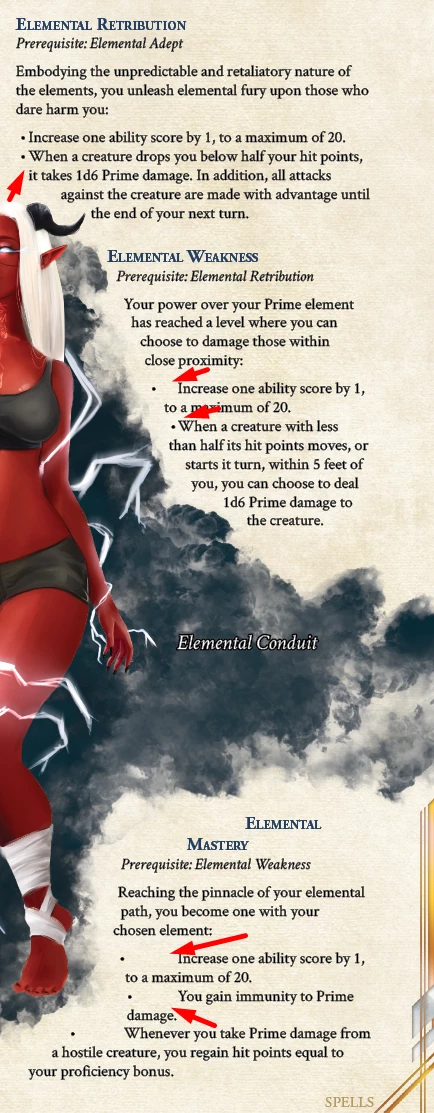
 

This topic has been closed for replies.
Correct answer Peter Spier

The problem here, I think is in the formatting. In the style defintion you have a tab character in the Text After field. Change that to a fixed-width space (or several fixed-width spaces to get the distance you want).

4 replies

Peter Spier
Community Expert
Peter SpierCommunity ExpertCorrect answer
Community Expert
January 26, 2024

The problem here, I think is in the formatting. In the style defintion you have a tab character in the Text After field. Change that to a fixed-width space (or several fixed-width spaces to get the distance you want).

James Gifford—NitroPress
Legend
January 26, 2024

Possibly the best suggestion for a workaround, as long as a perfectly matching indent is either tweaked in or no overall indent is used (as seems to be the case on some of examples.)


For me, a warning light went off when the word "template" appeared in the OP's comments. Templates are often a landmine of either bad or excessively convoluted design, and these oddities often trace to some combination of advanced settings by the original designer — things that are not often evident until every other possibility is exhausted or a keen-eyed pro goes through every menu.

Willi Adelberger
Community Expert
Community Expert
January 26, 2024

The bullets follow the form text wrapping and are pushed to the right and the text starts with the next given tab stop. Text from the second line on is also pushed from the text wrapping. I suggest to avoid hanging intents if text wrap from the left is applied.

Known Participant
January 26, 2024

Is that a selection I need to make somewhere, or you just mean don't have bullets when text wrap is to the left of them? That's not very doable with images scattered throughout the text, without forcing all of the images to be to the right of the text. 

Willi Adelberger
Community Expert
Community Expert
January 26, 2024

In such pages I move or mirror the wrapped image to the other side because in the right side no problems with bullets appear. 
Another way is to talk with the author to change bullets to something else. Here is an adjustment between content and layout needed. 

Barb Binder
Community Expert
Community Expert
January 26, 2024

What happens if you remove the frame with the text wrap—you can just undo afterwards to put it back—do they straighten out?


~Barb


~Barb at Rocky Mountain Training
Known Participant
January 26, 2024

It looks normal if I move the object causing the the text wrap.


James Gifford—NitroPress
Legend
January 25, 2024

It's pretty clear that the bullet style isn't set up correctly. I'm not even sure that's a style, but perhaps hand-typed content (bullet symbol, tab, text instead of a bullet definition on the style).


A proper text bullet has Bullets enabled under the Paragraph style, with Bullets selected over Numbering), and (in general) a left indent of say, 1/2 inch and then an "outdent"  — negative first line indent —of 1/4 to 1/2 inch, all adjusted for esthetics.


You might post the Paragraph Style / Bullets panel to provide more troubleshooting details if the above doesn't make sense to you.

Known Participant
January 25, 2024

Good call, here's the bullet paragraph style with the bullets and numbering tab open. Let me know if anything else would be helpful!


James Gifford—NitroPress
Legend
January 25, 2024

Okay, it's not "hand crafted bullets" — we do see those here, from time to time.


It looks as if you have the text following the shape. That's almost certainly at the core of the problem, but I am not sure why it's interfering with the bullets.
