
jenniferp56247351
Known Participant
December 23, 2024
Answered

Strange issue when dragging text box onto page from pasteboard

  • December 23, 2024
  • 3 replies
  • 1041 views

I have an existing INDD file that I want to add some wording to on certain pages.

I have the text I want to add in a text box on the pasteboard but when I drag the text box over onto my page the text shifts or spaces out in the text box.

I do not have “Text wrap” applied to anything on the page or any “space before or after”.

What could be causing this?  I’ve used this file a few times and haven’t had a problem.
This topic has been closed for replies.
Correct answer Peter Spier

How do I remove it?  I've never see this window before in the screen shot you sent.

I've learned INDD from the school of "Throw them to the wolves and figure it out."


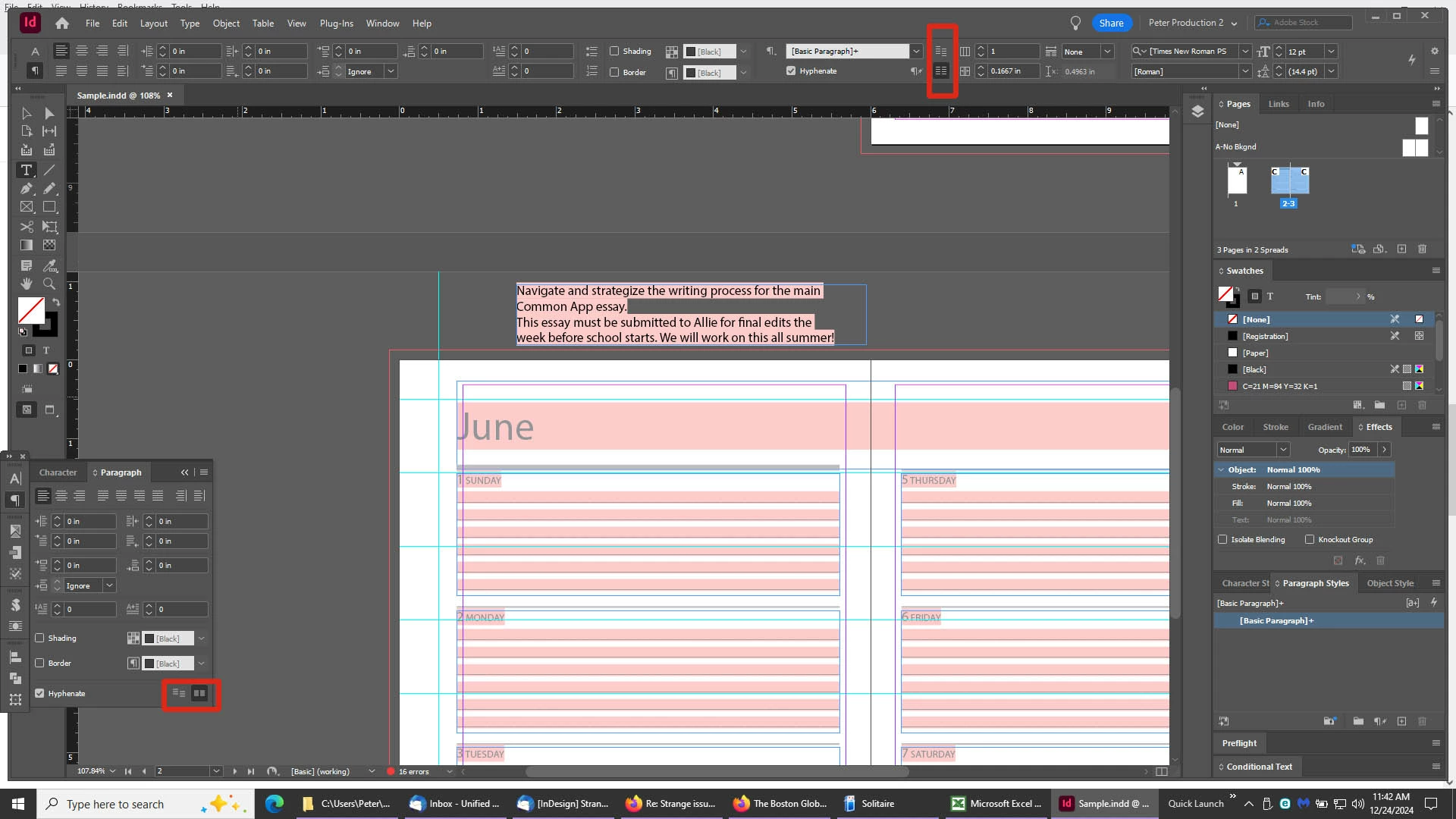
That screen shot is from @Robert at ID-Tasker 's tool rather than InDesign. You'll find a pair of buttons to control grid alignment in the Control Panel when in Paragraph mode, or at the bottom right corner of the Paragraph Panel.

3 replies

Robert at ID-Tasker
Legend
December 24, 2024

@jenniferp56247351


Screenshots always help to clarify question.


jenniferp56247351
Known Participant
December 24, 2024

Robert at ID-Tasker
Legend
December 24, 2024

Looks like Align to Baseline Grid. 


Mike Witherell
Community Expert
Community Expert
December 24, 2024

If this is adjusting vertically, it might be related to snap to Baseline Grid. There are three things to look for with Baselines:

1. The setting for the leading distance in document Preferences > Grids > Baseline Grids

2. The paragraph style might call for Baseline alignment under Indents and Spacing section of paragraph style options

3. Align to Baseline also has a view setting under View > Grids & Guides > Show Baseline Grid

4. I suppose Align to Baseline Grid could also have been applied manually to the one textframe, too.

Mike Witherell
Peter Spier
Community Expert
Community Expert
December 23, 2024

Can you share the page from this file that is causing the problem? Without that it is virtually impossible to find the answer.

jenniferp56247351
Known Participant
December 24, 2024
Peter Spier
Community Expert
Peter SpierCommunity ExpertCorrect answer
Community Expert
December 24, 2024

How do I remove it?  I've never see this window before in the screen shot you sent.

I've learned INDD from the school of "Throw them to the wolves and figure it out."


That screen shot is from @Robert at ID-Tasker 's tool rather than InDesign. You'll find a pair of buttons to control grid alignment in the Control Panel when in Paragraph mode, or at the bottom right corner of the Paragraph Panel.