
Inspiring
July 10, 2018
Answered

Stray header

  • July 10, 2018
  • 1 reply
  • 421 views

Weird problem, I just exported the book I'm working on to EPUB, and at the end of the last page, is a header that I deleted way before finishing the book. It doesn't seem to actually exist in any of my master pages, and isn't showing up where a header would show up in an actual book. So, I can't find it in the .indd to make sure it's deleted. Is there some way I can search for the text in it to find it?

Also, I really need to change my email connected to this account, but can't find where to do that...
    This topic has been closed for replies.
    Correct answer Barb Binder

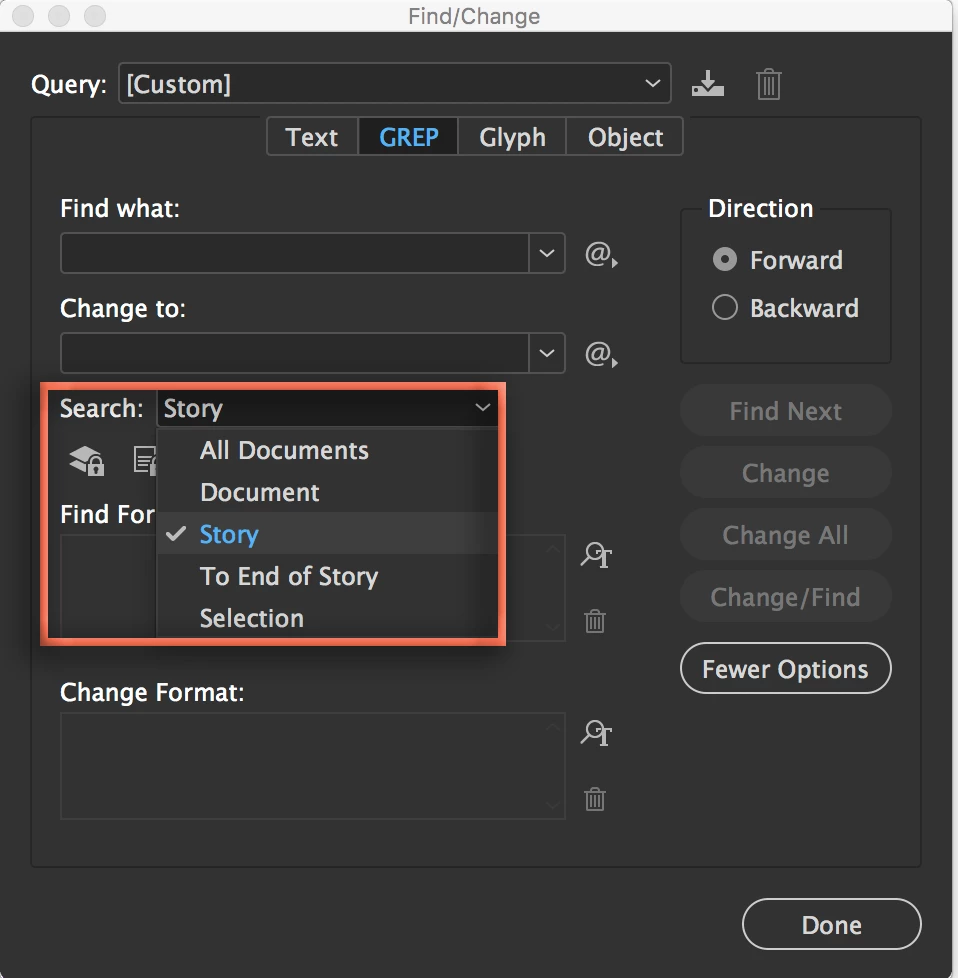
    Find/Change is one of the most powerful clean-up tools available in InDesign. You have access to myriad controls over how and what you search, including searching All (open) Documents, the current Document (all stories), the current Story, from there To End of the Story, and the active Selection. The more you can learn about how to harness all the of the Find/Change controls, the better.

    ~Barb

    1 reply

    Barb Binder
    Community Expert
    Community Expert
    July 10, 2018

    Hi left bank books:

    You sign into the forums with your Adobe ID. To change the email address associated with it:

    Changing Adobe ID email

    Is the header overset? Do you have a red light as your preflight status at the bottom of the document window? Is it sitting on the pasteboard, out of site? Did you try Edit > Find/Change and looking for the first few characters of the text string?

    ~Barb

    ~Barb at Rocky Mountain Training
    Inspiring
    July 10, 2018

    Wow, I found it, but it was sitting in a completely different place. I don't know how I never noticed that I could CTRL+F the whole document instead of just body text? Thanks!

    Barb Binder
    Community Expert
    Barb BinderCommunity ExpertCorrect answer
    Community Expert
    July 10, 2018

    Find/Change is one of the most powerful clean-up tools available in InDesign. You have access to myriad controls over how and what you search, including searching All (open) Documents, the current Document (all stories), the current Story, from there To End of the Story, and the active Selection. The more you can learn about how to harness all the of the Find/Change controls, the better.

    ~Barb

    ~Barb at Rocky Mountain Training