Answered
Stroke thickness scripting advice
I get a lot of files with tables in them, that are constructed with strokes that are less than 0.25mm thick, is there a way, to select all these thin lines, and then bump them up to 0.25mm?

I get a lot of files with tables in them, that are constructed with strokes that are less than 0.25mm thick, is there a way, to select all these thin lines, and then bump them up to 0.25mm?
Hi together,
I'd still prefer a fix on the PDF output.
Reasons:
1. An ExtendScript cannot inspect and change the contents of placed vector graphics.
2. It's next to impossible to catch cases where strokes are showing only partly because they are pasted inside other objects and therefore are clipped.
3. How about strokes on text like Underline, Rule Above, Rule Below etc.pp.?
All this can be treated by PDF preflight.
With Acrobat Pro, with PitStop or pdfToolbox etc.pp.
Below just a special case not mentioned above where one item is scaled and another one is not. Effective stroke weight vs nominal stroke weight. Both objects appear to have the same nominal stroke weight of 20 Pt. Effectively both stroke weights are very different.
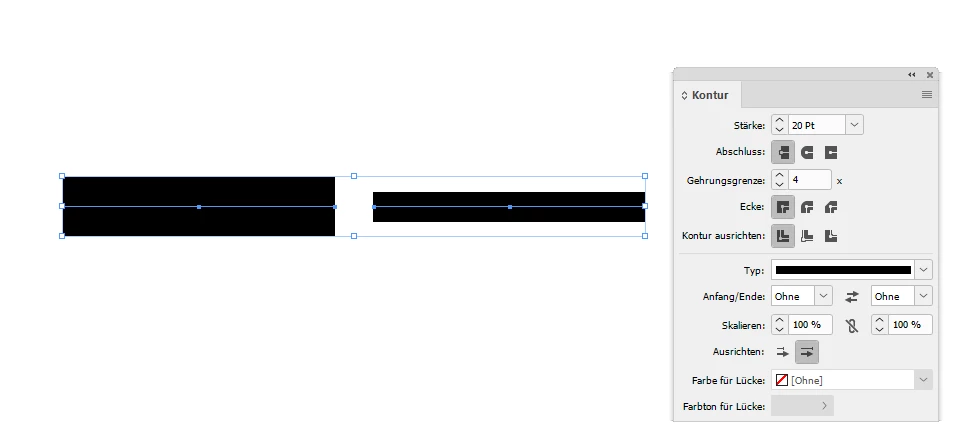
Why? Because one of the objects was scaled:
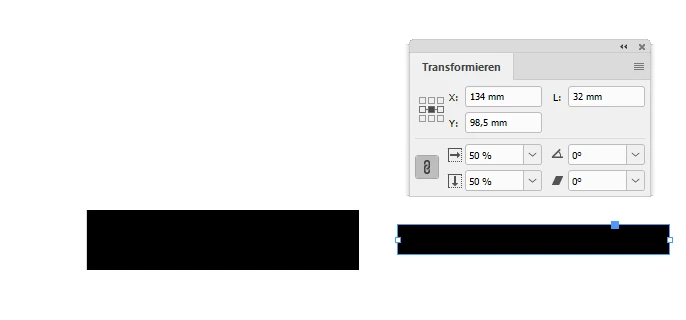
How should we handle issues like that by scripting?
Solution: We could "Redefine Scaling as 100%" first and then hunt for nominal stroke weights.
// Added one line to Rob's code to redefine scaling:

var minstroke = .8;
var newstroke = 1;
var api = app.activeDocument.allPageItems;

for(var i=0; i < api.length; i++){

	try
	{
	// First redefine scaling as 100%:
	api[i].redefineScaling();

	// Then go for the stroke weights:
	if(api[i].strokeWeight>0 && api[i].strokeWeight<minstroke)
	{
		api[i].strokeWeight=newstroke;
	}

	}catch(e){};

};

// Now do tables as well using Manan's code:
// …
Regards,
Uwe Laubender
( ACP )
Already have an account? Login
Enter your E-mail address. We'll send you an e-mail with instructions to reset your password.
 AdChoices