Exit
  • Global community
    • Language:
      • Deutsch
      • English
      • Español
      • Français
      • Português
  • 日本語コミュニティ
  • 한국 커뮤니티
0

sub-bullets

Explorer ,
Mar 20, 2018 Mar 20, 2018

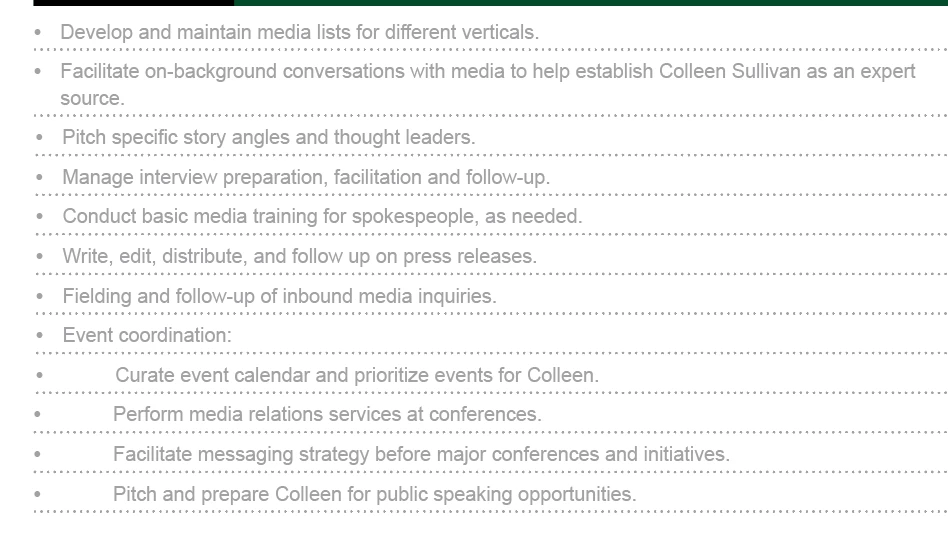
how can i alter the bulleting style to make the last four bullet points in this list appear indented as sub bullets under "event coordination"? i've tried creating a new paragraph style but it doesn't seem to be working

Screen Shot 2018-03-20 at 2.59.37 PM.png

24.0K
Translate
Report
Community guidelines
Be kind and respectful, give credit to the original source of content, and search for duplicates before posting. Learn more
community guidelines

correct answers 1 Correct answer

Community Expert , Mar 20, 2018 Mar 20, 2018

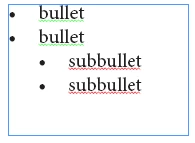
Here's an example:

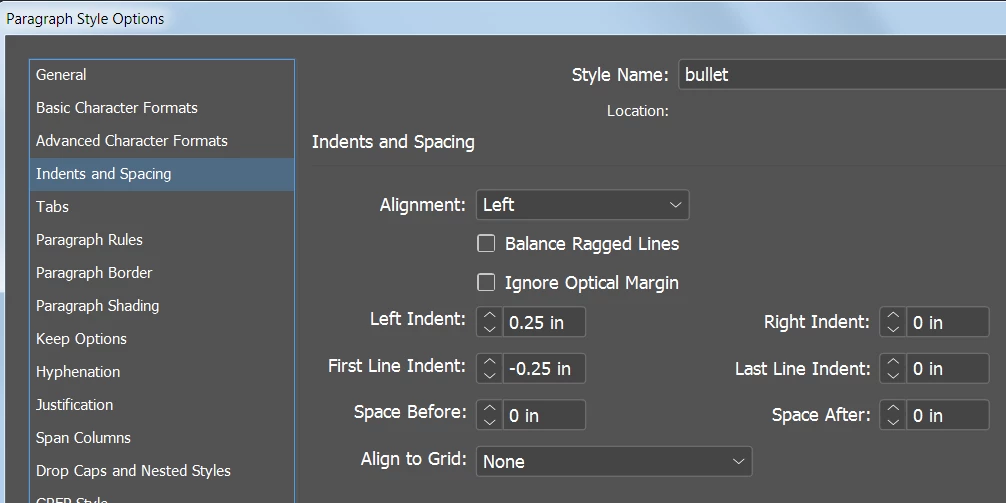
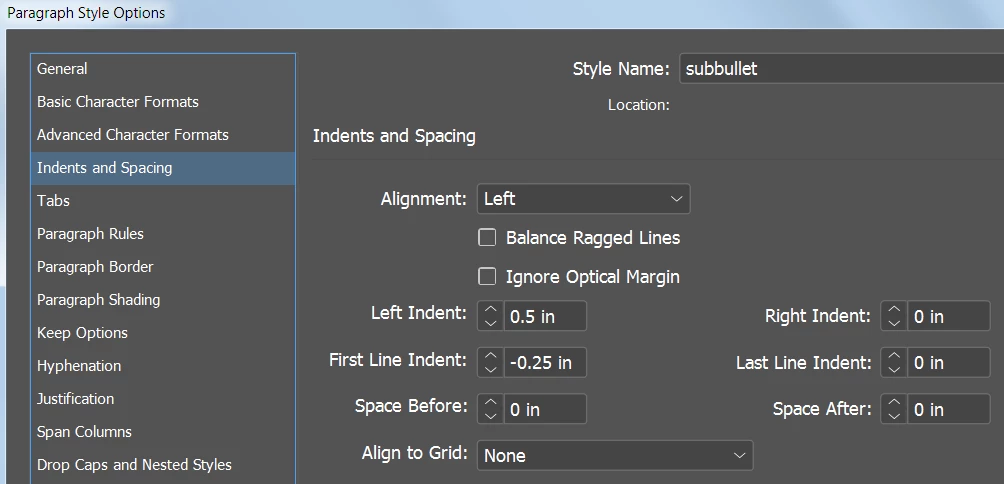
Note that the subbullet settings are Left Indent twice the amount of the bullet setting, and First Line Indent are the same for both styles.

Bullet settings:
Subbullet settings:
Translate
Adobe Employee ,
Mar 20, 2018 Mar 20, 2018

Hi,

To achieve something like in your screenshot above, adjust the values of Tab Position in the "Bullets and numbering" section of paragraph style applied on the bullet text.

You can also adjust the "Left Indent" value to have a different kind of indented bullets like this...

-Aman

Translate
Report
Community guidelines
Be kind and respectful, give credit to the original source of content, and search for duplicates before posting. Learn more
community guidelines
LEGEND ,
Mar 20, 2018 Mar 20, 2018

A new paragraph style should work. You need to change your indents. You can do this in the tab panel or the Indents and spacing panel

Screenshot 2018-03-20 15.20.26.png Screenshot 2018-03-20 15.21.42.png

Translate
Report
Community guidelines
Be kind and respectful, give credit to the original source of content, and search for duplicates before posting. Learn more
community guidelines
Community Expert ,
Mar 20, 2018 Mar 20, 2018

Here's an example:

Note that the subbullet settings are Left Indent twice the amount of the bullet setting, and First Line Indent are the same for both styles.

Bullet settings:

Subbullet settings:

Translate
Report
Community guidelines
Be kind and respectful, give credit to the original source of content, and search for duplicates before posting. Learn more
community guidelines
Explorer ,
Mar 20, 2018 Mar 20, 2018

all of that worked, but now i'm wondering how to align the second line in a sub-bullet with the first - i.e., how can i indent "each platform" to align with "identify social media..."?

Screen Shot 2018-03-20 at 3.43.13 PM.png

Translate
Report
Community guidelines
Be kind and respectful, give credit to the original source of content, and search for duplicates before posting. Learn more
community guidelines
Community Expert ,
Mar 20, 2018 Mar 20, 2018
LATEST

Select the list.

Alt/Opt click the Bullets button on the Control Panel

Screenshot 2018-03-20 14.53.43.png

Set left, first and tab position as follows (leave blank or set to left indent value):

Screenshot 2018-03-20 14.52.04.png

~Barb

Translate
Report
Community guidelines
Be kind and respectful, give credit to the original source of content, and search for duplicates before posting. Learn more
community guidelines