
Good Venture
Known Participant
December 11, 2023
Answered

sum of ink exceeding maximum value of standard ISO 320%

  • December 11, 2023
  • 4 replies
  • 4336 views

Hi,


I'm getting this query from the printer: 

"sum of ink exceeding maximum value of standard ISO 320% (350% in special conditions). Printing with supplied artwork may cause an problem with stability of colours on the printout or/and can cause sheets to stick together in stock. In current case sum of ink equals 355 %."
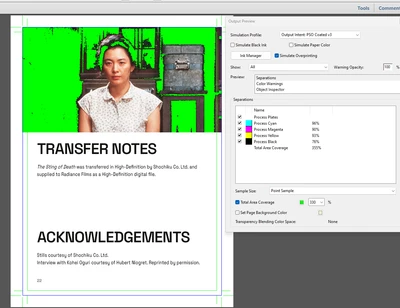


Does anyone know how export the image from photoshop, or what settings of InDesign I can change to avoid this? 


Thanks!

This topic has been closed for replies.
Correct answer rob day

Convert to LAB Color mode.

Convet back to CMYK.


That works in Photoshop for an individual CMYK image if the chosen Destination CMYK profile on the 2nd conversion limits the ink to the the desired total ink limit. You can’t do it in InDesign because the page can have a mix of color modes with different profile assignments—InDesign doesn’t have a single document color mode.

4 replies

Participant
July 10, 2024

My cheat to this...

Get the eyedroper tool and place it over your heavy ink area.

In the "Info" pop up window, select "Total Ink Coverage".

Convert to LAB Color mode.

Convet back to CMYK.

This resets the dark areas to default, print ready, CMYK.

Check Info... there's a side by side comparison of then/now of the image.

rob day
Community Expert
rob dayCommunity ExpertCorrect answer
Community Expert
July 10, 2024

Convert to LAB Color mode.

Convet back to CMYK.


That works in Photoshop for an individual CMYK image if the chosen Destination CMYK profile on the 2nd conversion limits the ink to the the desired total ink limit. You can’t do it in InDesign because the page can have a mix of color modes with different profile assignments—InDesign doesn’t have a single document color mode.

Good Venture
Known Participant
March 19, 2024

Thank you for your answer, was very useful, and the link! 


I've also found this tutorial helpful: https://www.youtube.com/watch?v=HcBrmAQqc9c&ab_channel=GrPrint

Community Expert
December 13, 2023

Hi @Good Venture ,

also check if an effect is applied to the image or its container frame that adds extra color to the image's pixels.

Remove the effect then…


FWIW:

Usually a printing company's prepress department could tackle the issue by converting your PDF with a special color server using Device Link technology so that the TAC does not exceed a certain amount of color without changing the appearance of the image in an unacceptable way…


Regards,
Uwe Laubender
( Adobe Community Expert )

Willi Adelberger
Community Expert
Community Expert
December 11, 2023

Did you place a CMYK image into InDesign. If a CMYK image is edited after conversion to CMYK it can happen that the maximum value is exceeded.

In InDesign are normally RGB images imported and converted to CMYK with the final PDF export or later with the APPE (Adobe PDF Print Engine). In Photoshop you need to turn on the CMYK Print Preview when you work with RGB images for print.

Good Venture
Known Participant
December 11, 2023

The image was originally palced as RGB, and file exported as PDF/X-4:2010  standard, with colour conversion to CMYK Convert to destination (Preserve Numbers). 


Not sure how the ink coverage came out 355%. I am asking myself, is there anything one could do directly on the image in Photoshop to avoid this, or is there a way to tell InDesign to limit the ink coverage of specific assets? 

Good Venture
Known Participant
March 21, 2024

I've actually changed the total ink limit in Photoshop by creating a new profile based on the colour profile


How did you do that? Photoshop’s Color Settings’ Custom CMYK lets you create legacy curved based profiles, but those profiles would not have any relation to modern profile like FOGRA51, which is capured from a press sheet off of a press running to the FOGRA standard. You can create a profile like that and set an Ink Limit, but you would lose all of the other FOGRA 51 profile properties.


FOGRA51’s TAC is already 300%, so if you are using it as the Destination profile for an RGB-to-CMYK conversion, you should not be getting 355% Total Ink.


https://www.color.org/registry/index.xalter


Hi Rob, 


I did that by going to: Edit -> Color Settings... -> in the "Working Spaces" area, under the "CMYK" dropdown menu, I selected "Custom..." -> lowered the Total Ink Limit to under 300% (280% I think if remember well). [I probably did something wrong!]


I understand what you say, and I agree it is strange that the Total Ink reported from printer is 355%, when FOGRA51's TAC is set to 300%. And yes, the website you linked is where I downloaded the colour profile from. 


At this point, I suspect the aggregator is using a different printer for that specific product, which may be the reason the colour profile is not respected.