Participant
July 18, 2025
Answered

Swatches Shortcut Error - unable to use lowercase "x" in Indesign

  • July 18, 2025
  • 1 reply
  • 207 views

Hi all,

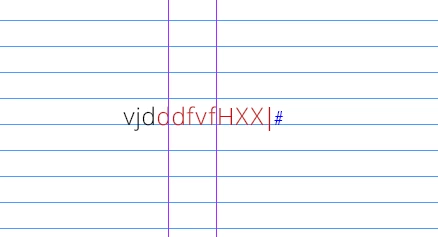
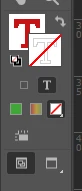
I have recently came across an annoying error. I have somehow switched on a setting which alters the "Shift + X" setting in my Indesign. When typying and pressing "x" nothing appears but my text fill automatically switches to red. the rest of the letters continue as normal. When pressing "Shift + X" I am able to type in capital "X" letter.

It is almost as if the shortcuts themselves have been swopped? Not sure how I have accidentally switched this on. 

Thank you in advance.


Correct answer VeronikaSiel

It's possible that you're affected by this InDesign bug:

https://indesign.uservoice.com/forums/601180-adobe-indesign-bugs/suggestions/50005143-typing-letter-in-paragraph-character-style-shortcu


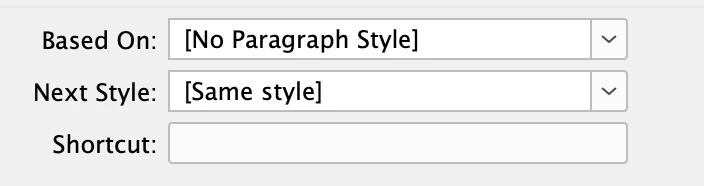
You might have inadvertently typed "x" into the Shortcut field of a style (Paragraph, Character, or Object). Due to the bug, the letter will be invisible but yet assigned as the shortcut for the style. Thus every time you press "x", the style is being applied. You'll need to delete this invisible letter (see the bug description above for solutions).


It's a longstanding bug that keeps catching quite a few unsuspecting users by surprise (although I'm not exactly sure if that's indeed the cause for your particular issue).


Hi Leo,
Thank you for this! I have tried the proposed solution and it stopped the "colour change to red" when pressing "x" but still did not give me usable lower case letter. 

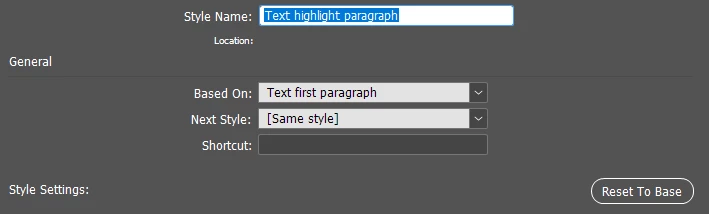
I have however managed to resolve the issue by going into both Paragraph Style Options as well as Character Style Options and resetting all used pharagraph and styles to base (Screenshot below).

That was able to resolve the issue for me and finally have usable letter.

Thank you for the help!



1 reply

Abhishek Rao
Community Manager
Community Manager
July 18, 2025

Hi @VeronikaSiel,


Thanks for reaching out, and I can totally see how that behavior would be frustrating when you're just trying to type normally. To help us check this further, could you please confirm which version of InDesign you're currently using, along with the details of your Windows operating system?

In the meantime, I'd suggest trying to reset your InDesign preferences to see if that clears up the issue. Sometimes a shortcut conflict or a minor corruption in settings can cause unexpected behavior like this. Here's how you can do it: Reset Preferences. Just make sure to back up your current preferences before doing so, in case you want to restore them later.

Let me know if this helps resolve the issue or if it still persists after the reset.


Looking forward to your update!

Abhishek 

Participant
July 21, 2025

Hi Abhishek,

Thank you for reaching out. I have just updated to Indesign v20.4.1 and I am working in Window 11 Version 24H2 for x64.

I have reset the InDesign preferences and restored all the settings back to the baseline and it has not fixed the issue. One of my cooworkers had the same issue few months back and after hours of digging we found online solution but we do not remember the exact setting nor shortcut, only that it is related to the swatches and switching from Indesign Type mode to "shortcut mode" hence the keyboard recognising "x" as a shortcut rather than typing in the letter.

Any help is extremly appriciated as we are working towards tight deadlines and now two users have this issue.

Somehow either both of us have "accidentally" switched this setting on or are experiencing the same bug.

Thank you!

VeronikaSielAuthorCorrect answer
Participant
July 25, 2025

It's possible that you're affected by this InDesign bug:

https://indesign.uservoice.com/forums/601180-adobe-indesign-bugs/suggestions/50005143-typing-letter-in-paragraph-character-style-shortcu


You might have inadvertently typed "x" into the Shortcut field of a style (Paragraph, Character, or Object). Due to the bug, the letter will be invisible but yet assigned as the shortcut for the style. Thus every time you press "x", the style is being applied. You'll need to delete this invisible letter (see the bug description above for solutions).


It's a longstanding bug that keeps catching quite a few unsuspecting users by surprise (although I'm not exactly sure if that's indeed the cause for your particular issue).


Hi Leo,
Thank you for this! I have tried the proposed solution and it stopped the "colour change to red" when pressing "x" but still did not give me usable lower case letter. 

I have however managed to resolve the issue by going into both Paragraph Style Options as well as Character Style Options and resetting all used pharagraph and styles to base (Screenshot below).


That was able to resolve the issue for me and finally have usable letter.

Thank you for the help!