
Participant
August 20, 2020
Answered

Tab ruler is reading right to left

  • August 20, 2020
  • 5 replies
  • 2372 views

I’m working on a client supplied document to do edits. The tab ruler is reading from right to left. I think the document was created from a “save as” file in their UAE office using an Arabic language doument. The document is currently in English and will not be converted to any other languages. 


I’ve tried the following: 

• Trashed InDesign preferences first. This didn't do the trick.

• Created a new document, and my tabs ruler is reading from left to right as we do in English. So, I don't think it is a corrupt pref file.

• Checked the single line composer settings to be sure that it isn't world composer.


Any suggestions? 


Thank you in advance.
This topic has been closed for replies.
Correct answer Zaid Al Hilali

You may download another InDesign version with Arabic support to handle this particular document well. But you will still need to adjust things around.

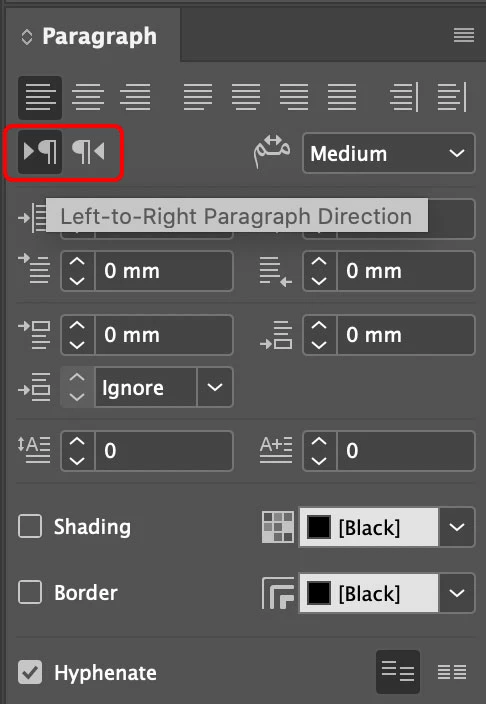
For instance, if you open the document in question in InDesign with Arabic support, you may highlight the text, Change Paragraph Direction found in Paragraph Panel to get your tabs starts from left-to-right or vise versa.

5 replies

Zaid Al Hilali
Community Expert
Zaid Al HilaliCommunity ExpertCorrect answer
Community Expert
August 24, 2020

You may download another InDesign version with Arabic support to handle this particular document well. But you will still need to adjust things around.

For instance, if you open the document in question in InDesign with Arabic support, you may highlight the text, Change Paragraph Direction found in Paragraph Panel to get your tabs starts from left-to-right or vise versa.

Participant
March 25, 2021

I have this same issue. My paragraph Panel doesn't have buttons you've selected. Is this in the Arabic version and do I have to now use the Arabic version or can I just open the file in the arabic InDesign and resave and open in my normal UK version of InDesign?


David Popham
Participating Frequently
August 22, 2020

Just for clarification, are you referring to the ruler for the document page or the ruler in the Tabs panel?

Diane Burns
Inspiring
August 21, 2020

I have some simple scripts that reverse direction. They are usually used to introduce ME RTL direction, but can perhaps be used to solve your problem. Let me know if you can grab them from this Dropbox link. You may want to just grab the .zip file. https://www.dropbox.com/sh/dzvkg4iv1vsg6tq/AAC_FlxT4qr55lwNrA0QKd5da?dl=0

Basically, you need access to the Paragraph/character, etc direction controls which are not available in the English/Euro version of ID. Hope this helps. 

Participating Frequently
June 6, 2024

Diane, you're a Genius and life saver! I was about to throw my laptop out of the window, your script "r2l_characterdirection_flip.jsx" did the trick; THANK YOU!!!

John Mensinger
Community Expert
Community Expert
August 21, 2020

There are probably several things to try, but one of the first things I'd check is Character Styles. They carry a language setting, so if there are just a few, you can open each and look (in the Advanced Character Formats section) for R-to-L languages. If there are many, I'd consider, (in a copy of the file), eliminating all the pre-existing Character Styles, replacing them all with [None]. Save As... > Close > Re-open, and check the rulers.

Geоrge
Legend
August 21, 2020

Did you try to save document as .idml, open this .idml, save as .indd, open this new .indd?

Remember, never say you can't do something in InDesign, it's always just a question of finding the right workaround to get the job done. © David Blatner