
Known Participant
July 23, 2022
Answered

Table error - invalid parameter

  • July 23, 2022
  • 1 reply
  • 1196 views

Hi Friends,


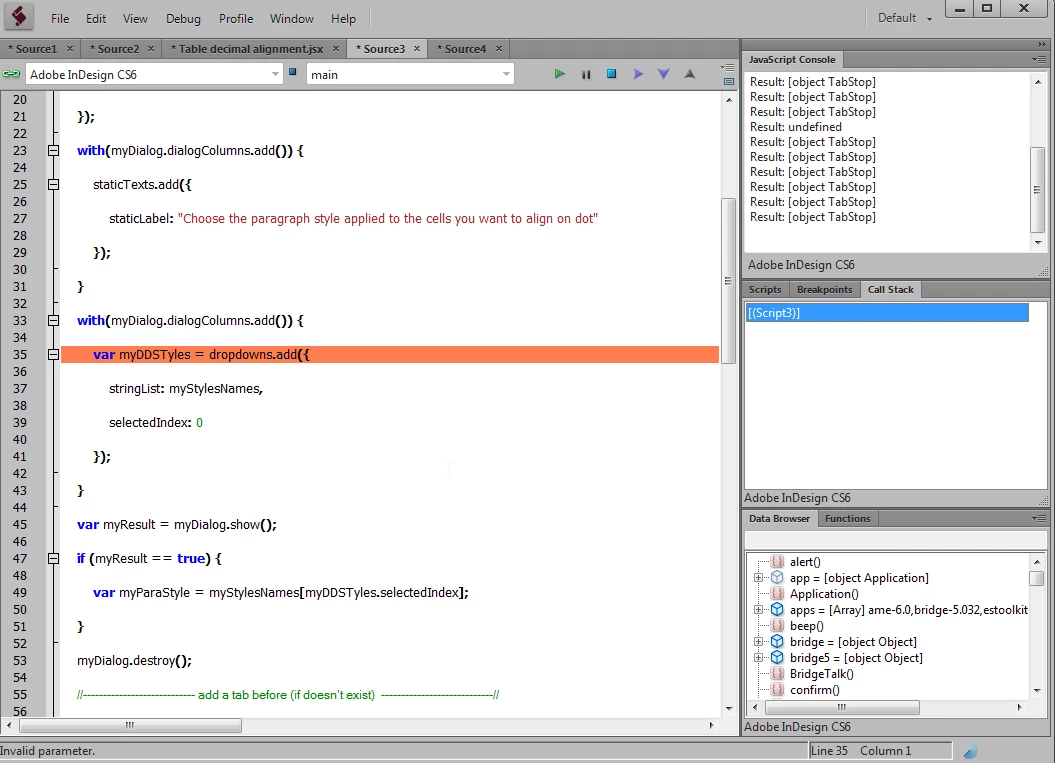
The below scripts provided by "vinny38", when i run the script its showing "invalid parameter" error, please see the screen shot below, i am beginner of this platform, anybody can guide to me:


-----------------------------------------------------

if (app.documents.length > 0) {

    var myDocument = app.documents[0];


    //----------------------------Open Dialog box----------------------------//

    var myStylesNames = [];

    for (i = 0; i < myDocument.allParagraphStyles.length; i++) {

        myStylesNames.push(myDocument.allParagraphStyles.name);

    }


    var myDialog = app.dialogs.add({

        name: "Align to dots script",

        canCancel: true

    });

    with(myDialog.dialogColumns.add()) {

        staticTexts.add({

            staticLabel: "Choose the paragraph style applied to the cells you want to align on dot"

        });

    }

    with(myDialog.dialogColumns.add()) {

        var myDDSTyles = dropdowns.add({   

            stringList: myStylesNames,

            selectedIndex: 0

        });

    }


    var myResult = myDialog.show();

    if (myResult == true) {

        var myParaStyle = myStylesNames[myDDSTyles.selectedIndex];

    }

    myDialog.destroy();


    //---------------------------- add a tab before (if doesn't exist)  ----------------------------//

    app.findGrepPreferences = null;

    app.changeGrepPreferences = null;


    app.findGrepPreferences.properties = {

        findWhat: "^(\\d)",

        appliedParagraphStyle: myParaStyle,

    }

    app.changeGrepPreferences.changeTo = "\\t$1";


    app.activeDocument.changeGrep();


    app.findGrepPreferences = null;

    app.changeGrepPreferences = null;


    //---------------------------- create array     ----------------------------//

    var myText = [];

    var allText = myDocument.stories.everyItem().tables.everyItem().cells.everyItem().paragraphs.everyItem().getElements();


    for (i = 0; i < allText.length; i++) {

        if (allText.appliedParagraphStyle.name == myParaStyle) {

            myText.push(allText);

        }

    }


    //---------------------------- Set tab alignment  and apply to cells   ----------------------------//


    var tabStopProperties = {

        alignment: TabStopAlignment.CHARACTER_ALIGN,

        alignmentCharacter: "."

    };


    for (var i = 0; i < myText.length; i++) {

        var cellWidth = myText.parent.width;

        var cellLeftInset = myText.parent.leftInset;

        var cellRightInset = myText.parent.rightInset;


        var position = (cellWidth - cellRightInset - cellLeftInset - 1.058) / 2;

        myText.tabStops.everyItem().remove();

        myText.tabStops.add();

        myText.tabStops[0].properties = tabStopProperties;

        myText.tabStops[0].position = position;

    }


} else {

    alert("Please open a document");

}


--------------------------------------

Thanks

kanagakumar.k


This topic has been closed for replies.
Correct answer Manan Joshi

Dear Manan,

This is source script defined by "vinny38":

--------------------------------------------------

if (app.documents.length > 0) {

var myDocument = app.documents[0];

//----------------------------Open Dialog box----------------------------//

var myStylesNames = [];

for (i = 0; i < myDocument.allParagraphStyles.length; i++) {

myStylesNames.push(myDocument.allParagraphStyles.name);

}

var myDialog = app.dialogs.add({

name: "Align to dots script",

canCancel: true

});

with(myDialog.dialogColumns.add()) {

staticTexts.add({

staticLabel: "Choose the paragraph style applied to the cells you want to align on dot"

});

}

with(myDialog.dialogColumns.add()) {

var myDDSTyles = dropdowns.add({

stringList: myStylesNames,

selectedIndex: 0

});

}

var myResult = myDialog.show();

if (myResult == true) {

var myParaStyle = myStylesNames[myDDSTyles.selectedIndex];

}

myDialog.destroy();

//---------------------------- add a tab before (if doesn't exist) ----------------------------//

app.findGrepPreferences = null;

app.changeGrepPreferences = null;


app.findGrepPreferences.properties = {

findWhat: "^(\\d)",

appliedParagraphStyle: myParaStyle,

}

app.changeGrepPreferences.changeTo = "\\t$1";

app.activeDocument.changeGrep();

app.findGrepPreferences = null;

app.changeGrepPreferences = null;

//---------------------------- create array ----------------------------//

var myText = [];

var allText = myDocument.stories.everyItem().tables.everyItem().cells.everyItem().paragraphs.everyItem().getElements();

for (i = 0; i < allText.length; i++) {

if (allText.appliedParagraphStyle.name == myParaStyle) {

myText.push(allText);

}

}

//---------------------------- Set tab alignment and apply to cells ----------------------------//

var tabStopProperties = {

alignment: TabStopAlignment.CHARACTER_ALIGN,

alignmentCharacter: "."

};

for (var i = 0; i < myText.length; i++) {

var cellWidth = myText.parent.width;

var cellLeftInset = myText.parent.leftInset;

var cellRightInset = myText.parent.rightInset;

var position = (cellWidth - cellRightInset - cellLeftInset - 1.058) / 2;

myText.tabStops.everyItem().remove();

myText.tabStops.add();

myText.tabStops[0].properties = tabStopProperties;

myText.tabStops[0].position = position;

}

} else {

alert("Please open a document");

}

---------------------------


Thanks

kanagakumar.k


Hi @kanagakumar,

The script works for me. See a demo of it working in the video below

Infact looking the discussion here, it seems the find replace in the script is also not needed in the script. So the following script also works.

if (app.documents.length > 0) {
    var myDocument = app.documents[0];
    //----------------------------Open Dialog box----------------------------//
    var myStylesNames = [];
    for (i = 0; i < myDocument.allParagraphStyles.length; i++) {
        myStylesNames.push(myDocument.allParagraphStyles[i].name);
    }
    var myDialog = app.dialogs.add({
        name: "Align to dots script",
        canCancel: true
    });
    with (myDialog.dialogColumns.add()) {
        staticTexts.add({
            staticLabel: "Choose the paragraph style applied to the cells you want to align on dot"
        });
    }
    with (myDialog.dialogColumns.add()) {
        var myDDSTyles = dropdowns.add({
            stringList: myStylesNames,
            selectedIndex: 0
        });
    }
    var myResult = myDialog.show();
    if (myResult == true) {
        var myParaStyle = myStylesNames[myDDSTyles.selectedIndex];
    }
    myDialog.destroy();
    //---------------------------- create array ----------------------------//
    var myText = [];
    var allText = myDocument.stories.everyItem().tables.everyItem().cells.everyItem().paragraphs.everyItem().getElements();
    for (i = 0; i < allText.length; i++) {
        if (allText[i].appliedParagraphStyle.name == myParaStyle) {
            myText.push(allText[i]);
        }
    }
    //---------------------------- Set tab alignment and apply to cells ----------------------------//
    var tabStopProperties = {
        alignment: TabStopAlignment.CHARACTER_ALIGN,
        alignmentCharacter: "."
    };
    for (var i = 0; i < myText.length; i++) {
        var cellWidth = myText[i].parent.width;
        var cellLeftInset = myText[i].parent.leftInset;
        var cellRightInset = myText[i].parent.rightInset;
        var position = (cellWidth - cellRightInset - cellLeftInset - 1.058) / 2;
        myText[i].tabStops.everyItem().remove();
        myText[i].tabStops.add();
        myText[i].tabStops[0].properties = tabStopProperties;
        myText[i].tabStops[0].position = position;
    }
} else {
    alert("Please open a document");
}

-Manan

1 reply

brian_p_dts
Community Expert
Community Expert
July 23, 2022

This line at the top should be 

        myStylesNames.push(myDocument.allParagraphStyles[i].name);


It's missing the [i] iterator. Old code on the forum was stripped of those iterators when the forums moved to a new platform a while back. 


Known Participant
July 25, 2022

Thank you "brianp311",

The above mentiond code added, and running. And its stoped another place, script showing another error "undefined is not an object". This error place i have marked and post the screen shot below, kindly suggest:


Thanks

kanagakumar.k


Community Expert
July 26, 2022

Thank you very much "Manan"


This script working fine but some column not align center, kindly see the screen shot blow  yellow color highlighting, can you suggest on this:


Thanks

kanagakumar.k


Hi @kanagakumar ,

Align Center is a property of the paragraph.

Perhaps the alignment now switched to "center", but optically it is not, because other formatting will not allow this. Like there are indents for the paragraph defined or there are tabs in the text or the tab is set to the decimal dot.


The task is more difficult as you might see at first glance. And that would require a different script that is way more complicated to write than the one you are currently running.


Regards,
Uwe Laubender
( Adobe Community Professional )