Participant
April 19, 2022
Answered

Table not centered in bounding box

  • April 19, 2022
  • 2 replies
  • 3781 views

All of a sudden I cannot get a table to be centered in the bounding box for the life of me. I use tables frequently (often with 30+ rows and 10+ columns) and have never had this problem. With this table I can adjust the right side of the box up to the edge of the table but when I do the left and table jumps to the right. Anyone have any idea how to fix this? I havent changed any settings to my knowledge. I had just worked all morning on another table with no troubles. Thanks in advance! 
This topic has been closed for replies.
Correct answer Laubender

Hi Sarah,

check the formatting of the paragraph that is holding the table.

Could be a left indent value that is not zero.


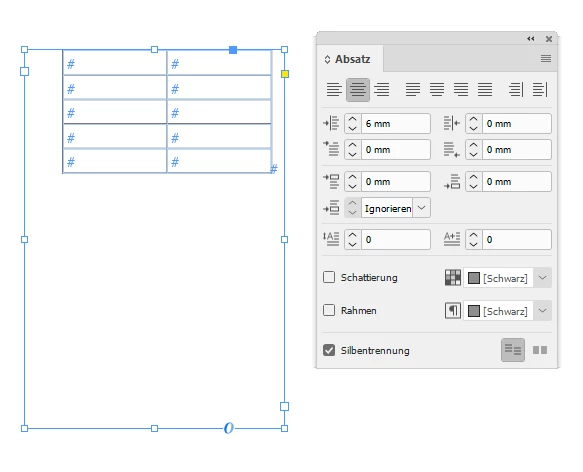
From my German InDesign where the Paragraph panel is showing a left indent value of 6 mm with the paragraph that is holding the table:

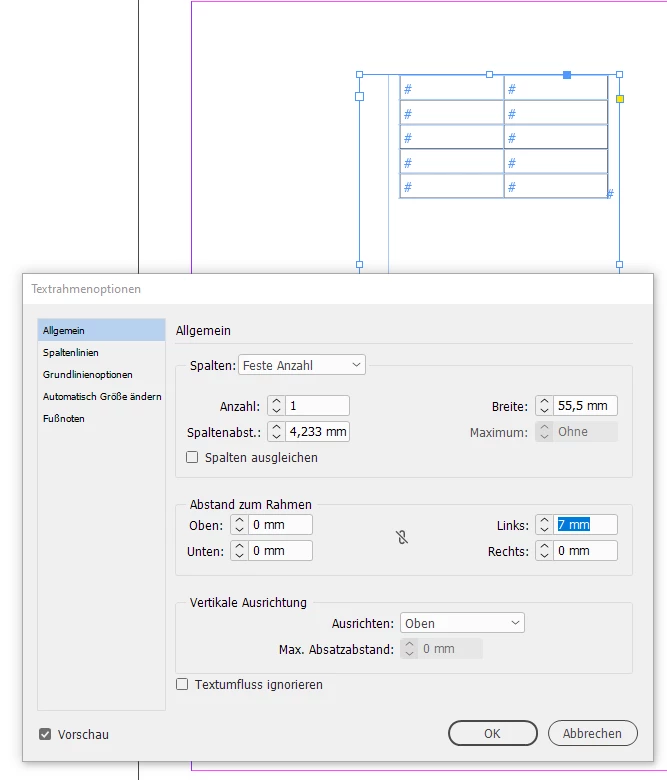
Or look after the Text Frame Options if there is a left indent there.

Just like this:


Regards,

Uwe Laubender

( ACP )

2 replies

LaubenderCommunity ExpertCorrect answer
Community Expert
April 19, 2022

Hi Sarah,

check the formatting of the paragraph that is holding the table.

Could be a left indent value that is not zero.


From my German InDesign where the Paragraph panel is showing a left indent value of 6 mm with the paragraph that is holding the table:

Or look after the Text Frame Options if there is a left indent there.

Just like this:


Regards,

Uwe Laubender

( ACP )

Willi Adelberger
Community Expert
Community Expert
April 19, 2022

I make also for anchored objects or tables a paragraph style with no intent but also with an automatic (also not fixed) leading.


James Gifford—NitroPress
Legend
April 19, 2022

If you know all the table settings and so forth (as you imply you do), it might be one of two things:


  1. A bad element in one cell. Try doing a force-format of all contents to some base style (both paragraph and cell), clearing all attributes, and starting over.
  2. A corrupt doc. Save/Export to IDML and reopen it.