
Inspiring
February 21, 2019
Question

Table of Contents and Styles Conflict

  • February 21, 2019
  • 3 replies
  • 6052 views

I'm having an issue with my Table of Contents. For the most part, I have everything working the way I need it except for ONE instance where it is applying the wrong Character Style to a heading.
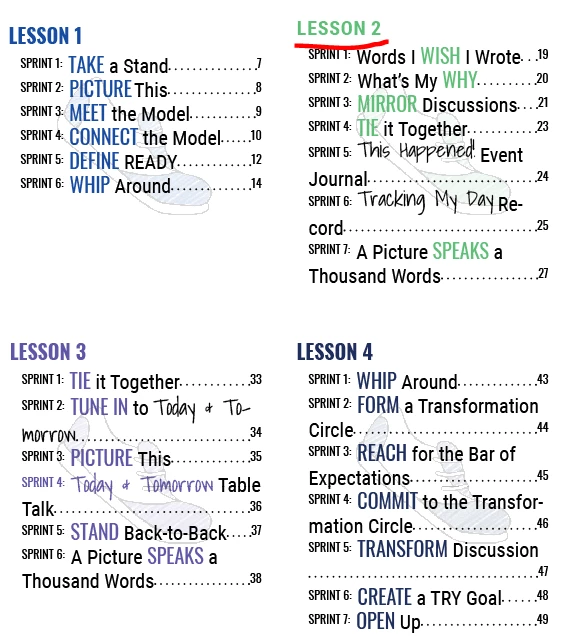
I'm still in the process of fixing the TOC with the correct page titles. The sections for Lessons 1, 3, and 4 are applying the correct style, but Lesson 2 is not. I've deleted the Character and Paragraph Style and remade it from scratch with no parent style and ended up with the same result, so I am at a loss for how to correct this issue. Any ideas what could be happening?

This topic has been closed for replies.

3 replies

Participant
January 3, 2020

I'm trying to do this exact thing. The book style is overriding the TOC style in the TOC. And they're not the same.


When you look at the dialog box, it gives you character options to apply to each TOC level - they're not paragraph styles, cut character ones. And yet, when I update the TOC, it's picking up the heading style for the book itself rather than the style I specifically designed for the TOC.


I have read about GERP, but it seems like this is no longer necessary. BUT, the character style option in the TOC isn't working for some reason.

morgleaAuthor
Inspiring
February 23, 2019

Well, according to your advice here, my only option is to use the GREP styles because as I've said, no Character Styles have been applied to my headings. It'll take time, but I'll give this a shot. Thank you.

hammer0909
Community Expert
Community Expert
February 21, 2019

Well, you can't apply a character style to headings using the TOC feature in InDesign. Only paragraph styles can be used. I'd look to see if you have any local formatting applied to the heading on the page where the TOC is grabbing the information. A screen shot of your TOC setup could help along with a shot of what style(s) are applied to the heading where the Lesson 2 text resides.

morgleaAuthor
Inspiring
February 21, 2019

After working with it for another 2 hours last night, I broke all links to character styles to my headings and just altered the text as it appeared on the page manually while focusing on Paragraph Styles. I also reset all the Paragraph Styles to the base. It fixed my problem with the headings, but now the actual TOC is giving me a problem.

The problem is easily identified in that any instance where a title is using a specific font, the size of the manual heading is applied into the TOC, whereas everything else is abiding by the font size I've set in place.

Is it not possible to just take the text and create a TOC without taking data from the font?

Barb Binder
Community Expert
Community Expert
February 21, 2019

Hi Morglea:

No, InDesign will pick up and copy the character style when you generate a TOC. But notice that the character  styles from the source docs show up in the Character Styles panel in the TOC. Just redefine the style(s) to look the way you want them to in the file.

~Barb

~Barb at Rocky Mountain Training