
Legend
October 18, 2019
Answered

Table of Contents appears/Table of Figures does not

  • October 18, 2019
  • 4 replies
  • 1498 views

Hi. I have a relatively short (15-page) document for which the client wants a TOC and a Table of Figures. I have done this before in another document for the same client, and I am using the TOC and TOF definitions that were successful in that doc. (Anything can happen, though...)


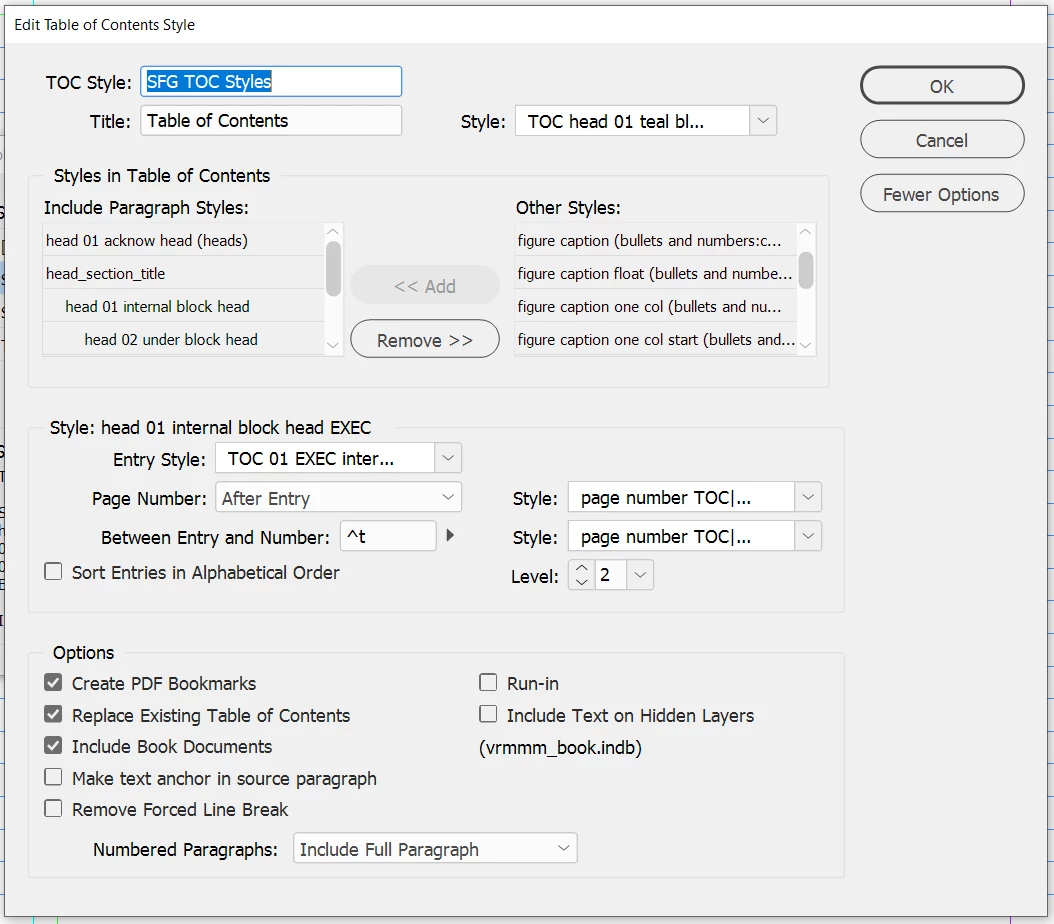
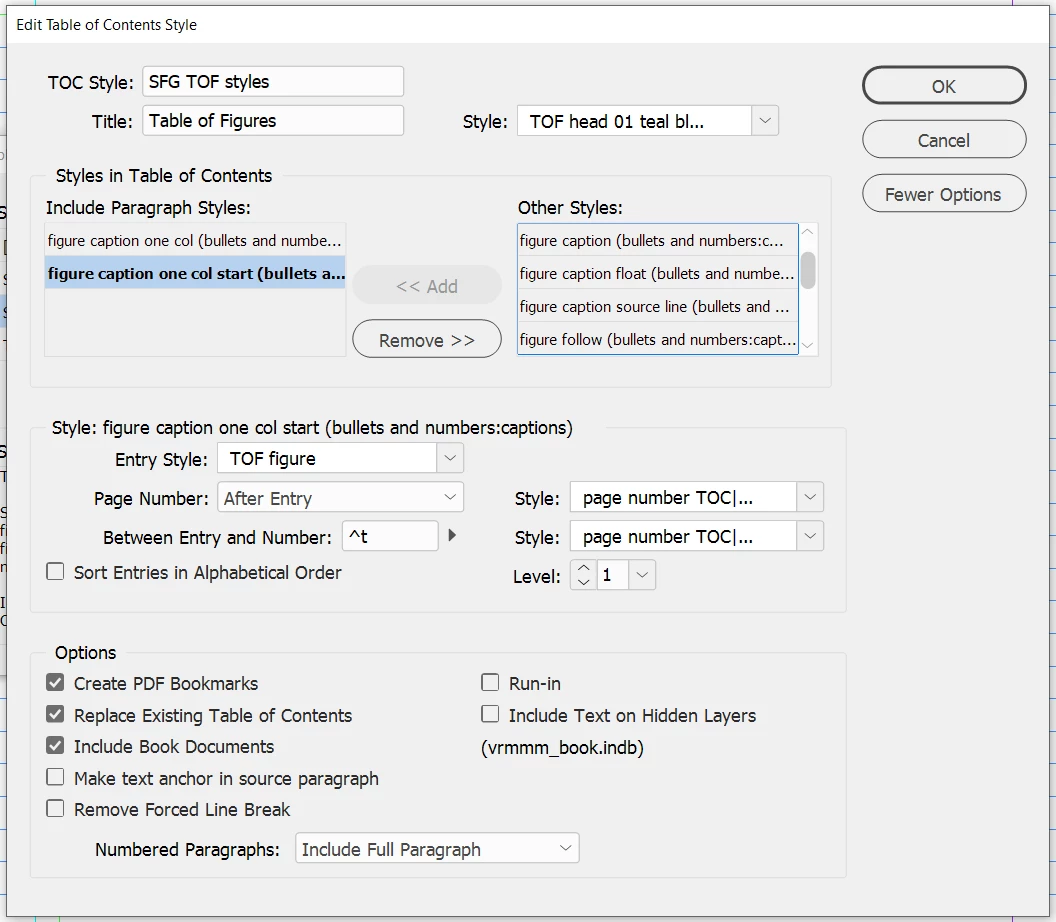
There are three doc files in the book: cover, body, and back cover. TOC and TOF are generated in the cover file. All documents are open in the book at the time of generation. Both TOC and TOF definitions (images below) specify using the files in the book. All paragraph styles referenced a) are present and b) have the same definitions in all three files.


The TOC generates just fine, exactly as expected. The TOF generates its head (Table of Figures) appropriately, but does not produce any items under that. I am sure I'm missing some important setting, but don't know what it might be. The TOF will generate properly in the body file (but not in the cover file). Simply copying the generated TOF from the body file to the cover file kills the hyperlinks when I create a PDF.


As I said, these same TOC/TOF definitions worked in a previous document that also spanned a cover, body, back setup. Any advice appreciated.


This topic has been closed for replies.
Correct answer Barb Binder

Hi Nedlaw: If you make the browser window wider, the Correct Answer button will appear below each post. If it is too narrow, the option disappears. 

Glad we could help and happy Friday,

~Barb

4 replies

Barb Binder
Community Expert
Barb BinderCommunity ExpertCorrect answer
Community Expert
October 18, 2019

Hi Nedlaw: If you make the browser window wider, the Correct Answer button will appear below each post. If it is too narrow, the option disappears. 

Glad we could help and happy Friday,

~Barb

~Barb at Rocky Mountain Training
NedlawAuthor
Legend
October 18, 2019

Thanks. I see your included image, but I now have my browser spread across two 4K monitors, and no "Correct Answer" button appears next to the +Follow item. I'm using Chrome on a PC. Maybe that's the problem.

jane-e
Community Expert
Community Expert
October 25, 2019

Hi Nedlaw,

Any moderator can mark the correct answer for you. They are still working on giving the Original Poster the same ability.


I have marked Barb's answer as you indicated.


~ Jane

Barb Binder
Community Expert
Community Expert
October 18, 2019

Hi Nedlaw: In my experience, when a TOC (or LOT or LOF) won't pull in the expected data, it's because tags don't match exactly. It's even more common when you are using folders to nest the styles because the folder names need to match across files too. All it takes is a trailing space at the end of the style name or folder name to not match, or one capital letter when the other files have lower case. Comb through the three files (hey, it's only three!) to find the inconsistency with the way you named the paragraph style "figure caption one col start".


~Barb

~Barb at Rocky Mountain Training
NedlawAuthor
Legend
October 18, 2019

These posts are all correct, although Barb's answer is the most immediately correct. Since the TOF would work in the body file, I copied the TOF style definitions into the cover file (rather than try to analyze them) and >POOF< it was working. 


I would mark Barb's answer as correct, but I don't see that functionality in the new forum format. I know it exists... I just can't find it.


Thanks to everyone.

Bevi Chagnon - PubCom.com
Legend
October 18, 2019

Usually I find that this is caused by one of two things:

  • My TOC style doesn't pick up the actual styles I used in the layout. Could be just a one-letter difference in a style name that throws it off. Check which styles were actually used for the figures compared to the styles chosen in the TOC style.
  • Something in the definition of the formatting style for the TOC entry is kicking it out of the text frame. (In your screen capture, this is the Entry Style | TOF figure.)  By chance I just diagnosed this in a client's file today where it had the style set with a Start in Next Frame + Keep with Next x lines. These settings created an endless loop of "nothingness" because nothing could be rendered.
|&nbsp;&nbsp;&nbsp;&nbsp;Bevi Chagnon &nbsp;&nbsp;|&nbsp;&nbsp;Designer, Trainer, &amp; Technologist for Accessible Documents ||&nbsp;&nbsp;&nbsp;&nbsp;PubCom |&nbsp;&nbsp;&nbsp;&nbsp;Classes &amp; Books for Accessible InDesign, PDFs &amp; MS Office |
Scott Citron
Legend
October 18, 2019

Does it make any difference if you reverse the order of the two TOF Paragraph Styles?
