
Known Participant
June 2, 2018
Question

Table of contents (& Bookmarks) Level 3 and lower not showing in ToC (or Bookmarks)

  • June 2, 2018
  • 2 replies
  • 1914 views

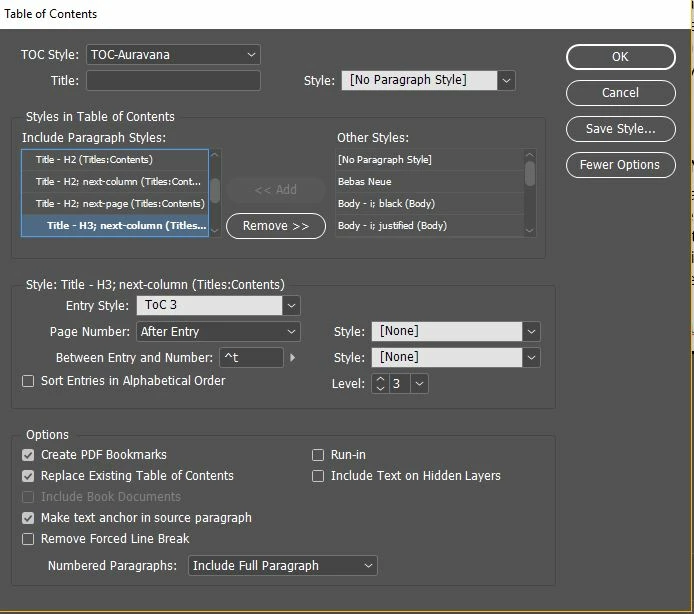
I guess the title says it all, I have created a table of contents (& Bookmarks) with 5 levels. However, when I publish the ToC (and look at bookmarks), only levels 1-2 appear. Level 3s and deeper do not. However, as you can see from the image, I have selected "create PDF Bookmarks" for levels 3 and deeper.

Any advice. I am on the latest version of Indesign 13.1.
    This topic has been closed for replies.

    2 replies

    ravisavisAuthor
    Known Participant
    June 13, 2018

    Sorry for the late reply. I have tried the cleanup option and still I can't see all the levels as levels in the bookmarks.

    Dave Creamer of IDEAS
    Community Expert
    Community Expert
    June 13, 2018

    Can you upload the file to look at? You can post the link or send the link directly (hove over name).

    David Creamer: Community Expert (ACI and ACE 1995-2023)
    ravisavisAuthor
    Known Participant
    June 2, 2018

    I have attached an screenshot of the Bookmarks panel to show how low they go. The problem is I can't seem to get the next level to show, even though I have added paragraph styles and set them to level 3 (FYI, they start at level 0, so visibly it is the 4th level I can't visualize).

    This is perplexing, any ideas?

    Barb Binder
    Community Expert
    Community Expert
    June 2, 2018

    Hi ravisavis:

    Do the H3s appear in the table of contents?

    Do they appear in the Bookmarks pane in Acrobat or Reader?

    ~Barb

    ~Barb at Rocky Mountain Training
    ravisavisAuthor
    Known Participant
    June 2, 2018

    No, nowhere.