
DuSpec
Participant
July 27, 2018
Question

Table of Contents showing extra characters

  • July 27, 2018
  • 3 replies
  • 544 views

Hello everyone,

I have a number of indd files that I had exported into PDFs. I then have a separate indd document that is built by compiling all these PDFs using Scripts. I am trying to create Table of Contents for this master document, but can't get a clean ToC. Here is what I currently have:
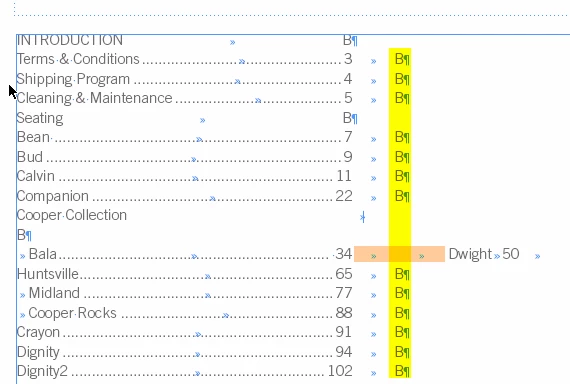
I have no idea where these "B"'s are coming from, and need to have them removed.

Also, all page names are showing up fine as separate lines, except for "Dwight". I don't understand how since all page names have the same paragraph style.

Help, please?

    This topic has been closed for replies.

    3 replies

    barbara_a7746676
    Community Expert
    Community Expert
    July 30, 2018

    It looks like there are extra tab characters in the problem paragraph. Have you checked for those?

    barbara_a7746676
    Community Expert
    Community Expert
    July 28, 2018

    Looks like Dwight should be on a separate paragraph. Double-check the Dwight paragraph wherever it is in the document to make sure it is on its own paragraph.

    DuSpec
    DuSpecAuthor
    Participant
    July 30, 2018

    Hi Barbara - thank you for your response. Word "Bala" is a single word textbox on page 34, and word "Dwight" is a single word textbox on page 50. Does that by default make them separate paragraphs? I'm not really sure how this works.

    Barb Binder
    Community Expert
    Community Expert
    July 31, 2018

    Hi Barb!

    These are not threaded, and page numbers are not part of paragraphs. I know, this is very confusing. I've inherited this document and am trying to see if it can be cleaned up without me actually starting from scratch.


    HI DuSpec :

    I’m intrigued! And happy to take a look at the file (or relevant parts) if you want to share it. if so, you could post it on Dropbox and share a link here (public), or hover over my name and message me (private).

    ~Barb

    ~Barb at Rocky Mountain Training
    DuSpec
    DuSpecAuthor
    Participant
    July 27, 2018

    Update: I was able to remove "B"'s by selecting "No Page Number" :

    Any thoughts on "Dwight" appearance?