
Inspiring
March 15, 2022
Question

Table of Contents: Subheads and chapter heads in the wrong place.

  • March 15, 2022
  • 2 replies
  • 5680 views

My ToC is mostly complete and for the most part it's behaving as it should, but I have a few problems to work out, with this one being the most serious. 


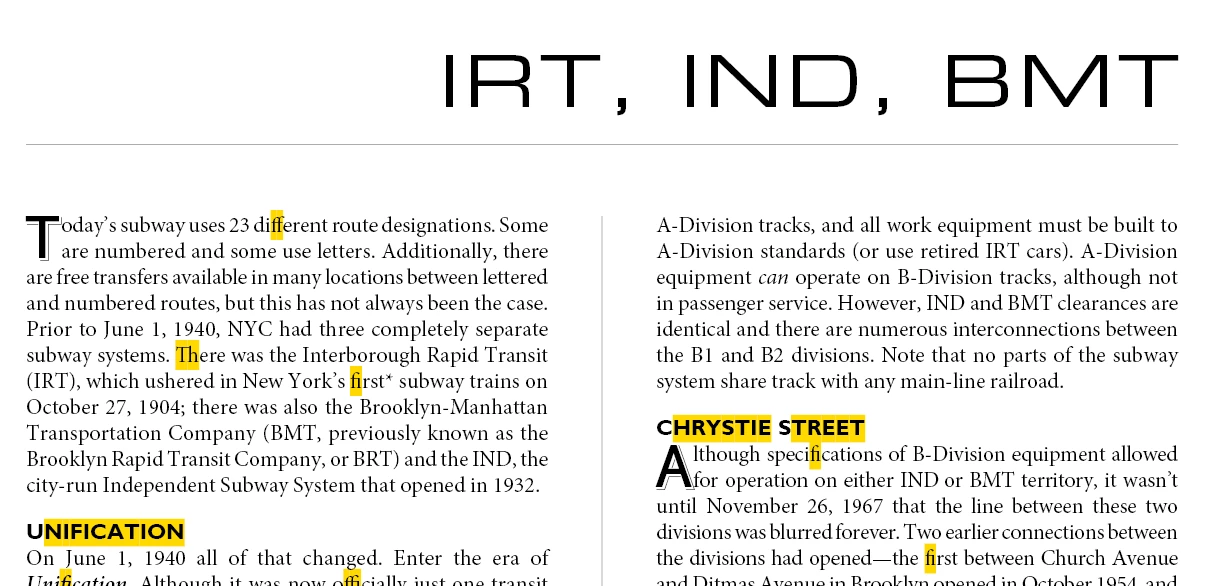
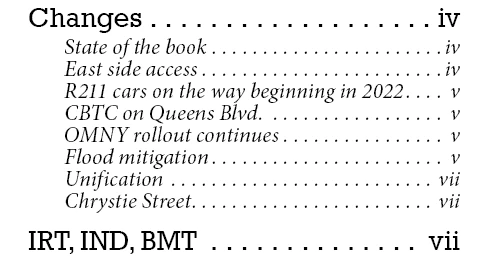
On two separate instances, the Chapter header (paragraph style Intro_Chapter_TOC) is on the top-right of the page, and the multiple subheads (Subhead_TOC) are in the middle of the page. However when generating the ToC, the subheads appear grouped with the previous chapter, not the current chapter. As shown below, IRT, IND, BMT is the Chapter, and Unification and Chrystie St. are the subheads that should appear below it. The subheads in the ToC are bunched with previous subheads from pages iv-vi


This is only happening a couple of times. The rest of the ToC is just fine and everything is where it ought to be. It's just this one and one or two others, and it's driving me crazy.


This topic has been closed for replies.

2 replies

Peter Spier
Community Expert
Community Expert
March 17, 2022

I have not read the entire thread, but contrary to what I have read, in my experience this problem occurs because InDesign reads text in the frames starting in the upper left corner of the page and moving down before moving right. You said your chapter head is further to thye right than your subheads.

Extending the frame holding the chapter head further to the left so it is more left than the other frame should solve the problem.

PeterD-NJAuthor
Inspiring
March 17, 2022

Just tried it and that isn't the solution. The problem is that subheads that are on the same page as the main heading are grouped under the previous main heading. Let's say this is how I actually want the Headings and Subheads to appear


COLORS

Red
Blue
Green

NUMBERS

One
Two

Three

Four


What is in fact happening is this:

COLORS

Red

Blue

Green

One

Two


NUMBERS

Three

Four


What's frustrating is that this is only happening on a few instances. Maybe 3 or 4 at most. The object styles and paragraph styles are identical on the good ones and the bad ones. It's just these few are wrong.

PeterD-NJAuthor
Inspiring
March 18, 2022

It only has to be one or two pages and the toc. It should only take a few minutes to recreate.


OK, I think this file should "work", and by work I mean it has the problem. It's a ToC page and six text pages with the exact headings and subheads. Body text has been munged and formatting is completely out of whack, but that's not relevant here. The color subheads should go with the same color heading styles, and I manually colored the ToC to highlight how subheads that should be below a main heading are somehow above it.

Willi Adelberger
Community Expert
Community Expert
March 15, 2022

THe headlines are in a different frame, not connected in a thread. In the TOC headlines are token from a page not in their geometric order, but in the order how they were created. 

Solution, make headline and text in a single thread, better in the same name, which is much easier. You can do it with span columnd and break options.

PeterD-NJAuthor
Inspiring
March 15, 2022

This would break the format of the entire document. The chapter heading boxes are set on the master left and master right pages, and they are filled with whatever text is needed. They are not part of the content.

Willi Adelberger
Community Expert
Community Expert
March 15, 2022

If you are not working from the begining as it should be, you have some work to do to correct it.

  1. If you fill text frames with titles which should appear in the Table of Content, they are part of content. Remove them from the parent page.
  2. Why are you not applying a paragraph style to them, which will specify position, size and space after? You might apply a different Object Style with a different start of the baseline grid.
  3. These titles MUST be IN THE TEXT FLOW. Otherwise you get the result you do not want.