

tpk1982
Legend
October 13, 2016
Answered

Table paragraph split and move

  • October 13, 2016
  • 2 replies
  • 1867 views

Hi All,

I hope it can doable in script. But am struck from a point.

Requirement:

If a table cell contains more than one line then we need to insert the rows and move the content

Logic used:

1) Count the line in each cell

2) If it contains more than one line then add the rows before

3) move the contents
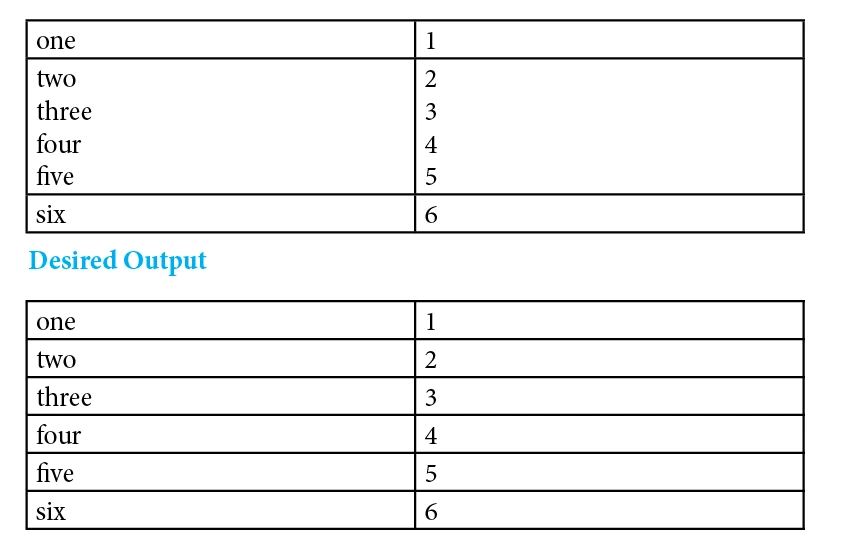
Tried coding (Code got from forum, thanks to Chinna):

var doc = app.activeDocument,          

    _tables = doc.stories.everyItem().textStyleRanges.everyItem().getElements(),    

    i, j, k, l, _columns, _cells, tempVar = "", page; 


for (i = 0; i < _tables.length; i++) 

    for (j = 0; j < _tables.tables.length; j++) 

    { 

        tempVar += "\r"; 

        _columns = _tables.tables.columns; 

        for (k = 0; k < _columns.length; k++) 

        { 

            _cells = _columns.cells; 

            tempVar += "\r"; 

            for (l = 0; l < _cells.length; l++) 

            { 

                if(_cells.paragraphs.length>1){

                    alert(_cells[1].contents)

//~                     tempVar += _cells.paragraphs + "\t";          //Copy contents from table cell to a temporary variable 

                    _cells.rows.add( LocationOptions.BEFORE, _cells.rows[0] );


                }

            } 

        } 

    } 

}    

Thanks,

K

This topic has been closed for replies.
Correct answer Skemicle

I may have over complicated this a bit.. but here is my script:

/*

scripted by Skemicle

11:42 AM 10/14/2016

*/

if(parseFloat(app.version) < 6){

    main();

}else{

    app.doScript(main, ScriptLanguage.JAVASCRIPT, undefined, UndoModes.ENTIRE_SCRIPT, "Seperate Table Rows");

}

function main(){

    var doc = app.activeDocument,

    text = doc.textFrames;

    for(t=0;t<text.length;t++){

        table = text.tables;

        for(T=0;T<table.length;T++){

            row = table.rows;

            for(r=0;r<row.length;r++){

                cell = row.cells;

                if(cell[0].lines.length > 1){

                    table.rows.add(LocationOptions.AFTER, row)

                    for(c=0;c<table.columns.length;c++){

                        row[r+1].cells.contents = cell.lines[-1].contents;

                        cell.lines[-1].contents = "";

                        cell.characters[-1].contents = "";

                    }r--;

                }

            }

        }


    }

}

This could be a good starting point for modifications Obi-wan​.

2 replies

Skemicle
SkemicleCorrect answer
Inspiring
October 14, 2016

I may have over complicated this a bit.. but here is my script:

/*

scripted by Skemicle

11:42 AM 10/14/2016

*/

if(parseFloat(app.version) < 6){

    main();

}else{

    app.doScript(main, ScriptLanguage.JAVASCRIPT, undefined, UndoModes.ENTIRE_SCRIPT, "Seperate Table Rows");

}

function main(){

    var doc = app.activeDocument,

    text = doc.textFrames;

    for(t=0;t<text.length;t++){

        table = text.tables;

        for(T=0;T<table.length;T++){

            row = table.rows;

            for(r=0;r<row.length;r++){

                cell = row.cells;

                if(cell[0].lines.length > 1){

                    table.rows.add(LocationOptions.AFTER, row)

                    for(c=0;c<table.columns.length;c++){

                        row[r+1].cells.contents = cell.lines[-1].contents;

                        cell.lines[-1].contents = "";

                        cell.characters[-1].contents = "";

                    }r--;

                }

            }

        }


    }

}

This could be a good starting point for modifications Obi-wan​.

tpk1982
tpk1982Author
Legend
October 15, 2016

Hi Skemicle

Exactly this is i want.. thank you so much

Thanks Obi for your interest on this thread

Regards,

K

Community Expert
October 21, 2016

Hi Skemicle

Sorry i tried and get some help from forum if anything posted before with move method. I hardly dont found anything. I was not did more script in tables. So little struggled and asking help from you.

if(parseFloat(app.version) < 6){  

    main();  

}else{  

    app.doScript(main, ScriptLanguage.JAVASCRIPT, undefined, UndoModes.ENTIRE_SCRIPT, "Seperate Table Rows");  

}  

function main(){  

    var doc = app.activeDocument,  

    text = doc.textFrames;  

    for(t=0;t<text.length;t++){  

        table = text.tables;  

        for(T=0;T<table.length;T++){  

            row = table.rows;  

            for(r=0;r<row.length;r++){  

                cell = row.cells;  

                if(cell[0].paragraphs.length > 1){  

                    table.rows.add(LocationOptions.AFTER, row)  

                    for(c=0;c<table.columns.length;c++){  

                        row[r+1].cells.contents.move(LocationOptions.AT_BEGINNING, cell.paragraphs[-1].contents);  

                        cell.paragraphs[-1].contents = "";  

                        cell.characters[-1].contents = "";  

                    }r--;  

                }  

            }  

        }  


    }  

}  

Regards,

K


Simply test the move() method on two text frames with differently formatted text on a page to get your feet wet:

var tf1 = app.documents[0].pages[0].textFrames[0];

var tf2 = app.documents[0].pages[0].textFrames[1];

tf1.texts[0].move( LocationOptions.AFTER , tf2.texts[0].insertionPoints[-1] );

Or try something like that:

tf1.texts[0].lines[0].move( LocationOptions.AFTER , tf2.texts[0].insertionPoints[0] );

Also see for details:

Adobe InDesign CS6 (8.0) Object Model JS: Text

Regards,
Uwe

tpk1982
tpk1982Author
Legend
October 13, 2016

Any suggestions please?

Obi-wan Kenobi
Legend
October 14, 2016

Cool and interesting topic!  I'll take a look to a script this WE! 

(^/)

tpk1982
tpk1982Author
Legend
October 14, 2016

Thanks Obi