orib7317974
Known Participant
February 5, 2023
Answered

Table's Position & Scripting

  • February 5, 2023
  • 4 replies
  • 3359 views

Hi,


I've got a table within a text frame.

I'd like to my script to figure out the table's position (its x & y coordinates).

How do I do that?


Thanks! 

This topic has been closed for replies.
Correct answer rob day

Hi @m1b , I’m not sure if this would always work, but a simpler approach might be to work off of the insertion point before the table (the table’s .storyOffset property). Its baseline minus the table height minus the top border stroke width would get Y, and its horizontalOffset plus 1 point would get X. With some limited testing this seems to work:


var et = app.activeDocument.stories.everyItem().tables.everyItem().getElements();
var pos = getTableXY(et[0])

alert("X: " + pos[0] + "   Y: " + pos[1])

/**
* Get a table’s X,Y position 
* t.storyOffset is the insertion point before the table 
* get its baseline - the table h - the top border for Y
* the insertion point’s horizontal position gets X
*
* @ param the table  
* @ return x,y as an array 
* 
*/
function getTableXY(t){
    app.scriptPreferences.measurementUnit = MeasurementUnits.POINTS;
    var tr = t.rows[0].cells.everyItem().getElements()
    var ti = t.topBorderStrokeWeight;
    for (var i = 0; i < tr.length; i++){
        if (tr[i].topEdgeStrokeWeight > ti) {
            ti = tr[i].topEdgeStrokeWeight
        } 
    };    
    var ty = t.storyOffset.baseline - t.height - ti;
    var tx = t.storyOffset.horizontalOffset+1
    app.scriptPreferences.measurementUnit = AutoEnum.AUTO_VALUE;
    return [tx,ty]
}


Margin guides at 1". The table is pushed to the right of the text frame via a 1" Left Indent, and pushed down via Space After in the paragraph above:
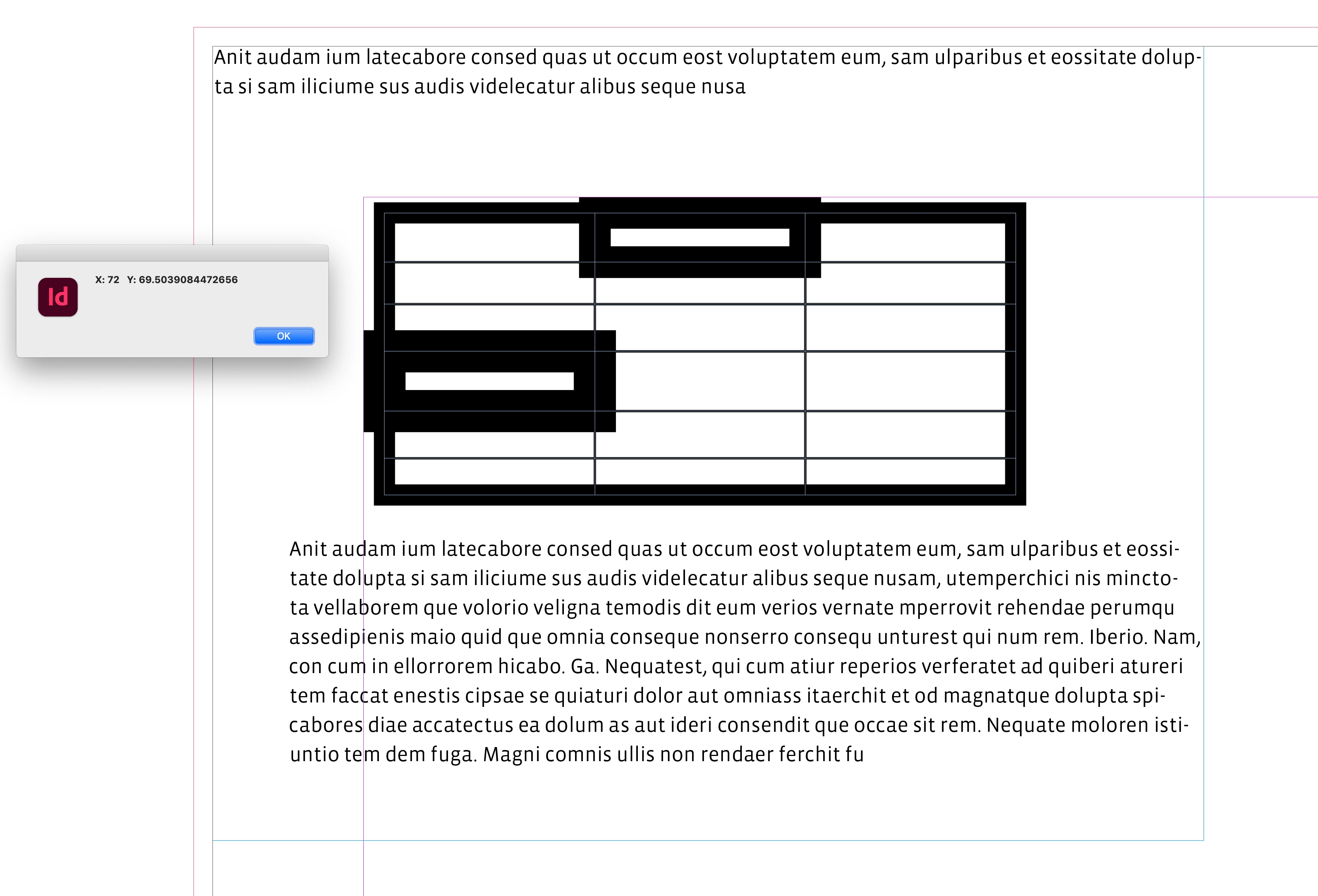
 

EDIT had X,Y reversed—the returned array is [X,Y]

4 replies

Community Expert
April 20, 2023

Hi @orib7317974 ,

see also in this discussion here where I posted a link to the TableCellBox.jsx script by Marc Autret:

https://community.adobe.com/t5/indesign-discussions/how-to-get-coordinates-of-table-column-or-cell/m-p/13738450#M524166


Regards,
Uwe Laubender
( Adobe Community Expert )

orib7317974
Known Participant
April 21, 2023

Thank you 🙂

Peter Kahrel
Community Expert
Community Expert
February 6, 2023

I've used Rob's method in the past and it works well. I've always wondered about that 1 point horizontal offset, it's probably some artefact. 

rob day
Community Expert
Community Expert
February 6, 2023

Hi Peter, it seems like a nominal padding —the insertion point before the table seems to be unusual in that you can’t change the kerning amount the way you can with other insertion points.

Peter Kahrel
Community Expert
Community Expert
February 6, 2023

Yes, maybe. Just to be able to show the cursor. Anyway, it never really bothered me, just curious.

m1b
Community Expert
Community Expert
February 5, 2023

Hi @orib7317974, you would think it would be straightforward, but... nope. I've written a script that (I hope) does it. Have a read through and see if you can tell how it works. It was fun to write. You can just add the relevant functions from my script to yours.

- Mark


/**
 * Gets the bounds of the selected table.
 * @author m1b
 * @discussion https://community.adobe.com/t5/indesign-discussions/table-s-position-amp-scripting/m-p/13555533
 */

function main() {

    var doc = app.activeDocument,
        selectedCell = getCell(app.selection[0]);

    if (
        selectedCell == undefined
        || !selectedCell.isValid
    ) {
        alert('Please select a table or inside a table and run script again.');
        return;
    }

    var table = selectedCell.parent;
    var bounds = getTableBounds(table, 'geometricBounds');

    if (!bounds)
        return;

    // draw a rectangle with the calculated bounds
    var justForShowing = doc.layoutWindows[0].activePage.rectangles.add({ geometricBounds: bounds, fillColor: doc.swatches[4] });
    justForShowing.transparencySettings.blendingSettings.opacity = 50;

}; // end main

app.doScript(main, ScriptLanguage.JAVASCRIPT, undefined, UndoModes.ENTIRE_SCRIPT, "Get Table Position Demo");


/**
 * Gets the table's bounds.
 * @author m1b
 * @version 2023-02-11
 * @param {Table} table - an Indesign Table.
 * @param {String} boundsType - can be 'geometricBounds' or 'visibleBounds'.
 * @returns {Array<Number>}
 */
function getTableBounds(table, boundsType) {

    if (table.cells.lastItem().texts[0].parentTextFrames.length == 0) {
        alert('Cannot getTableBounds: table has overset cells.');
        return;
    }

    var topLeft = getCellBounds(table.cells.firstItem(), boundsType),
        bottomRight = getCellBounds(table.cells.lastItem(), boundsType);

    return [topLeft[0], topLeft[1], bottomRight[2], bottomRight[3]];

}


/**
 * Returns the bounds of the cell;
 * @author m1b
 * @version 2023-06-07
 * @param {Cell} cell - an Indesign Table Cell.
 * @param {String} [boundsType] - can be 'geometricBounds' or 'visibleBounds' (default: 'geometricBounds').
 * @returns {Array<Number>}
 */
function getCellBounds(cell, boundsType) {

    app.scriptPreferences.measurementUnit = MeasurementUnits.POINTS;

    boundsType = boundsType || 'geometricBounds';

    if (!cell.hasOwnProperty('index'))
        throw Error('getCellBounds failed: bad cell parameter.');

    var table = cell.parent;
    while (table.constructor.name != 'Table')
        table = table.parent;

    table.insertLabel('findMe', '1');

    var textFrame = table.parent;

    while (textFrame.parent.constructor.name == 'Character') {
        // inside anchored frame
        textFrame = textFrame.parent.parentTextFrames[0];
    }

    var cellID = cell.id,
        dupTextFrame = textFrame.duplicate(),
        dupTable;

    // find the table in dup text frame
    tableSearch:
    for (var i = 0; i < dupTextFrame.tables.length; i++) {
        if (dupTextFrame.tables[i].extractLabel('findMe') == '1') {
            dupTable = dupTextFrame.tables[i];
            break tableSearch;
        }
    }

    if (dupTable == undefined) {

        // find the table in anchored text frames
        tableSearch:
        for (var i = 0; i < dupTextFrame.textFrames.length; i++) {
            for (var j = 0; j < dupTextFrame.textFrames[i].tables.length; j++)
                if (dupTextFrame.textFrames[i].tables[j].extractLabel('findMe') == '1') {
                    dupTable = dupTextFrame.textFrames[i].tables[j];
                    break tableSearch;
                }
        }

    }

    if (dupTable == undefined)
        throw Error('getCellBounds failed: Could not find table in duplicate.');

    // convert cell to graphic, so we can get the bounds
    var dupCell = dupTable.cells.itemByID(cellID);
    dupCell.convertCellType(CellTypeEnum.GRAPHIC_TYPE_CELL);

    var bounds = dupCell.rectangles[0].geometricBounds;

    // clean up
    table.insertLabel('findMe', '');
    dupTextFrame.remove();

    // add strokeWidths
    if (boundsType === 'visibleBounds') {
        bounds[0] -= cell.topEdgeStrokeWeight;
        bounds[1] -= cell.leftEdgeStrokeWeight;
        bounds[2] += cell.bottomEdgeStrokeWeight;
        bounds[3] += cell.rightEdgeStrokeWeight;
    }
    else if (boundsType === 'geometricBounds') {
        bounds[0] -= cell.topEdgeStrokeWeight / 2;
        bounds[1] -= cell.leftEdgeStrokeWeight / 2;
        bounds[2] += cell.bottomEdgeStrokeWeight / 2;
        bounds[3] += cell.rightEdgeStrokeWeight / 2;
    }

    return bounds;

};


/**
 * Attempts to return a Cell, given an object.
 * @author m1b
 * @version 2023-02-06
 * @param {InsertionPoint|Text|Cells|Table} obj - an object related to a Cell.
 * @returns {Cell}
 */
function getCell(obj) {

    if (obj == undefined)
        return;

    if (obj.constructor.name == 'Cell')
        return obj;

    if (obj.parent.constructor.name == 'Cell')
        return obj.parent;

    if (
        obj.hasOwnProperty('cells')
        && obj.cells.length > 0
    )
        return obj.cells[0];

};


Edit 2023-06-07: added handling of tables in anchored text frames, and multiple tables in same text frame.

rob day
Community Expert
rob dayCommunity ExpertCorrect answer
Community Expert
February 6, 2023

Hi @m1b , I’m not sure if this would always work, but a simpler approach might be to work off of the insertion point before the table (the table’s .storyOffset property). Its baseline minus the table height minus the top border stroke width would get Y, and its horizontalOffset plus 1 point would get X. With some limited testing this seems to work:


var et = app.activeDocument.stories.everyItem().tables.everyItem().getElements();
var pos = getTableXY(et[0])

alert("X: " + pos[0] + "   Y: " + pos[1])

/**
* Get a table’s X,Y position 
* t.storyOffset is the insertion point before the table 
* get its baseline - the table h - the top border for Y
* the insertion point’s horizontal position gets X
*
* @ param the table  
* @ return x,y as an array 
* 
*/
function getTableXY(t){
    app.scriptPreferences.measurementUnit = MeasurementUnits.POINTS;
    var tr = t.rows[0].cells.everyItem().getElements()
    var ti = t.topBorderStrokeWeight;
    for (var i = 0; i < tr.length; i++){
        if (tr[i].topEdgeStrokeWeight > ti) {
            ti = tr[i].topEdgeStrokeWeight
        } 
    };    
    var ty = t.storyOffset.baseline - t.height - ti;
    var tx = t.storyOffset.horizontalOffset+1
    app.scriptPreferences.measurementUnit = AutoEnum.AUTO_VALUE;
    return [tx,ty]
}


Margin guides at 1". The table is pushed to the right of the text frame via a 1" Left Indent, and pushed down via Space After in the paragraph above:


EDIT had X,Y reversed—the returned array is [X,Y]

m1b
Community Expert
Community Expert
February 6, 2023

Hi @rob day and @Peter Kahrel, thank you both. Yes that was my initial direction for solving this problem, too, but, prior to having experts like yourselves endorse it, I decided to switch tracks for two reasons: (1) I wasn't confident that I was taking all the edge cases into account and your method seemed a bit shaky in that regard, and (2) my way was more fun to write 🙂


For the OP, and others reading this thread, Rob/Peter's method would be quicker to execute, because it does less DOM manipulation (would only be noticable to a human if performing many of executions of the function) and also calculates the maximum strokewidth (see Rob's example where the top left cell has thinner strokes than some other cells in the row/column).

- Mark

Robert at ID-Tasker
Legend
February 5, 2023

If there is no text before the table - and no insets in the parent TF - then it's easy:

Table's top-left corner will be the same as TF's.


If there will be some text - then a bit more math is needed 😉


If you can remove insets in one of the cells - easier math - then from the baseline of the "a" you can subtract height of the row/cell and then stroke - to get Y. And from the HorizontalOffset of the 1st InsertionPoint you can get X - after subtracting stroke.

