
Participating Frequently
July 25, 2024
Question

Tabs/Indent alignment within a single Paragraph (using forced line breaks)

  • July 25, 2024
  • 3 replies
  • 3152 views

In the following screenshot, all of the text flows in, auto-formatted by paragraph styles.

It is essential to use forced line breaks for the entire restaurant's "listing"

Is there anyway to get overhanging text to properly align, without placing an additional line break?
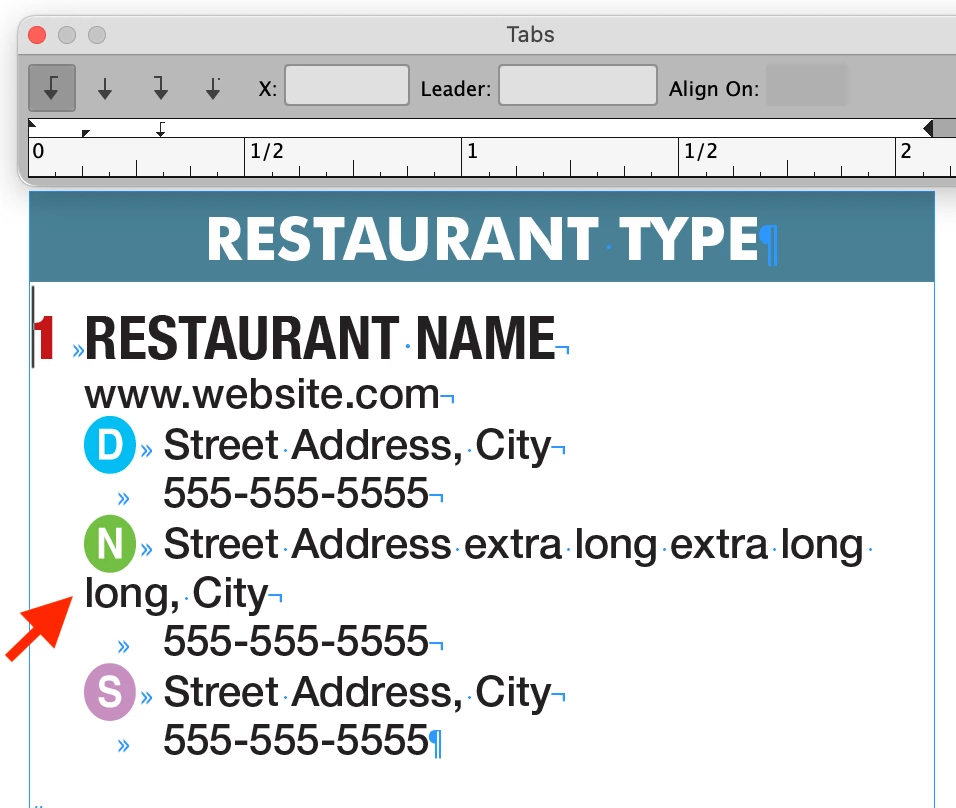


I tried placing Indent To Here markers before "Street Address"- but because its all one paragraph, it tiers the third location further.

Backstory: This is for a large directory in which xml is imported, and everything is auto formatted. I'm trying to minimize manual adjustments once it flows in. I do have full control of the xml and can change tabs/markers where needed.

Thanks in advance!

This topic has been closed for replies.

3 replies

Scott Falkner
Community Expert
July 26, 2024

Whether the text comes in using line breaks or not, the goal is a properly and consistently formatted InDesign document. You don’t need the text to remain as line breaks. I would use search and replace to replace the line break before each of the circled letters with a return, then use hanging indents for the text.

James Gifford—NitroPress
Brainiac
July 26, 2024

I can't come up with a Find/Replace that works, here.


The best I can do is:

  • GREP for <line return><single character><space>
  • REPLACE with <paragraph return><found text>
  • SEARCH for <paragraph return><line return>
  • REPLACE with <paragraph return>


Anything else gets tangled up in other target text or an inability to replace the correct line returns. Maybe someone with greater GREP-fu has a better plan.

Robert at ID-Tasker
Brainiac
July 26, 2024
quote

I can't come up with a Find/Replace that works, here.

[...] 


By @James Gifford—NitroPress


You can search for <forced line break> before <Anchored / InLine object> and replace it with <paragraph return>.


Robert at ID-Tasker
Brainiac
July 25, 2024

@scotts55118436


If you have full control over XML - then you should completely rebuild it. 


Each line of text on your screenshot - should be a separate paragraph - then you can map XML tags to Para / Char Styles. 


As @James Gifford—NitroPress said - forced line breaks should be avoided at all cost. 


Or at least each line starting with icon should be a separate paragraph. 


James Gifford—NitroPress
Brainiac
July 25, 2024

Since you go out of your way to say it's essential, you must already know that soft returns are something to be avoided in professional layout, certainly not something to use as part of running paragraph formats.


If the colored icon/letters are just part of the paragraph text, I don't see why using left indent plus first line outdent would not work; I'd also use a tab (or a fixed space — ID has about six to choose from) after the icon and I'd force wrap using nonbreaking spaces rather than a soft return. I'm not even sure you need to force the break if you set up the indent and any right indent correctly, although a few entries might need touch up for best results.


ETA: Wait, after looking more closely and reading your description, you're saying this listing is one single paragraph all the way? In that case, there's simply no good way to manage this formatting. Fix the text by using Find/Replace, GREP or better XML output to create separate paragraphs for each entry. I don't think you'll ever get to a successful. manageable workflow in any other way. Very much GIGO, here.


A GREP search should be able to find the unusual icon font/character, find the space before, and replace it with a paragraph return.

Participating Frequently
July 26, 2024

Thanks for your input everyone. Attached is why I need to use forced line breaks.

The layout changes quite frequently, and keeping each Restaurant's listing in one paragraph allows me to implement:

Text Frame Options > Vertical Justification > Paragraph Spacing Limit.

If each line were its own paragraph- the entire listing wouldn't "stick" with eachother, and the leading of the entire column becomes loose. 

Thinking on a solution, I may just GREP a soft-return: after a number of characters > find the next word boundary > add soft-return & tab.

Participating Frequently
July 26, 2024
quote

Interesting idea @Robert at ID-Tasker. That logic definately works, but unfotunately probably not in my application.


By @scotts55118436


Why not? 


I guess my knowlege with tables isn't too extensive- see  attached movie below:

The gap above the advertisement would be an issue.

Is there something I'm missing to get the table cells to auto-justify to fit the frame?