
Exit
  • Global community
    • Language:
      • Deutsch
      • English
      • Español
      • Français
      • Português
  • 日本語コミュニティ
  • 한국 커뮤니티
1

Target InDesign Script Labels with text variables from one dialogue box

Explorer ,
Jun 30, 2023 Jun 30, 2023

I am trying update a cover page on all open InDesign documents using javascript and Script Labels on text boxes. The cover page is the first page in each document with individual text boxes & Script Labels for each variable.


The script I have captures the variables, one at a time, from the user inputs then updates the text boxes with the corresponding Script Label.


// Prompt for variables
var campaign = prompt("Enter Campaign:", "");
var jobNumber = prompt("Enter Job Number:", "");
var offerStartDate = prompt("Enter Offer Start Date:", "");
var cm = prompt("Enter CM:", "");
var ticketOperator = prompt("Enter Ticket Operator:", "");

// Loop through all open documents
for (var i = 0; i < app.documents.length; i++) {
  var doc = app.documents[i];
  
  // Find and replace text content in text frames
  for (var j = 0; j < doc.textFrames.length; j++) {
    var textFrame = doc.textFrames[j];
    var scriptLabel = textFrame.label;
    
    // Replace text content based on script label
    switch (scriptLabel) {
      case "campaign":
        textFrame.contents = campaign;
        break;
      case "jobNumber":
        textFrame.contents = jobNumber;
        break;
      case "offerStartDate":
        textFrame.contents = offerStartDate;
        break;
      case "CM":
        textFrame.contents = cm;
        break;
      case "ticketOperator":
        textFrame.contents = ticketOperator;
        break;
      default:
        break;
    }
  }
}

alert("Text replacement completed in all open documents.");

I would like help amending the script so it collects all the variables from one dialogue similar to screenshot below.
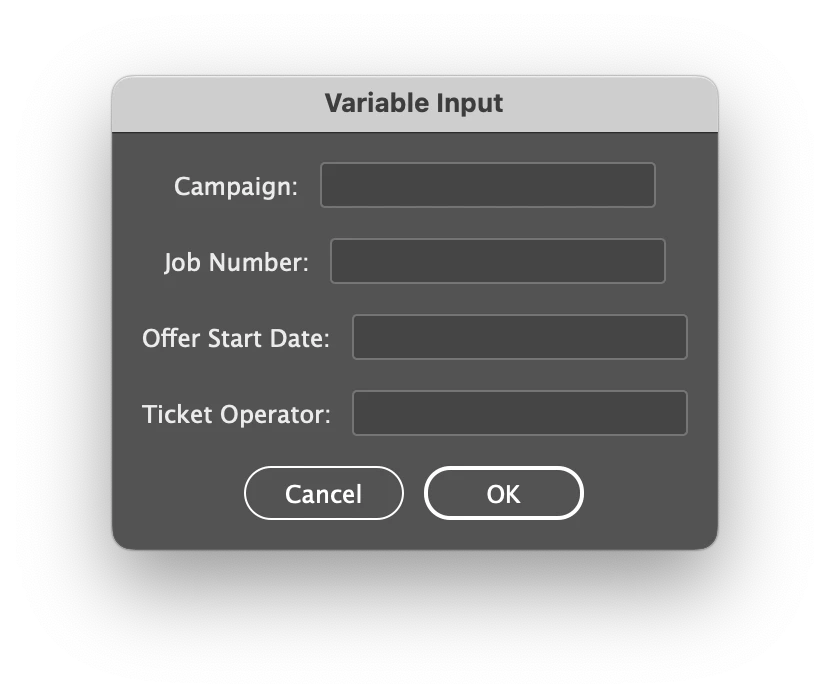
 

Screenshot 2023-07-01 at 12.50.22 PM.png

Is this possible? Any help appreciated.

TOPICS
Scripting
854
Translate
Report
Community guidelines
Be kind and respectful, give credit to the original source of content, and search for duplicates before posting. Learn more
community guidelines

correct answers 1 Correct answer

Community Expert , Jul 01, 2023 Jul 01, 2023

Try the following, it will prompt the values entered by the user. You can add your code in the if block where I have added the alter statement.

var myDialog = app.dialogs.add({ name: "Variable Input" });
var column = myDialog.dialogColumns.add();

var r1 = column.dialogRows.add()
var cmpgLbl = r1.staticTexts.add({ staticLabel: "Campaign:" });
var cmpg = r1.textEditboxes.add();

r1 = column.dialogRows.add()
var jnLbl = r1.staticTexts.add({ staticLabel: "Job Number:" });
var jn = r1.textEditboxes.
...
Translate
Community Expert ,
Jul 01, 2023 Jul 01, 2023

Try the following, it will prompt the values entered by the user. You can add your code in the if block where I have added the alter statement.

var myDialog = app.dialogs.add({ name: "Variable Input" });
var column = myDialog.dialogColumns.add();

var r1 = column.dialogRows.add()
var cmpgLbl = r1.staticTexts.add({ staticLabel: "Campaign:" });
var cmpg = r1.textEditboxes.add();

r1 = column.dialogRows.add()
var jnLbl = r1.staticTexts.add({ staticLabel: "Job Number:" });
var jn = r1.textEditboxes.add();

r1 = column.dialogRows.add()
var offrLbl = r1.staticTexts.add({ staticLabel: "Offer Start Date:" });
var offr = r1.textEditboxes.add();

r1 = column.dialogRows.add()
var tktLbl = r1.staticTexts.add({ staticLabel: "Ticket Operator:" });
var tkt = r1.textEditboxes.add();

// Display the dialog
var dialogResult = myDialog.show();

// Check if the user clicked OK
if (dialogResult == true) {
  alert("Entered text: " + cmpg.editContents + " " + jn.editContents + " " + offr.editContents + " " + tkt.editContents);
}

-Manan

Translate
Report
Community guidelines
Be kind and respectful, give credit to the original source of content, and search for duplicates before posting. Learn more
community guidelines
Explorer ,
Jul 01, 2023 Jul 01, 2023

Thanks @Manan Joshi this works great and the dialog results is a nice addition for the user to check afterwards.

Is there also a way to make the variable input boxes longer?

This would be usefull on the Campaign box as it can be quite wordy and easier for the user to see what they are typing.

Translate
Report
Community guidelines
Be kind and respectful, give credit to the original source of content, and search for duplicates before posting. Learn more
community guidelines
Community Expert ,
Jul 02, 2023 Jul 02, 2023

Hi @rickt38612460,

Yes, you can change the width of the editbox by setting the value of minWidth property. Something like the following should work

cmpg.minWidth = 300

-Manan

Translate
Report
Community guidelines
Be kind and respectful, give credit to the original source of content, and search for duplicates before posting. Learn more
community guidelines
Community Expert ,
Jul 03, 2023 Jul 03, 2023

Hi @rickt38612460 ,

see into DOM documentation for dialog and dialogs:

https://www.indesignjs.de/extendscriptAPI/indesign-latest/#Dialog.html

https://www.indesignjs.de/extendscriptAPI/indesign-latest/#Dialogs.html


As you can see from Manan's script, you first need a dialogColumn and then you could add a dialogRow.

So also inspect dialogColumn and dialogRow:

https://www.indesignjs.de/extendscriptAPI/indesign-latest/#DialogColumn.html

https://www.indesignjs.de/extendscriptAPI/indesign-latest/#DialogRow.html


Also be aware that the dialog's appearance could be a bit different with InDesign on macOS vs Windows.

Here a screenshot of Mana's dialog from macOS of my German InDesign 2023. The buttons are automatically using the German localized contents:


macOS-DialogSample-Variable Input.png


Regards,
Uwe Laubender
( Adobe Community Expert )

Translate
Report
Community guidelines
Be kind and respectful, give credit to the original source of content, and search for duplicates before posting. Learn more
community guidelines
Community Expert ,
Jul 04, 2023 Jul 04, 2023

Rob Day posted a nice sample script (a cheat sheet, as it were) that illustrates how to use all the dialog items:


https://community.adobe.com/t5/indesign-discussions/indesign-folder-to-jpg-folder-exporter-the-scrip...

Translate
Report
Community guidelines
Be kind and respectful, give credit to the original source of content, and search for duplicates before posting. Learn more
community guidelines
Explorer ,
Jul 11, 2023 Jul 11, 2023
LATEST

Thanks @Peter Kahrel I will bookmark that cheat sheet for future reference.

Translate
Report
Community guidelines
Be kind and respectful, give credit to the original source of content, and search for duplicates before posting. Learn more
community guidelines