
Participant
August 24, 2021
Answered

Text all staying on one line in header of InDesign

  • August 24, 2021
  • 3 replies
  • 2551 views

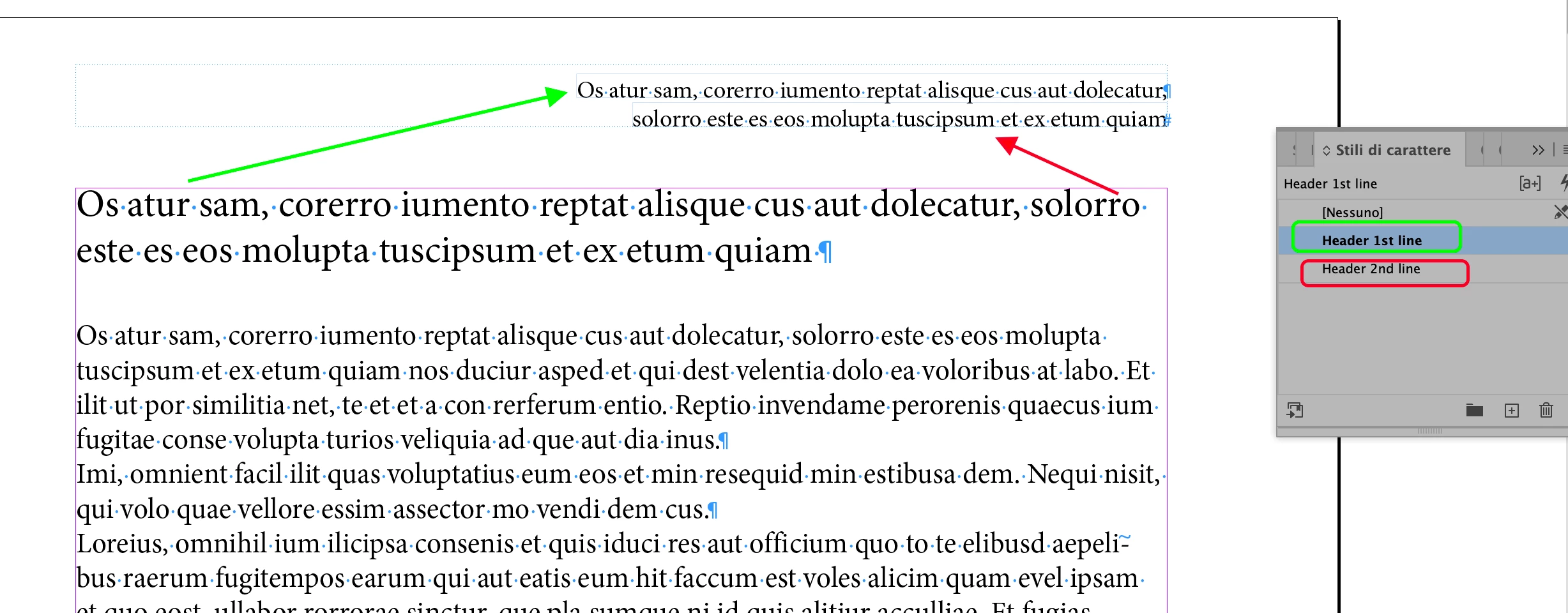
I inherited a publication layout a few years back that already has the header setup in it. The header automatically grabs the Author paragraph style and enters the text. For the first time I have so many authors that it is overlaying the names all on one line. I need to figure out how to give that line the ability to split into two lines. See the image below. What setting am I missing. I have even tried to just change it in my master page to basic paragraph and set it to have the same font style and it still all goes on one line.

 

Correct answer vladan saveljic

3 replies

vladan saveljic
vladan saveljicCorrect answer
Inspiring
August 24, 2021

Community Expert
August 24, 2021

I agree with Vladan


I have done this for a book that had 16 different running heads per spread. 

You need to use Character Styles to style the text.

And in the Text Variables instead of using Paragraph Styles choose the option to use Character Styles instead.

Then - for each variable - it picks up from the character style on the page - and not the paragraph style. 


vladan saveljic
Inspiring
August 24, 2021

you could do this with 2 header lines and with two character styles


Brad @ Roaring Mouse
Community Expert
Community Expert
August 24, 2021

I believe the answer is to convert the variable to text. Take a look here:

https://helpx.adobe.com/indesign/using/text-variables.html#delete_convert_and_import_text_variables

Participant
August 24, 2021

So if I convert to text it just shows the variable in the header <Author Name>.

I looked at the variable and it says Running Header (Paragraph style) but I don't see anything else I can change it to that makes sense to create two lines.

Participant
August 24, 2021

I found this statement "There is no way to make a text variable break over two lines without converting the variable to text (choose Type > Text Variables > Convert Variable to Text). Doing so will allow the text to break over more than one line, but sacrifices the link to the information in the caption." so it sounds like this is correct, it just changes the text variable to the text of the text variable and loses its link to the variable elsewhere in the document.