
kai*smith
Known Participant
April 10, 2017
Answered

Text boxes in Master Pages not showing up in pages I apply the Masters to

  • April 10, 2017
  • 3 replies
  • 14647 views

Hello, I'm new with InDesign. I've learned quite a bit over the past few weeks, but I'm having a small problem (however it is causing me to have to do a lot of extra work). I have created several master pages, and two of them have text boxes as placeholders (so I can make sure my text is lined up from one spread to the next). When I apply these master pages, the textboxes do not show up on the pages I've applied them to. I've checked the master pages themselves several times and the textboxes are there.. I just cannot figure out why they aren't showing up on the pages I've applied them to? I would think they are supposed to, perhaps I'm wrong? Any help would be greatly appreciated!
    This topic has been closed for replies.
    Correct answer amaarora

    Here is a page that I applied the master to after following your advice.. it looks like the text boxes are there, but when I try to actually use them, it doesn't work...?


    Hi,

    You need to override your master page items to make them selectable/editable on document pages.

    Check this link Learn how to use master pages in InDesign  and see the "Override a master item" section.

    -Aman

    3 replies

    amaarora
    Inspiring
    April 10, 2017

    Hi,

    Thats fine. It just got me a little confused.

    Ctrl+h way to show frame edges is good try.

    Do let us know how it worked for you.

    -Aman

    Nicolette Leigh Creative
    Participant
    October 6, 2021

    Piggybacking n this post with the same issue but the existing answers didnt work. 


    The Master primary text box worked perfectly for the first 13 pages. Then I had to leave for a bit and when I came back it wasn't working anymore!


    Page margins are no longer showing either. 

    Heres the Master. Notice the icon for primary text box will not change when clicked. Please help if you can. Deadline is Friday. ◑﹏◐   Much Apreesh


    Nicolette Leigh Creative
    Participant
    October 6, 2021

    SOLVED!

    I had some spaces in the master text box which turned it into a regular text frame. lol 🤦‍♀️

    macpawel
    Participating Frequently
    April 10, 2017

    Text frame on Master is locked.

    If you want to edit content (text) on your page you need to unlock this frame.

    Try this: CTRL + Shift + click on your frame on normal page to unlock it and type your text

    Pawel

    kai*smith
    kai*smithAuthor
    Known Participant
    April 10, 2017

    I'm really sorry to both of you guys! Before I ask anything I spend hours trying to find the information myself, and I really thought I had tried that. I think I'm just getting a bit burned out from working on this and trying to learn so much so quickly! I really appreciate you guys and again, I'm very sorry!

    amaarora
    Inspiring
    April 10, 2017

    Hi,

    No need to feel sorry. Helping and sharing information is the objective of the forum page.

    Glad we could help and your problem was solved

    -Aman

    amaarora
    Inspiring
    April 10, 2017

    Hi,

    Duplicate of Re: Textboxes on Master Pages not showing up when I "apply master" to those pages..  ?

    Also posting screenshots of the pages panel and your master pages is helpful for people to answer.

    -Aman

    kai*smith
    kai*smithAuthor
    Known Participant
    April 10, 2017

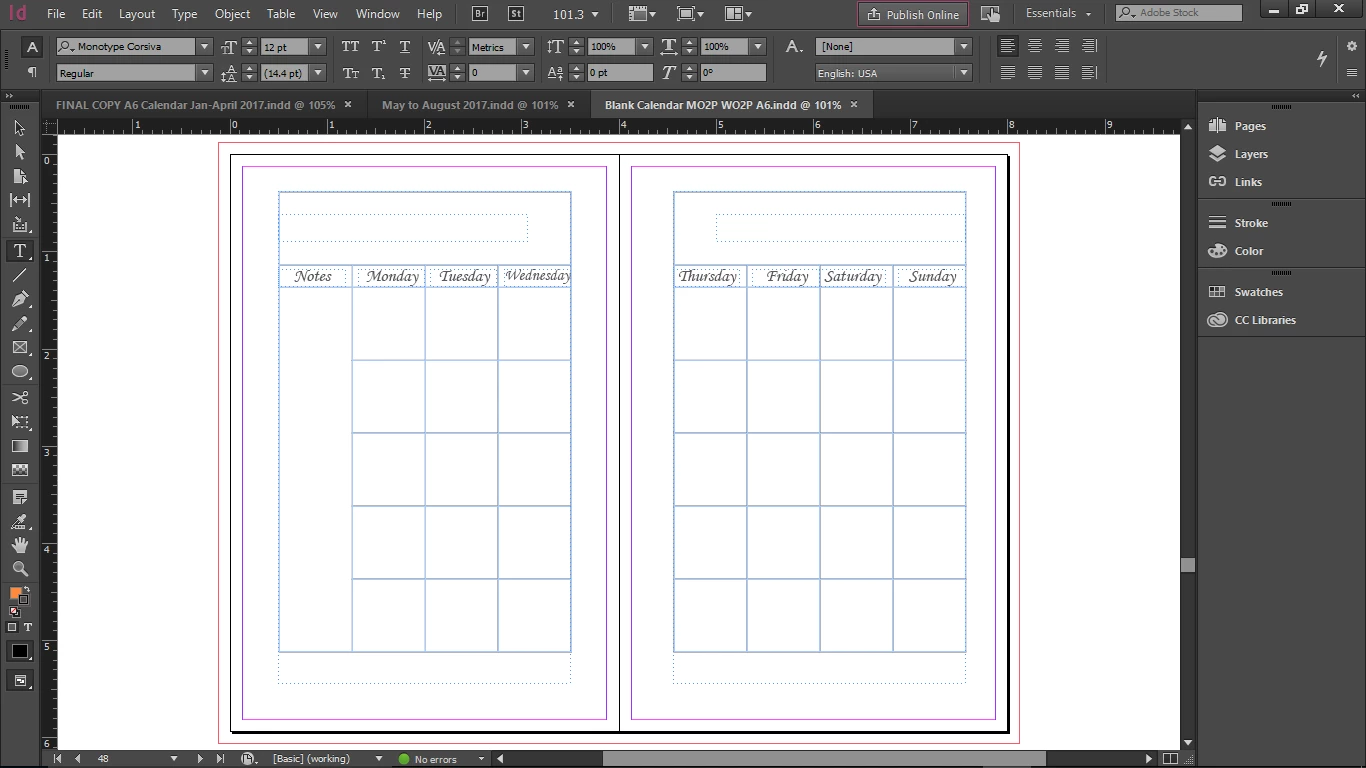
    This is the master page, and you can see I'm pointing to show where one of my text boxes is....

    Here I'm showing that I am adding a new spread and applying the master shown above

    And here is the spread, with that master applied. I tried to point my cursor to where the text box should be, but I don't think it shows that. However, the text boxes are not there.  If there is something else I can post that would be more helpful, please let me know. Thank you!

    macpawel
    Participating Frequently
    April 10, 2017

    Hi,

    Thanks for those screenshots. The behavior looks strange.

    Can you share your document either by uploading to Dropbox and posting a link here or sending me at amaarora@adobe.com ?

    -Aman


    Maybe try this:

    CTRL+H - it's Hide/Show Edges Command - maybe frame edges are hidden?

    Pawel